Hi,
Yesterday i cleared the installation and configuration exam of CRM 2011. There were 74 questions in it and 140 minutes to answer them.
Most of the questions were on system requirements while installing Microsoft Dynamics CRM 2011, Outlook, Email Router.
If we remember the below points we can easily answer around 40 questions correctly.
Microsoft Dynamics CRM Server 2011 E-Mail Router
can be installed on computers running
- Windows 7 32-bit, 64-bit editions. (32 bit version of router on Windows 7 32-bit)
- Windows Server 2008 or later 64-bit editions.
can work with following e-mail systems
- Microsoft Exchange 2003, 2007, 2010, Online.
- SMTP servers for outgoing.
- POP3 complaint server for incoming.
Microsoft Dynamics CRM for Outlook is supported on
- Window 7 RTM (32-bit and 64-bit)
- Windows Vista SP1 (32-bit and 64-bit) SP1
- Windows XP Professional SP3, Professional x64 SP2, Tablet PC SP3 Edition.
Supported version of Microsoft Office Outlook
- Office 2010 RTM
- Office 2007 SP2
- Office 2003 SP3
IE Version Supported for Microsoft Dynamic CRM for Outlook
Microsoft Dynamics CRM 2011 Server can be installed on following Windows Server (only 64-bit versions)
- Windows Server 2008 Standard, Enterprise, Datacenter – SP2
- Windows Web Server 2008 – SP2
- Windows Small Business Server Premium, Standard – RTM.
Supported SQL Server Editions (only 64-bit)
SQL Server 2008 Standard, Enterprise, Datacenter, Developer all SP1.
- Microsoft Dynamics Reporting Extensions setup must be run on a computer that has SQL Server 2008 Reporting Services installed.
- Microsoft Dynamics CRM Report Authoring Extension must be installed on the computer where SQL Server is installed.
- Understand how Claim Based Authentication and IFD are configured for Microsoft Dynamics CRM 2011.
Read about permission required while installing CRM 2011.
Minimum permissions required for Microsoft Dynamics CRM Setup, services, and components.
To remember the above points i also created a small mind map as well.
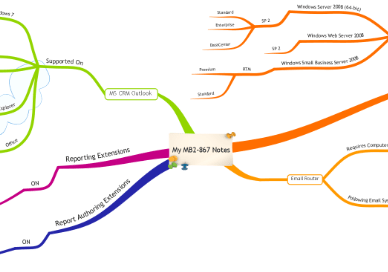
Hope it helps.
0.000000
0.000000


 Nishant Rana's Weblog