
Update :- Works for CRM 2013 as well.
Hi,
Normally to get the guid we need to click on “Copy a link” button and then get id from the url, so just thought of creating a custom button that only copies the guid.
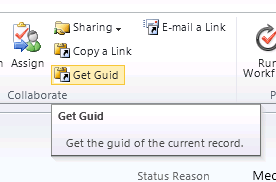
Clicking on Get Guid button will copy the id to the clipboard
RibbonDiffXml:-
 <RibbonDiffXml>
    <CustomActions>
      <CustomAction Id="Sample.all.form.GetGuid.CustomAction"
                    Location="Mscrm.Form.{!EntityLogicalName}.MainTab.Collaborate.Controls._children"
                    Sequence="75">
        <CommandUIDefinition>
          <Button Id="Sample.{!EntityLogicalName}.form.GetGuid.Button"
                  Command="Sample.form.GetGuid"
                  Sequence="61"
                  LabelText="$LocLabels:Sample.all.GetGuid.LabelText"
                  ToolTipTitle="$LocLabels:Sample.all.GetGuid.LabelText"
                  ToolTipDescription="$LocLabels:Sample.all.GetGuid.ToolTip"
                  TemplateAlias="o2"
                  Image16by16="/_imgs/ribbon/copyshortcut16.png"
                  Image32by32="/_imgs/ribbon/copyshortcut32.png" />
        </CommandUIDefinition>
      </CustomAction>
    </CustomActions>
    <Templates>
      <RibbonTemplates Id="Mscrm.Templates"></RibbonTemplates>
    </Templates>
    <CommandDefinitions>
      <CommandDefinition Id="Sample.form.GetGuid">
        <EnableRules>
          <EnableRule Id="Mscrm.FormStateNotNew" />
        </EnableRules>
        <DisplayRules />
        <Actions>
          <JavaScriptFunction FunctionName="getGuid"
                              Library="$webresource:new_formActions" >
            <CrmParameter Value="FirstPrimaryItemId" />
          </JavaScriptFunction>
        </Actions>
      </CommandDefinition>
    </CommandDefinitions>
    <RuleDefinitions>
      <TabDisplayRules />
      <DisplayRules />
      <EnableRules />
    </RuleDefinitions>
    <LocLabels>
      <LocLabel Id="Sample.all.GetGuid.LabelText">
        <Titles>
          <Title languagecode="1033" description="Get Guid" />
        </Titles>
      </LocLabel>
      <LocLabel Id="Sample.all.GetGuid.ToolTip">
        <Titles>
          <Title languagecode="1033" description="Get the guid of the current record." />
        </Titles>
      </LocLabel>
    </LocLabels>
  </RibbonDiffXml>
Download the managed solution here ( Change the extension to zip from doc).
https://nishantrana.me/wp-content/uploads/2011/10/getguidapplicationribbon_1_0_0_0_managed.doc
Hope it helps.

 Nishant Rana's Weblog