Specifying SharePoint Site Url SharePoint Hosted Apps in SharePoint 2013


Hi,

Recently I downloaded a SharePoint Hosted app from codepex. I was getting error while deploying the app as it was pointing to SharePoint Site which obviously couldn’t be found.

To specify our own SharePoint site Url we need to edit the [Project].csproj.user file. And specify the correct SharePoint Url over there

Followed by closing and reopening the csproj file.

Hope it helps.

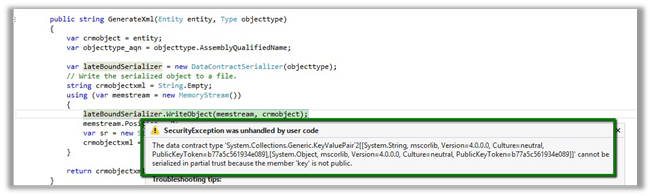
The data contract type cannot be serialized in partial trust because the member is not public while using Serialization in the sandboxed plugin in CRM 2011


Hi,

Was getting the below error while serializing the CRM Entity as mentioned here

Then gave it a try with a DataContract just to check if it works properly with it or not. It worked properly on the sandbox plugin.

Please check the below discussion for more details.

http://social.microsoft.com/Forums/en-US/d0332c9c-3cef-4b34-8c11-2b263369e21f/serializing-entity-in-sandbox-doesnt-work

Bye.

Calling WCF Rest Service from a Plugin in CRM 2011 (Online)


Let us take a simple rest service example here

http://www.rockycherry.net/services/Photos/photos.svc/photos

It returns the string “You have asked for photos”.

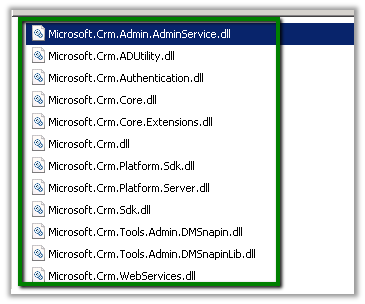
Within the plugin class add references to following assemblies.

The sample code of the plugin


namespace TestPlugin
{
 public class Class1 : IPlugin
 {
 public void Execute(IServiceProvider serviceProvider)
 {
 IPluginExecutionContext context = (IPluginExecutionContext)serviceProvider.GetService(typeof(IPluginExecutionContext));

 if (context.InputParameters.Contains("Target") && context.InputParameters["Target"] is Entity)
 {

// using WebClient
 WebClient webClient1 = new WebClient();
 string data1 = webClient1.DownloadString("http://www.rockycherry.net/services/Photos/photos.svc/photos");

// using WebChannelFactory
 WebChannelFactory<IPhotos> factory = new WebChannelFactory<IPhotos>(new Uri("http://www.rockycherry.net/services/Photos/photos.svc"));
 IPhotos proxy = factory.CreateChannel();
 string photos = proxy.GetPhotos();

 }

 }
 }

[ServiceContract]
 public interface IPhotos
 {
 [WebGet(UriTemplate = "Photos")]
 [OperationContract]
 string GetPhotos();
 }
}


Register the plugin in Sandbox mode for CRM 2011 online.

Check this wonderful post for all the details

http://rockycherry.net/blog/?p=179

Hope it helps.

“Empty results generated: No binaries were instrumented. Make sure the tests ran, required binaries were loaded, had matching symbol files, and were not excluded through custom settings” issue in Code Coverage in Visual Studio 2012


Hi,

I was getting the above message while analyzing the code coverage for a Unit Test case written for a Plugin using Microsoft Fakes.

Followed this article

http://blogs.msdn.com/b/allendm/archive/2012/06/05/troubleshooting-missing-data-in-code-coverage-results.aspx

And also deleted the .SUO file (hidden file in the root of the solution) and also restarted the Visual Studio. Re-running the code coverage worked properly this time.

Hope it helps.

Enable Sub Grid for Contract Line (ContractDetail) entity in CRM 2011


Hi,

OOB if we try to add\insert sub grid for Contract Line entity in an Entity’s Form we would realize that the Contract Line entity doesn’t show up in the Entity drop down there.

The UNSUPPORTED way to get it enabled is to

Open the OrgName_MSCRM database

Run the following query

update metadataschema.entity

set  IsChildEntity=0

where name=‘contractdetail’

This will let us add the sub grid for the contract line entity.

Bye.

Import User Profile properties in SharePoint 2013 from CRM 2011 using BCS.


For import to work  we will first define our WCF Service.

We could refer to this post first on how to define and use the WCF Service.

https://nishantrana.wordpress.com/2013/06/13/integrating-crm-2011-and-sharepoint-2013-using-bcs-wcf-service-crud-operation/

Here as we are not going to perform update, delete or create operation we don’t have to implement those methods.

Here we would be defining only Read Item, Read List and IdEnumerator Operation of BCS.

IdEnumerator method enables external data search in SharePoint and will be used while defining new profile synchronization connection.

For our scenario we have created a custom entity named Lawyer in our CRM System. These Lawyers are SharePoint user (AD User)


[ServiceContract]
 public interface IWCFLawyer
 {

[OperationContract]
 string[] GetLawyerLoginIDs();

[OperationContract]
 IEnumerable<WCFCustomType> ReadList();

[OperationContract]
 WCFCustomType ReadItem(String lawyerLoginID);

 }


 [DataContract]
 public class WCFCustomType
 {
 String lawyerLoginID;
 string practiceDetail;
 DateTime lawyerAvailability;

[DataMember]
 public String LawyerLoginID
 {
 get { return lawyerLoginID; }
 set { lawyerLoginID = value; }
 }

[DataMember]
 public string PracticeDetail
 {
 get { return practiceDetail; }
 set { practiceDetail = value; }
 }

[DataMember]
 public DateTime LawyerAvailability
 {
 get { return lawyerAvailability; }
 set { lawyerAvailability = value; }
 }
 }


public class WCFLawyer : IWCFLawyer
 {
 private IOrganizationService orgService = GetOrganizationService();
 public IEnumerable<WCFCustomType> ReadList()
 {
 try
 {
 QueryExpression queryExpression = new QueryExpression("new_lawyer");
 ConditionExpression conditionExpression = new ConditionExpression("statuscode", ConditionOperator.Equal, 1);
 queryExpression.ColumnSet = new ColumnSet(new String[] { "new_name","new_lawyerid", "new_practicedetail", "new_nextavailability" });
 EntityCollection contactCollection = orgService.RetrieveMultiple(queryExpression);
 List<WCFCustomType> lstLawyerType = new List<WCFCustomType>();
 WCFCustomType lawyerRecord;
 foreach (Entity entity in contactCollection.Entities)
 {
 lawyerRecord = new WCFCustomType();
 lawyerRecord.LawyerLoginID = entity.Attributes["new_name"].ToString();
 if (entity.Contains("new_practicedetail"))
 {
 lawyerRecord.PracticeDetail = entity.Attributes["new_practicedetail"].ToString();
 }
 if (entity.Contains("new_nextavailability"))
 {
 lawyerRecord.LawyerAvailability =(DateTime)entity.Attributes["new_nextavailability"];
 }

lstLawyerType.Add(lawyerRecord);
 }

return lstLawyerType;


 }
 catch (Exception generalException)
 {
 throw new RuntimeException(
 "There was a problem reading lawyer data.",
 generalException);
 }
 }
 public WCFCustomType ReadItem(string lawyerID)
 {
 try
 {
 // get the lawyer record's guid based on lawyer login id
 QueryExpression queryExpression = new QueryExpression("new_lawyer");
 ConditionExpression conditionExpression = new ConditionExpression("new_name", ConditionOperator.Equal, lawyerID);
 queryExpression.Criteria.AddCondition(conditionExpression);
 queryExpression.ColumnSet = new ColumnSet(new String[] { "new_name", "new_lawyerid" });
 EntityCollection contactCollection = orgService.RetrieveMultiple(queryExpression);
 Guid lawyerGuid = Guid.Empty;
 if (contactCollection.Entities.Count > 0)
 {
 Entity lawyerEntity = contactCollection.Entities[0];
 lawyerGuid = new Guid(lawyerEntity.Attributes["new_lawyerid"].ToString());
 }


 ColumnSet cols= new ColumnSet(new String[] { "new_name","new_lawyerid", "new_practicedetail", "new_nextavailability" });
 WCFCustomType lawyerRecord = null;
 Entity entity = orgService.Retrieve("new_lawyer", lawyerGuid, cols);
 if (entity != null)
 {
 lawyerRecord = new WCFCustomType();
 lawyerRecord.LawyerLoginID = entity.Attributes["new_name"].ToString();
 if (entity.Contains("new_practicedetail"))
 {
 lawyerRecord.PracticeDetail = entity.Attributes["new_practicedetail"].ToString();
 }
 if (entity.Contains("new_nextavailability"))
 {
 lawyerRecord.LawyerAvailability = (DateTime)entity.Attributes["new_nextavailability"];
 }

 }

return lawyerRecord;


 }
 catch (InvalidOperationException)
 {
 throw new ObjectNotFoundException(
 "Unable to read data for the lawyer with ID = " +
 lawyerID.ToString() +
 ". The lawyer no longer exists.");
 }
 catch (Exception generalException)
 {
 throw new RuntimeException(
 "There was a problem reading lawyer data.",
 generalException);
 }
 }

 public String[] GetLawyerLoginIDs()
 {

string[] lawyerIDs;

try
 {
 QueryExpression queryExpression = new QueryExpression("new_lawyer");
 ConditionExpression conditionExpression = new ConditionExpression("statuscode", ConditionOperator.Equal, 1);
 queryExpression.ColumnSet = new ColumnSet(new String[] { "new_lawyerid","new_name", "new_practicedetail", "new_nextavailability" });
 EntityCollection contactCollection = orgService.RetrieveMultiple(queryExpression);
 List<WCFCustomType> lstLawyerType = new List<WCFCustomType>();
 WCFCustomType lawyerRecord;
 lawyerIDs = new string[contactCollection.Entities.Count];
 int i = 0;
 foreach (Entity entity in contactCollection.Entities)
 {

lawyerIDs[i] =entity.Attributes["new_name"].ToString();
 i++;
 }

return lawyerIDs;
 }
 catch (Exception generalException)
 {
 throw new RuntimeException(
 "There was a problem reading lawyer data.",
 generalException);
 }


 }
 private IOrganizationService GetOrganizationService()
 {
 Uri organizationUri = new Uri("http://crmserver/orgname/XRMServices/2011/Organization.svc");
 Uri homeRealmUri = null;
 ClientCredentials credentials = new ClientCredentials();
 credentials.Windows.ClientCredential = new System.Net.NetworkCredential("username", "password", "domain");
 OrganizationServiceProxy orgProxy = new OrganizationServiceProxy(organizationUri, homeRealmUri, credentials, null);
 IOrganizationService _service = (IOrganizationService)orgProxy;
 return _service;
 }

}

Here instead of taking Guid of the record we will be taking LoginId (login name of the AD User) of the user as the unique identifier in our BCS, because the same will be used for while defining user profile synchronization with the BCS. The login name of the users and SAMAccountName in the AD will be the connection point between the two. The records in CRM will be identified by the login name of Users in SharePoint.

Here after implementing the Interface and after publishing the service, here we will again create the External Content Type based on it and will define the operations Read List, Read Item. This time we will use the User’s Login Id as Identifier.

Next open the User Profile Service Application à Manage User Properties in Central Administration Site of SharePoint.

Create a new user property named User Login ID (Lawyer Login Id here in our case) that imports the value from SAMAccountName property of the AD. (Note: AD Profile Synchronization Connection should already be set up for the user’s profiles)

Create a new Synchronization Connection for importing profile from BCS

Define the synchronization connection based on Lawyer Login ID property

Create few more user properties e.g. one for Practice Detail field and other for Lawyer Availability field defined as Data Member in the contract in our case.

Open User Profile Application à Manage User Properties

Create a new property named Practice Detail of type String that imports the value from the PracticeDetail attribute of the BCS connection defined.

Create one more property name Next Availability of type date time that imports the value from the LawyerAvailability attribute of the BCS connection defined.

Go to Manage Profile Service à Start Profile Synchronization to start the synchronization

Select Start Full Synchronization


Select Configure Synchronization Timer Job to define the synchronization interval


Open the user profiles record after the synchronization

Select Manage User Profiles in the User Profile Application

Search for the record and open it to confirm the successful user profile import.

Hope it helps.