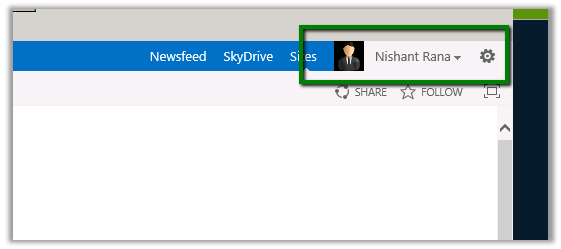
Showing current logged in user’s profile picture next to Welcome Menu in SharePoint 2013


Hi,

We recently got a requirement to show the logged in user’s profile picture along with the name on the Welcome Menu on the top right.

We followed these steps to implement it.

  1. Open the master page used by the Site (Site Settings àMaster Pages and page layouts à Select the master page file à right click and download a copy.
  2. Add the following tags in the master page.

<%@
Register
Tagprefix=”SPSWC”
Namespace=”Microsoft.SharePoint.Portal.WebControls”
Assembly=”Microsoft.SharePoint.Portal, Version=15.0.0.0, Culture=neutral, PublicKeyToken=71e9bce111e9429c”
%>

<SPSWC:ProfilePropertyLoader
runat=”server”
/>

<SPSWC:ProfilePropertyImage
PropertyName=”PictureUrl”
style=”float: left; height: 20px;
ShowPlaceholder=”true”
id=”PictureUrlImage”
runat=”server”/>

Saving and uploading the master page.

Hope it helps.

Using SharePoint CSOM (Client Side Object Model) in CRM 2011 On-Premise Plugin.


Hi,

We recently had a requirement to create List Item in SharePoint every time a case is resolved in CRM.

For this we decided to use SharePoint CSOM i.e.

Added reference to following assemblies in our plugin that will fire on Case Resolution

They can be found at

C:\Program Files\Common Files\Microsoft Shared\Web Server Extensions\15\ISAPI\

The plugin gets the content of the KB Article associated to the Case and creates a list item (for a Custom List) in SharePoint.

Sample Code


public void Execute(IServiceProvider serviceProvider)
 {
 IPluginExecutionContext context =
 (IPluginExecutionContext) serviceProvider.GetService(typeof (IPluginExecutionContext));
 if (context.InputParameters.Contains("Target") && context.InputParameters["Target"] is Entity)
 {

Entity entity = (Entity) context.InputParameters["Target"];

OptionSetValue serviceStage = (OptionSetValue) (entity.Attributes["statecode"]);
 if (serviceStage.Value == 1)
 {

IOrganizationServiceFactory serviceFactory =
 (IOrganizationServiceFactory)
 serviceProvider.GetService(typeof (IOrganizationServiceFactory));

IOrganizationService orgService = serviceFactory.CreateOrganizationService(context.UserId);

// Get the KB Article Associated
 ColumnSet cols = new ColumnSet();
 cols.AddColumn("kbarticleid");

// Get the content of the article
 Entity caseEntity = orgService.Retrieve("incident", context.PrimaryEntityId, cols);
 EntityReference entityRef = (EntityReference) caseEntity.Attributes["kbarticleid"];
 Guid kbId = entityRef.Id;
 Entity kbEntity = orgService.Retrieve("kbarticle", kbId, new ColumnSet(true));
 string title = kbEntity.Attributes["title"].ToString();
 string content = kbEntity.Attributes["content"].ToString();
 // create the custom list item in SharePoint using Client Side Object Model of SharePoint 2013

ClientContext clientContext = new ClientContext("http://sharepoint/sites/portal/");
 clientContext.Credentials = new System.Net.NetworkCredential("username", "password", "mydomain");
 List announcementsList = clientContext.Web.Lists.GetByTitle("Kb List");

ListItemCreationInformation itemCreateInfo = new ListItemCreationInformation();
 ListItem newItem = announcementsList.AddItem(itemCreateInfo);
 newItem["Title"] = title;
 newItem["Content"] = content;

newItem.Update();

clientContext.ExecuteQuery();

}
 }
 }

Hope it helps.

Changing font color of a column in jqGrid.


Hi,

We had a requirement to change the font color of a particular column in jqGrid. We achieved it in the following manner.

Using the formatter property


The fontColorFormat function


function fontColorFormat(cellvalue, options, rowObject) {
 var color = "blue";
 var cellHtml = "<span style='color:" + color + "' originalValue='" + cellvalue + "'>" + cellvalue + "</span>";
 return cellHtml;
 }

Hope it helps!

Implementing Marking Item as Read functionality for list item in SharePoint 2013.


Hi,

We recently had a requirement where we wanted to mark list item as read when they are opened (DispForm.aspx).

For this we added a Yes/No (checkbox) field to the List.

Opened the DispForm.aspx for editing and added a Content Editor web part there.

Uploaded a text file having following script in one of the document libraries.

</pre>
_spBodyOnLoadFunctionNames.push("updateListItem");

function updateListItem() {

var siteUrl = window.location.protocol + "//" + window.location.host;
 var clientContext = new SP.ClientContext(siteUrl);
 var oList = clientContext.get_web().get_lists().getByTitle('Notifications');

 JSRequest.EnsureSetup();

//Get a query string parameter called Id. i.e - "page.aspx?Id=11" will return 11
 var itemId = JSRequest.QueryString["ID"];
 this.oListItem = oList.getItemById(itemId);
 oListItem.set_item('MarkAsRead', true);
 oListItem.update();

clientContext.executeQueryAsync(
 Function.createDelegate(this, this.onQuerySucceeded),
 Function.createDelegate(this, this.onQueryFailed)
 );
 }

function onQuerySucceeded() {
 alert('Item updated!');
 }

function onQueryFailed(sender, args) {
 alert('Request failed. ' + args.get_message() + '\n' + args.get_stackTrace());
 }
<pre>

And refered that txt file in our content web editor web part.

Hope it helps.

Set AssignedToId for a ListItem using SharePoint 2013 Rest API.


Hi,

Was working on a requirement in which we had to create new listitems of task type and set the Assigned To field in it.

It wasn’t as straight forward as we thought. Finally this is what worked


var fieldUserValues = new Array();
 fieldUserValues.push(userIdForTask);

var item = {
 "__metadata": { "type": eventToSave.TaskTypeName },
 "Title": eventToSave.EventName,
 "StartDate": startDate,
 "DueDate": endDate,
 "Body" : eventToSave.Description,
 "Priority": eventToSave.TaskPriority,
 'AssignedToId': { "results": fieldUserValues },
 };
 executor.executeAsync(
 {
 url: appweburl + "/_api/SP.AppContextSite(@target)/web/lists/getbytitle('" + eventToSave.TaskName + "')/items?@target='" + hostweburl + "'",
 method: "POST",
 headers: {
 "accept": "application/json;odata=verbose",
 "content-type": "application/json;odata=verbose",
 "X-RequestDigest": $("#__REQUESTDIGEST").val()

 },
 body: JSON.stringify(item),
 success: function (data) { succeededInsert(data); },
 error: failedInsert
 }
 );

Hope it helps.

Manage New Icon Indicator for list items (DaysToShowNewIndicator) in SharePoint.


Hi,

Was looking into how long the new icon appears for a newly created list items in SharePoint.

The default is 2 days.

And this is configurable through DaysToShowNewIndicator property.

Powershell

http://www.deliveron.com/blog/post/Change-Settings-for-e2809cNewe2809d-Icon-in-SharePoint-2010-using-PowerShell.aspx

STSADM

http://technet.microsoft.com/en-us/library/cc287681(v=office.12).aspx

Programmatically

http://code-journey.com/2009/change-how-long-a-listitem-is-considered-a-new-item-setpropery-daystoshownewindicator/

Hope it helps.