Fixed – CRM service call returned an error: The top attribute can’t be specified with paging attribute page in SSIS Package


We might face this issue while using Dynamics CRM Source Component of SSIS Integration Toolkit

[Dynamics CRM Source] Warning: An exception has occurred while processing the service request, the same request will be attempted again immediately. KingswaySoft.IntegrationToolkit.DynamicsCrm.CrmServiceException: CRM service call returned an error: The top attribute can’t be specified with paging attribute page (Error Code: -2147220989, Detail Message: The top attribute can’t be specified with paging attribute page)

To fix it à

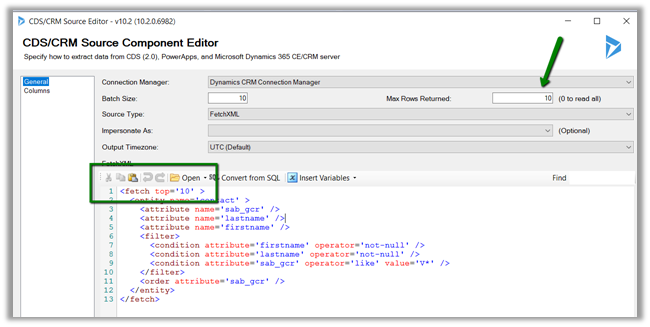
Remove the top attribute from the FetchXML specified and instead use Max Rows Returned property of the Source Component Editor.

https://www.kingswaysoft.com/products/ssis-integration-toolkit-for-microsoft-dynamics-365/help-manual/crm/source

Hope it helps..

Advertisements

Fixed – CRM service call returned an error: Date is less than the minimum value supported by CrmDateTime. Actual value ‘xyz’- Minimum value supported: 01/01/1753 00:00:00 in SSIS (Dynamics 365)


We got the below while trying to UPSERT contact records from a SQL table to Dynamics 365 CE using Kingswaysoft Dynamics 365 Adapter.

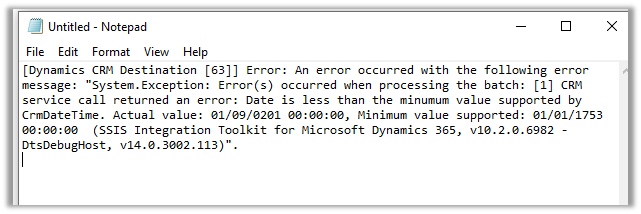
The source table had the Date of birth (DOB) as nvarchar type (string) and one of the rows had the following value stored for DOB à

‘0201-01-09 00:00:00’

Which was resulting into exception while creating record inside Dynamics 365 CE with the above date.

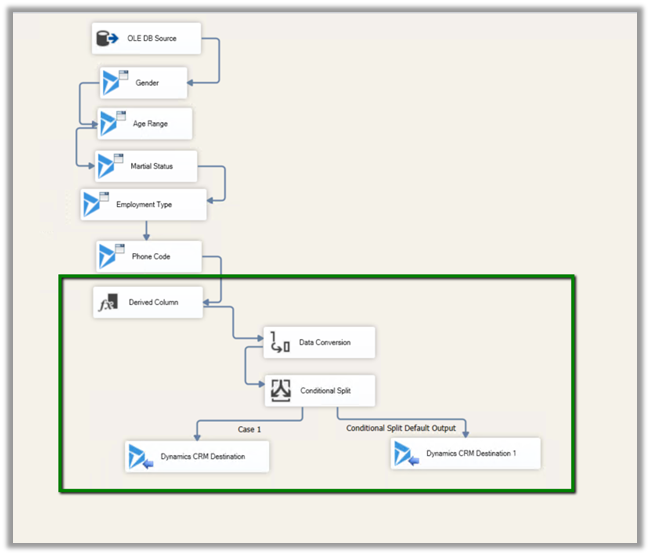
The way we fixed it was to make use of

Derived Column
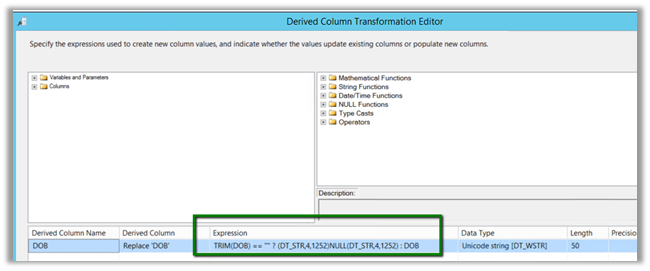
à Converting empty string to null for DOB column. https://nishantrana.me/2018/09/10/cannot-convert-between-unicode-and-non-unicode-string-data-types-error-in-ssis/

Data Conversion
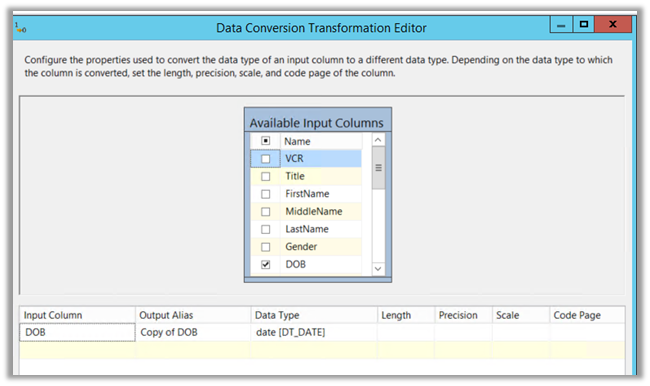
à Converting it to Date data type for comparison.

Conditional Split
à Updating DOB field in CRM for only those records having valid date i.e. greater 01/01/1753 00:00:00 and for records having null or date less than 01/01/1753 00:00:00, removing or not using the DOB field for Upsert.
Derived Column à
Data Conversion à Convert it to Date Type which makes it easy for use in Conditional Split Transformation editor for comparison.
Conditional Split à If the DOB is not null and is greater than 01/01/1753

!ISNULL([Copy of DOB]) && [Copy of DOB] >= (DT_DBDATE)”01/01/1753 00:00:00″
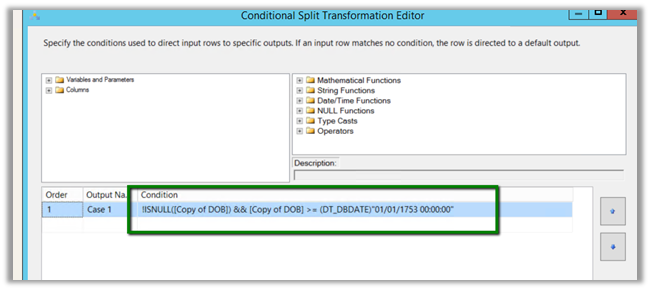
Then update the DOB for the record for Case 1 and in case of the DOB being less than 01/01/1753 and null, do not update the field (don’t map the field for update).
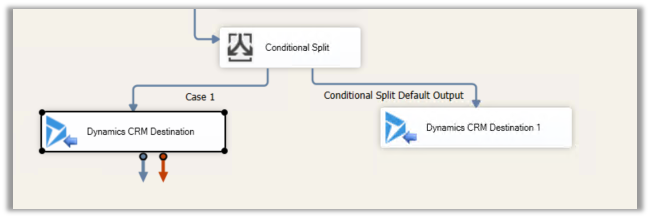
Inside Dynamics CRM Destination component

For Case 1: Map the birthdate field
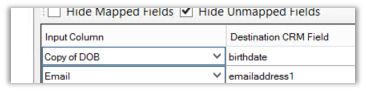
For default output: Don’t map the field, which will set the field as null as required.

Hope it helps..


Advertisements

Fixed – Cannot convert between unicode and non-unicode string data types error in SSIS


While using the OLE DB Source component in SSIS, on updating its SQL Command we started getting the below error for “Phone” column in our Table.

The fix is to open the Advanced Editor for the OLE DB Source component

Change the Data Type (non-unicode string) for the Phone column inside Output Columns in Input and Output Properties Tab.

Changing the Data Type from Unicode string [DT_WSTR] to string [DT_STR] fixed the issue.

Hope it helps..

Advertisements

Fixed – Publish as Azure Web Job Option missing in Visual Studio 2017


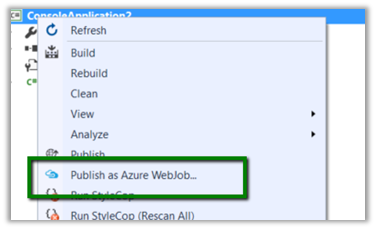
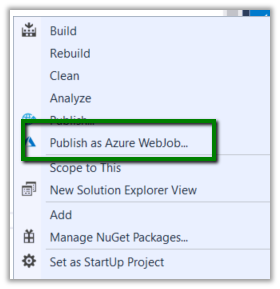
While trying to publish one of our console application to Azure as Web Job we couldn’t find the “Publish as Azure WebJob..” option

It was because Azure development tools were recently uninstalled from the system.

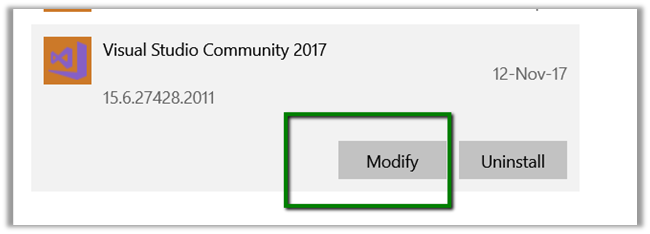
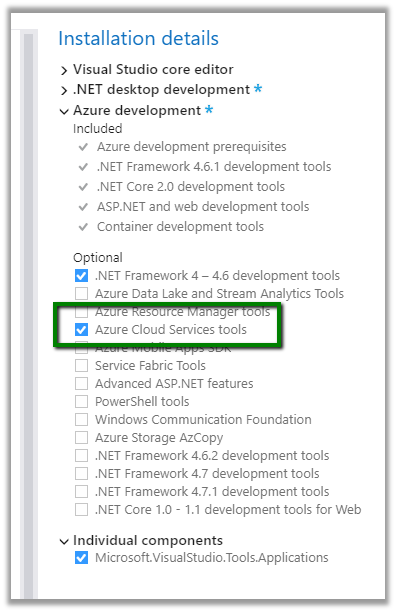
To install it, go to Windows à Program and Features à Select Visual Studio 2017 and click on Modify.

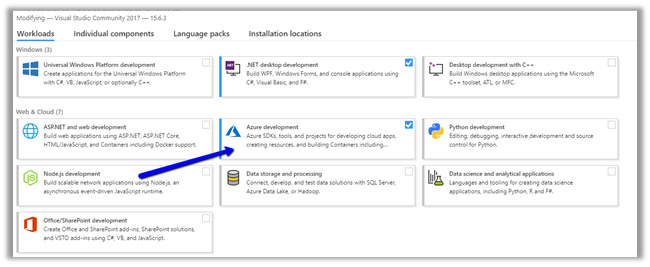
And select Azure Development for installation

Select Azure Cloud Services tool.

After installation it will ask for restart.

After restart we’d see the option added in our Visual Studio.

Hope it helps.

Advertisements

How to – convert a blank string to Null for DateTime field – SSIS


Recently while writing an SSIS package, we were getting the below exception.

System.Exception: Error: Failed to set field ‘birthdate’ value to ” for entity ‘contact’ (field type: DateTime, value type: String). System.FormatException: String was not recognized as a valid DateTime. (SSIS Integration Toolkit for Microsoft Dynamics 365, v10.2.0.6972 – DtsDebugHost, v14.0.3025.39)

We were getting the exception because the source table was having the birth date field as a string with blank value instead of null and in the destination table we had the corresponding mapped field as DateTime type.

The fix is to add a Derived Column with the following expression, which converts the blank string to null à

“TRIM(ColumnName) == “” ? (DT_STR,4,1252)NULL(DT_STR,4,1252) : Columnname”


Hope it helps..

Advertisements

No Action header was found with namespace ‘http://www.w3.org/2005/08/addressing’ for the given message – error while calling a WCF Service through C/AL (Client/server Application Language)


While trying to call a WCF service from within the C/Al in Microsoft Dynamics NAV, we were getting the below error

“No Action header was found with namespace ‘http://www.w3.org/2005/08/addressing‘ for the given message.”

Strangely enough that request was working properly from within the SOAP UI.

Eventually the following thread came to the rescue

https://stackoverflow.com/questions/16445945/no-action-header-was-found-error-message-while-using-soap-webservice

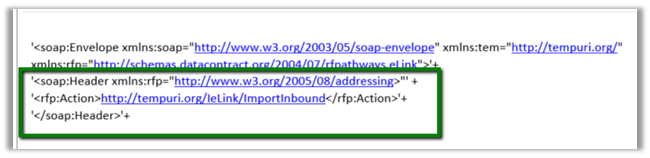
The service was expecting a Soap Header xml containing the Action along with SOAPAction header as shown below within the Soap Envelope.

Hope it helps..