

When designing Business Process Flows (BPF) in Dataverse, we often want to make certain fields mandatory before users can move to the next stage. A common scenario is using a Boolean (Two-Option) field — for example, Approved? with values Yes and No.
At first glance, it seems natural to mark this field as required in the BPF stage. But here’s the catch:
If the user selects Yes, the BPF allows stage progression.
If the user selects No, the BPF still blocks progression.
This can be confusing, because technically a Boolean field is never empty — it always holds a value. So why is “No” being treated as invalid?
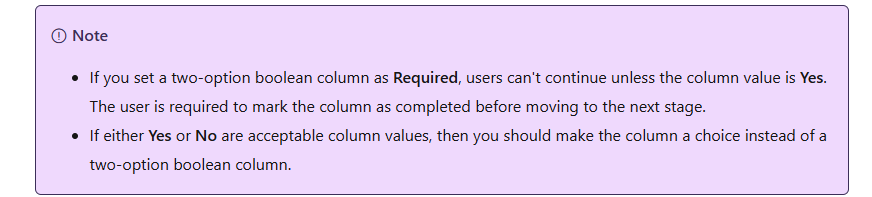
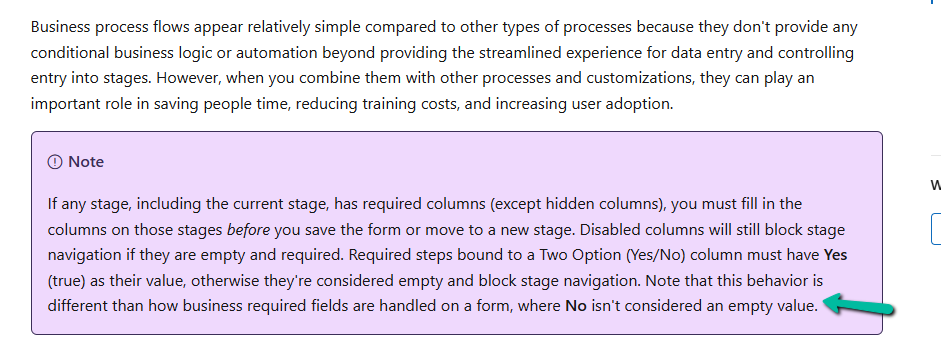
This happens because Dataverse handles Boolean fields differently inside BPF compared to regular forms. In a BPF, when a Boolean field is set as Required, the platform interprets only Yes (true) as a valid value. A No selection is treated as if the field is still unset. This is a limitation in how BPF validations work.
Below we have 2 approved fields, one is of type Boolean and the other of type Choice. We can see that on clicking on the Next button, although we have provided the value No to both these fields, it is still expecting a value for the boolean field.
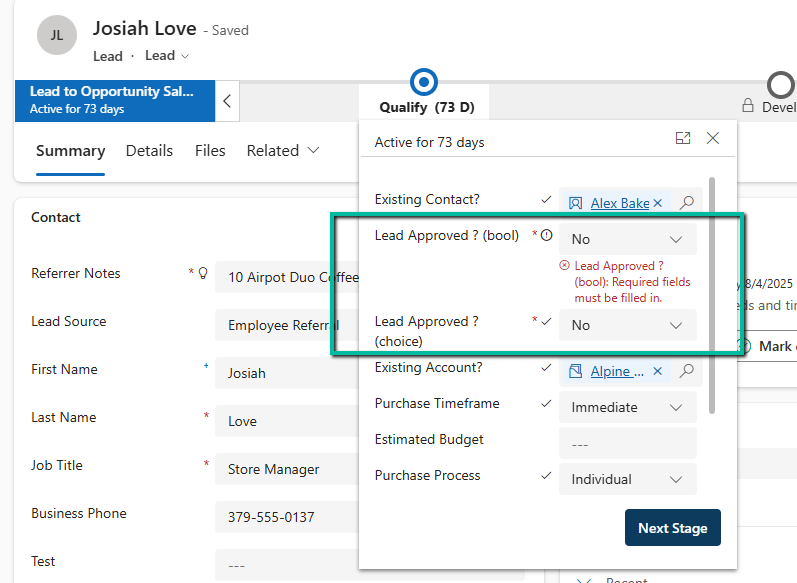
Here we can solve it 2 ways, as shown above, we can create and use a Choice field instead of a Boolean field.
Or instead of making the Boolean field as required in the BPF, we enforce the rule using JavaScript (addOnPreStageChange).
Boolean fields in BPF don’t behave the same way as in forms. When set to required, only Yes is treated as valid, while No is ignored. The simplest and most reliable solution is to replace Boolean fields with a two-value Choice field when they need to be required in a BPF. This ensures both Yes and No are considered valid, and users won’t be blocked unnecessarily.
Hope it helps..
Discover more from Nishant Rana's Weblog
Subscribe to get the latest posts sent to your email.
Share It -


2 thoughts on “Boolean Fields in Business Process Flows: Required Field Behavior Explained (Dataverse / Dynamics 365)”