

Last week, we came across a strange issue while working with Dataverse metadata.
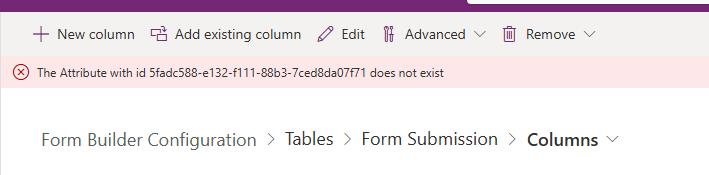
We had created a new attribute as part of our solution changes. Everything looked fine initially, and the attribute was created successfully without any errors. However, when we tried to delete that same attribute, we started getting an error saying that the attribute does not exist.
This was confusing for us because the attribute clearly existed and was visible in the system.
“The Attribute with ID doesnt not exist”
To validate further, we tried adding the same attribute to another solution. This time, we received a different error stating that the staged metadata for the attribute is still being processed.
The staged metadata for Attribute is still being processed, please wait before you can do any update/delete/retrieve operations.

At this point, it was clear that this was not a normal behavior. It felt like the attribute was stuck in an intermediate state where it was created but not fully available for operations.
We checked the Known Issues list in the Power Platform Admin Center and found a matching issue: https://admin.powerplatform.microsoft.com/knownissues/6269936
We applied the suggested fix mentioned there, but it did not work immediately for us. Instead of trying multiple workarounds, we decided to wait for some time and raised a support ticket.
After a couple of hours, we retried the same operations. This time, both deleting the attribute and adding it to another solution worked without any issues.
The key takeaway from this experience is simple.
If we encounter errors like: – Attribute does not exist (even though it does) – Staged metadata is still being processed
It is worth giving the system some time before trying again and/or raising a support ticket in parallel instead of wasting time trying different options to fix it.
Hope it helps..
Discover more from Nishant Rana's Weblog
Subscribe to get the latest posts sent to your email.
Share It -


 Nishant Rana's Weblog
One thought on “The Attribute with id does not exist — and Staged Metadata is still being processed (Dataverse / Dynamics 365 Issue)”