

In one of our recent Dynamics 365 / Dataverse projects, we ran into one issue with auto-number fields. We had configured an auto-number for the custom_id field on the Opportunity table. The format used a prefix of QU- followed by eight digits, resulting in IDs such as QU-00000133.
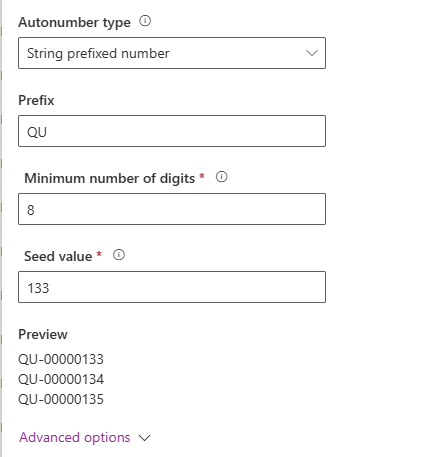
Everything functioned correctly for newly created records, and the field populated exactly as expected. However, during testing, we discovered a problem. When an Opportunity that had previously been closed was later reopened, the auto-number field did not populate as expected. The system did not treat the reopen action as a new record creation, so no auto-number was generated. Because the custom_id field was required for downstream integrations, the absence of a value became a breaking issue.
This happens because auto-numbers in Dataverse only trigger at creation time. A reopened record is simply updated, not recreated, so the auto-number mechanism never fires. This behavior is by design. Unfortunately, we had legacy records created long before auto-numbering was implemented, and when users reopened them for updates, those records still had no custom_id. The integration layer expects a value, so we needed a reliable way to populate one even after the original creation event had long passed.
To solve this, we implemented a plugin that checks whether the custom_id field is empty during update operations. If the value is missing, the plugin generates the next available QU number manually. The logic first retrieves the highest existing QU number in the system, extracts the numeric portion, increments it by one, and then applies the resulting value to the current record. Once the number is assigned, we also update the auto-number seed so that the built-in Dataverse auto-number engine continues from the correct sequence and avoids generating duplicates in the future.
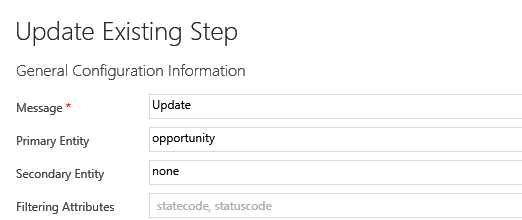
The plugin was registered on the post update of the opportunity table with statecode, statuscode as the filtering attributes.
And PreImage with the following attributes – statecode, statuscode, custom_id.
Sample Code –
private void EnsureCustomId(Guid oppId, Entity preImage)
{
    var customId = preImage.GetAttributeValue<string>("custom_id");
    if (!string.IsNullOrWhiteSpace(customId))
    {
        _trace.Trace("custom_id already populated, skipping.");
        return;
    }

    _trace.Trace("custom_id is NULL, generating new QU number.");

    var query = new QueryExpression("opportunity")
    {
        ColumnSet = new ColumnSet("custom_id"),
        Criteria =
        {
            Conditions =
            {
                new ConditionExpression("custom_id", ConditionOperator.NotNull),
                new ConditionExpression("custom_id", ConditionOperator.Like, "QU%")
            }
        },
        Orders =
        {
            new OrderExpression("custom_id", OrderType.Descending)
        },
        TopCount = 1
    };

    var existing = _service.RetrieveMultiple(query).Entities.FirstOrDefault();

    int next = 1;
    if (existing != null)
    {
        if (int.TryParse(existing.GetAttributeValue<string>("custom_id").Split('-').Last(), out int last))
            next = last + 1;
    }

    string newId = $"QU-{next:D8}";
    _trace.Trace($"Assigning new QU: {newId}");

    var update = new Entity("opportunity", oppId)
    {
        ["custom_id"] = newId
    };
    _service.Update(update);

    next = next + 1;

    var request = new OrganizationRequest("SetAutoNumberSeed");
    request["EntityName"] = "opportunity";
    request["AttributeName"] = "custom_id";
    request["Value"] = (long)next;
    _service.Execute(request);

    _trace.Trace($"Auto number seed updated to {next}");
}
Updating the auto-number seed is an important part of this solution. Without adjusting the seed, Dataverse might attempt to generate a number that has already been created manually by our plugin. By synchronizing the seed after each assignment, we ensure that the system’s internal auto-number feature continues counting from the correct position. This prevents duplicate values and keeps both manual and automatic generation aligned.
With this logic in place, reopened Opportunities now receive valid QU numbers automatically. The integration processes no longer break due to missing identifiers. Users can reopen and update older records confidently, and the system maintains a clean and consistent numbering sequence. A small enhancement to our plugin resolved a significant data quality issue end-to-end.
Hope it helps..
Discover more from Nishant Rana's Weblog
Subscribe to get the latest posts sent to your email.
Share It -


 Nishant Rana's Weblog
One thought on “Using a Plugin to Generate Auto-Number Values for Legacy and Reopened Records in Dynamics 365 / Dataverse”