

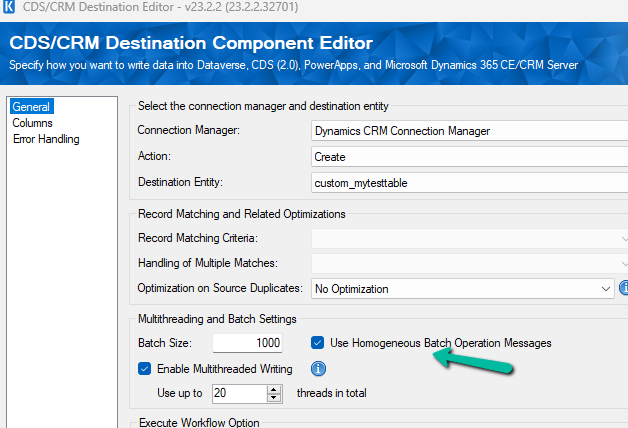
As we all are aware Microsoft has introduced Bulk Operation messages in the platform. Now we could use the same in our SSIS Package that uses KingswaySoft’s SSIS Integration Toolkit for Microsoft Dynamics 365 by using the Homengeneous Batch Operation Messages option in the CDS / CRM Destination Component Editor.
Let us first use the data spawner component to generate sample data for a custom table for which we just have 2 new custom first name and last name fields created as well as mapped with 100 K records.
- More on Data Spawner – https://nishantrana.me/2020/05/26/using-data-spawner-component-ssis-to-generate-sample-data-in-dynamics-365/

Let us first run the Package with batch size = 1000, threads as 20, multiplexing user = 5, and homogeneous batch operation disabled.

Below is the User Multiplexing option in the Connection Manger.

Here we have defined 5 different application users.



Now let us run the same with the Homogenous Batch Operation option checked.

Below are the findings with different variations of Batch Size, Threads, Multiplexing Users, Homogenous Batch Operation for the – 100K records – Custom table
Batch Size | Threads | Multiplexing Users | Homogenous Batch Operation | Duration (minutes) |
1000 | 20 | 5 | N | 5:48 |
1000 | 20 | 5 | Y | 1:54 |
500 | 20 | 5 | N | 4:16 |
500 | 20 | 5 | Y | 1:29 |
250 | 20 | 5 | N | 3:58 |
250 | 20 | 5 | Y | 1:38 |
100 | 20 | 5 | N | 4:47 |
100 | 20 | 5 | Y | 1:58 |
500 | 50 | 5 | N | 4:00 |
500 | 50 | 5 | Y | 1:24 |
We can see huge performance improvements while using Bulk Operations (Homogenous batch option) for our custom table, with threads around 20 and multiplexing users as 5. Increasing the number of multiplexing users will provide further performance improvement here.
Now let us run it against the Contact table and this time we take 10K as a sample instead of 100K as a sample.

10K records Contact table
Batch Size | Threads | Multiplexing Users | Homogenous Batch Operation | Duration (minutes) |
500 | 1 | 1 | N | 25:26 |
500 | 1 | 1 | Y | 42:14 |
100 | 1 | 1 | N | 24:34 |
100 | 1 | 1 | Y | 36:06 |
100 | 5 | 1 | N | 21:56 |
100 | 5 | 1 | Y | 16:45 |
100 | 10 | 1 | N | 6:59 |
100 | 10 | 1 | Y | 12:54 |
100 | 10 | 2 | N | 6:14 |
100 | 10 | 2 | Y | 11:28 |
100 | 10 | 5 | N | 3:26 |
100 | 10 | 5 | Y | 9:36 |
100 | 15 | 5 | N | 2:56 |
100 | 15 | 5 | Y | 9:57 |
100 | 20 | 5 | N | 2:34 |
100 | 20 | 5 | Y | 10:17(Ran into a server-side throttling error.) |
1000 | 20 | 5 | N | 5:30 (Ran into a server-side throttling error.) |
1000 | 20 | 5 | Y | 5:02 (Ran into a server-side throttling error.) |
500 | 20 | 5 | N | 4:20(Ran into a server-side throttling error.) |
500 | 20 | 5 | Y | 2:36 (Ran into a server-side throttling error.) |
100 | 20 | 1 | N | 18:00 (Ran into a server-side throttling error.) |
100 | 20 | 1 | Y | 11:20 (Ran into a server-side throttling error.) |
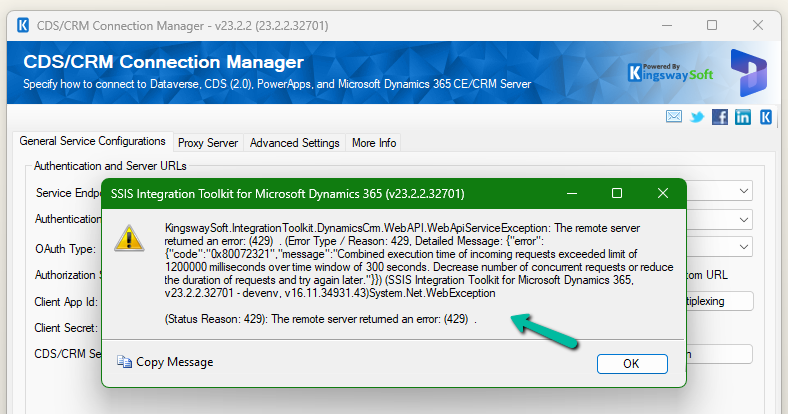
With the higher Batch size along Threads + Multiplexing users + Homogenous Batch Operation message option, we could get a good performance improvement, however, we can see that we ran into server-side throttling errors on increasing the batch size. So with tables having a higher number of fields/relationships, we need to be more careful than a custom/table with fewer relationships and fields

[CDS Destination] Warning: An exception has occurred while processing the service request, the same request will be attempted again immediately. KingswaySoft.IntegrationToolkit.DynamicsCrm.WebAPI.WebApiServiceException: The underlying connection was closed: A connection that was expected to be kept alive was closed by the server. (Error Type / Reason: KeepAliveFailure, Detailed Message: The underlying connection was closed: A connection that was expected to be kept alive was closed by the server.)
[CDS Destination] Warning: A server side throttling is encountered, the same request will be retried after 5 minutes (as instructed by the returned throttling error message from the server). KingswaySoft.IntegrationToolkit.DynamicsCrm.WebAPI.WebApiServiceException: The remote server returned an error: (429) . (Error Type / Reason: 429, Detailed Message: {“error”:{“code”:”0x80072321″,”message”:”Combined execution time of incoming requests exceeded limit of 1200000 milliseconds over time window of 300 seconds. Decrease number of concurrent requests or reduce the duration of requests and try again later.”}})
More on the Homogenous Batch Operation option – https://www.kingswaysoft.com/blog/2023/11/29/Use-Homogeneous-Batch-Operation-Messages-for-Greater-DataverseCRM-Writing-Performance
Hope it helps..
Discover more from Nishant Rana's Weblog
Subscribe to get the latest posts sent to your email.
Share It -


 Nishant Rana's Weblog
One thought on “Using Homogenous Batch / Bulk operation messages for improved performance – Data Migration / Dataverse”