
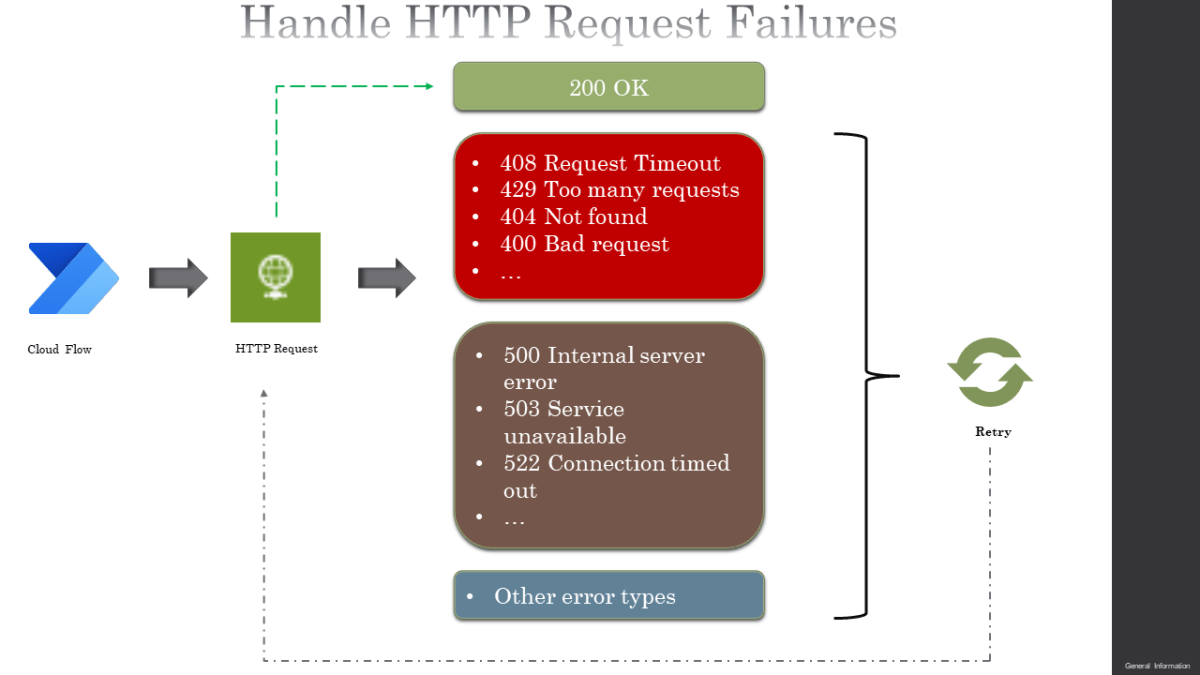

If the HTTP request you make in Power Automate cloud flow gets a 200 OK response, all is good but if the HTTP response has the status codes like 408 – Request Timeout, 429 – Too many requests, 522 – Connection Timeout, 404 – Not found, 400 – Bad request etc there is a problem which needs attention. This post will show you how to handle HTTP request failures using
- Retry Policy
- Custom Retry for requests which cannot be handled by Retry Policy
- Take actions based on HTTP status code
Retry Policy:
A Retry Policy specifies how the action or trigger retries a request when the original request times out or fails. The retry policy handles the following HTTP status codes
- 408 – Request Timeout
- 429 – Too many requests
- 5xx – xx refers to any number like 500 – Internal server error, 503 – Service Unavailable, 522 – Connection…
View original post 839 more words
Discover more from Nishant Rana's Weblog
Subscribe to get the latest posts sent to your email.
Share It -


