
Let us take a simple rest service example here
http://www.rockycherry.net/services/Photos/photos.svc/photos
 It returns the string “You have asked for photos”.
Within the plugin class add references to following assemblies.
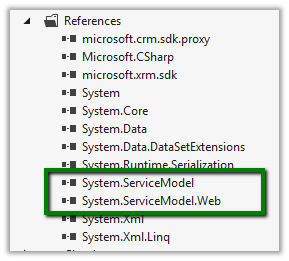
The sample code of the plugin
namespace TestPlugin
{
 public class Class1 : IPlugin
 {
 public void Execute(IServiceProvider serviceProvider)
 {
 IPluginExecutionContext context = (IPluginExecutionContext)serviceProvider.GetService(typeof(IPluginExecutionContext));

 if (context.InputParameters.Contains("Target") && context.InputParameters["Target"] is Entity)
 {

// using WebClient
 WebClient webClient1 = new WebClient();
 string data1 = webClient1.DownloadString("http://www.rockycherry.net/services/Photos/photos.svc/photos");

// using WebChannelFactory
 WebChannelFactory<IPhotos> factory = new WebChannelFactory<IPhotos>(new Uri("http://www.rockycherry.net/services/Photos/photos.svc"));
 IPhotos proxy = factory.CreateChannel();
 string photos = proxy.GetPhotos();

 }

 }
 }

[ServiceContract]
 public interface IPhotos
 {
 [WebGet(UriTemplate = "Photos")]
 [OperationContract]
 string GetPhotos();
 }
}
Register the plugin in Sandbox mode for CRM 2011 online.
Check this wonderful post for all the details
http://rockycherry.net/blog/?p=179
Hope it helps.
Discover more from Nishant Rana's Weblog
Subscribe to get the latest posts sent to your email.
Share It -


 Nishant Rana's Weblog