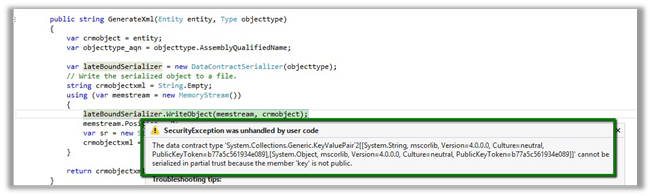
The data contract type cannot be serialized in partial trust because the member is not public while using Serialization in the sandboxed plugin in CRM 2011


Hi,

Was getting the below error while serializing the CRM Entity as mentioned here

Then gave it a try with a DataContract just to check if it works properly with it or not. It worked properly on the sandbox plugin.

Please check the below discussion for more details.

http://social.microsoft.com/Forums/en-US/d0332c9c-3cef-4b34-8c11-2b263369e21f/serializing-entity-in-sandbox-doesnt-work

Bye.

Calling WCF Rest Service from a Plugin in CRM 2011 (Online)


Let us take a simple rest service example here

http://www.rockycherry.net/services/Photos/photos.svc/photos

It returns the string “You have asked for photos”.
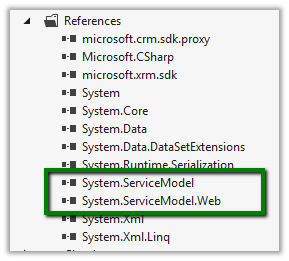
Within the plugin class add references to following assemblies.

The sample code of the plugin


namespace TestPlugin
{
 public class Class1 : IPlugin
 {
 public void Execute(IServiceProvider serviceProvider)
 {
 IPluginExecutionContext context = (IPluginExecutionContext)serviceProvider.GetService(typeof(IPluginExecutionContext));

 if (context.InputParameters.Contains("Target") && context.InputParameters["Target"] is Entity)
 {

// using WebClient
 WebClient webClient1 = new WebClient();
 string data1 = webClient1.DownloadString("http://www.rockycherry.net/services/Photos/photos.svc/photos");

// using WebChannelFactory
 WebChannelFactory<IPhotos> factory = new WebChannelFactory<IPhotos>(new Uri("http://www.rockycherry.net/services/Photos/photos.svc"));
 IPhotos proxy = factory.CreateChannel();
 string photos = proxy.GetPhotos();

 }

 }
 }

[ServiceContract]
 public interface IPhotos
 {
 [WebGet(UriTemplate = "Photos")]
 [OperationContract]
 string GetPhotos();
 }
}


Register the plugin in Sandbox mode for CRM 2011 online.

Check this wonderful post for all the details

http://rockycherry.net/blog/?p=179

Hope it helps.

“Network Error” while calling WCF Service through JavaScript.


Hi,

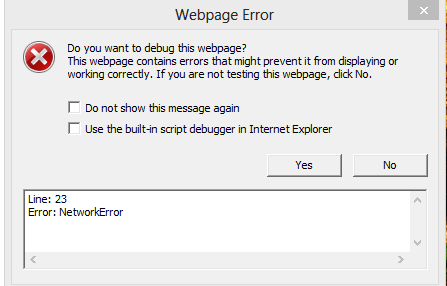
I was getting the following “Network Error” on calling WCF Service using XMLHttpRequest within an html page through JavaScript.

I was using IE 10 in a Windows 8 machine.

After some searching found out that this is a known issue.

http://bugs.jquery.com/ticket/12790

Running the same in compatibility mode worked properly.

Hope it helps.

An unsecured or incorrectly secured fault was received from the other party. See the inner FaultException for the fault code and detail.


We were getting the above error while testing one of our WCF service. On syncing the clock of our client and server machine we were able to resolve the issue.

This helped us resolve the issue

http://social.msdn.microsoft.com/Forums/eu/wcf/thread/eccf2b09-6ea1-4663-9ddf-af29901ea60a

Bye.


Using JavaScript to consume a WCF service


Suppose this is our simple WCF service which takes the name as input and returns the resulting string with Hello appended to it.

namespace HelloWorldWCFService{
[ServiceContract]
public interface IService1
{
[OperationContract]
string GetData(string name);
}
}

namespace HelloWorldWCFService{
public class Service1 : IService1 {
public string GetData(string name) {
return “Hello “ + name;

}}}
It uses BasicHttpBinding.

Now this would be our JavaScript function which can consume the above WCF service.

function MyRequest() {var xmlhttp = new XMLHttpRequest();

xmlhttp.open(‘POST’, http://localhost:64833/Service1.svc&#8217;, false);xmlhttp.setRequestHeader(‘SOAPAction’, http://tempuri.org/IService1/GetData&#8217;);

xmlhttp.setRequestHeader(‘Content-Type’, ‘text/xml’);
var data = ;

data += ‘<s:Envelope xmlns:s=”http://schemas.xmlsoap.org/soap/envelope/”>&#8217;;data += ‘ <s:Body>’;

data += ‘ <GetData xmlns=”http://tempuri.org/”>&#8217;;

data += ‘ <name>Nishant</name>’;

data += ‘ </GetData>’;

data += ‘ </s:Body>’;

data += ‘</s:Envelope>’;xmlhttp.send(data);

alert(“status = “ + xmlhttp.status);alert(“status text = “ + xmlhttp.statusText);

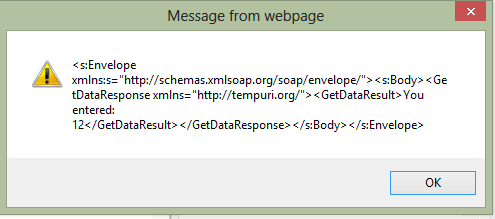
alert(xmlhttp.responseText); 

}

Here for

xmlhttp.setRequestHeader(‘SOAPAction’, http://tempuri.org/IService1/GetData&#8217;); 

We can get the value for SOAPAction from the wsdl of the WCF service. 

Open the http://localhost:64833/Service1.svc?wsdl

Search for soapAction there.

We would find soapAction value there.

<wsdl:operation name=”GetData“>  <soap:operation
soapAction=”http://tempuri.org/IService1/GetData style=”document” />
<wsdl:input>

Hope it helps !