
When working with Date and Time fields in Dataverse, one of the most confusing parts is how values are stored in the backend vs. how they are displayed to users in different time zones.
For data type – Date and Time, we can specify Format as Date Only and Date and Time, and Time zone adjustment as User Local, Time Zone Independent for (Date and Time), and Date only, User Local, Time Zone Independent for (Date Only).
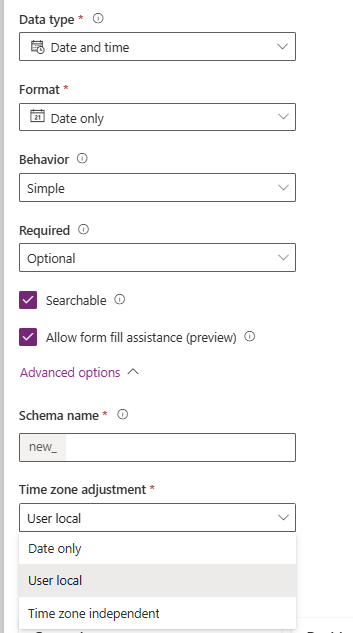
If we have specified during creation or changed the Time zone adjustment of the field to Date Only and Time Zone Independent from the user local, we cannot change it back to user local. (unless we modify the customizations.xml – more on it https://nishantrana.me/2025/08/05/fixing-date-shift-issue-after-changing-dateonly-field-from-time-zone-independent-to-user-local-dataverse-dynamics-365/ )
Below, we have created a few sample fields in Dataverse and tested their behavior.

And here’s how they are stored in the dataverse
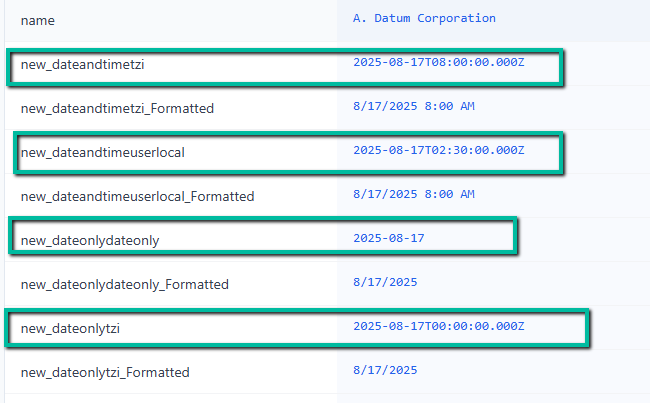
Date and Time – User Local
Stored value: 2025-08-17T02:30:00.000Z
Formatted value in UI: 8/17/2025 8:00 AM
The value is stored in UTC, but when displayed, Dataverse converts it to the current user’s time zone (in our case, IST). Suitable for Meetings, appointments, or events where the time matters and should be relative to the user’s location.
Date and Time – Time Zone Independent
Stored value: 2025-08-17T08:00:00.000Z
Formatted value in UI: 8/17/2025 8:00 AM
Even though the backend stores it as UTC, Dataverse does not adjust this value per user’s time zone. Everyone sees the same clock time. Suitable for Business deadlines, store opening/closing hours, or cutoff times that should be consistent across geographies.
Date Only – Date Only
Stored value: 2025-08-17
Formatted value in UI: 8/17/2025
Stored as a pure date, no UTC, no midnight timestamp. It’s just the calendar date. Suitable for Birthdays, anniversaries, or personal dates where time zones should never matter.
Date Only – Time Zone Independent
Stored value: 2025-08-17T00:00:00.000Z
Formatted value in UI: 8/17/202
This looks like a datetime in storage (midnight UTC), but Dataverse locks the display so all users see the same date. Contract signed dates, expiry dates, or compliance deadlines where everyone must agree on the calendar date. We might select this option if we need to add a time component in the future, want consistency for all users globally, or during integration, the external API is expecting a full date and time value.
In short –

Get all the details
Hope it helps..

 Nishant Rana's Weblog