Code to upload multiple attachments to SharePoint Folder using Client Object Model


public static void UploadDocument(
string siteURL,
string documentListName,
string documentListURL,
string documentName,
byte[] documentStream,
string folderName,
string invoiceId)
{
using (var clientContext = new ClientContext(siteURL))
{
// Get Document List
var documentsList = clientContext.Web.Lists.GetByTitle(documentListName);

// check if folder already exists else create folder

if (!FolderExists(clientContext.Web, documentListName, folderName))
{
var info = new ListItemCreationInformation();
info.UnderlyingObjectType = FileSystemObjectType.Folder;
info.LeafName = folderName.Trim();
var newItem = documentsList.AddItem(info);
newItem["Title"] = folderName;
newItem.Update();
clientContext.ExecuteQuery();
}

var fileCreationInformation = new FileCreationInformation();

// Assign to content byte[] i.e. documentStream
fileCreationInformation.Content = documentStream;

// Allow owerwrite of document
fileCreationInformation.Overwrite = true;

// Upload URL
fileCreationInformation.Url = siteURL + documentListURL + folderName + "/" + documentName;
var uploadFile = documentsList.RootFolder.Files.Add(fileCreationInformation);

// Update the metadata for a field having name "DocType"
uploadFile.ListItemAllFields["Invoice_x0020_Id"] = invoiceId;

uploadFile.ListItemAllFields.Update();
clientContext.ExecuteQuery();
}
}


public static bool FolderExists(Web web, string listTitle, string folderUrl)
{
var list = web.Lists.GetByTitle(listTitle);
var folders = list.GetItems(CamlQuery.CreateAllFoldersQuery());
web.Context.Load(list.RootFolder);
web.Context.Load(folders);
web.Context.ExecuteQuery();
var folderRelativeUrl = string.Format("/{0}/{1}", list.RootFolder.Name, folderUrl);
return Enumerable.Any(folders, folderItem => (string)folderItem["FileRef"] == folderRelativeUrl);
}

Remove web part that is causing error from a SharePoint page


Hi,

On adding a web part if in a page at times it throws error and we need to access the page and remove that web part.

To do so we need to add the following querystring to the page url

http://localhost/Pages/Home.aspx?contents=1

It will open the page and will present the list of web parts in the page from wherein we can select and delete the web part that was causing the error.

Hope it helps..

CAML Query Builder for SharePoint 2013


Hi,

Recently had to write CSOM code to fetch value of a particular list item.

The following tool made it really easy to write the CAML Query.

https://spcamlqueryhelper.codeplex.com/

Bye..

Missing Edit Web Part option in SharePoint 2013


Add the Site to Compatibility View Setting to get the page working properly in IE 11.

Use IsDateEmpty property of SharePoint DateTime Control to check for null


We were using SharePoint:DateTimeControl
in one of our Application Pages in SharePoint. The control returns current date time for SelectedDate if no date is selected.

To check for this we can use IsDateEmpty property.

Hide “Page-“ from title of SharePoint Page


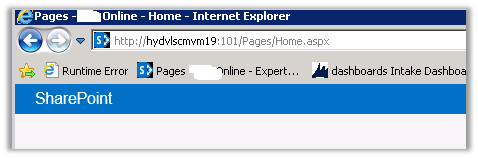
To hide the “Page -“text from the page title

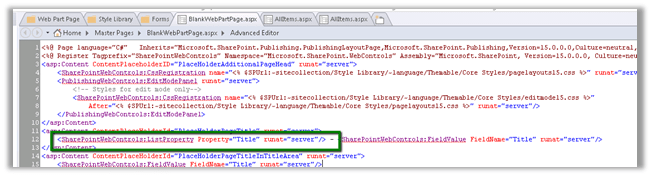
Open the BlankWebPartPage.aspx in the page designer and remove the tag highlighted in green.

http://stackoverflow.com/questions/13303764/page-layouts-not-available-in-sharepoint-designer

However, sometimes the Page Layouts link is missing. This is a common scenario:

•you have a subsite in a site collection

•the publishing feature is activated in the subsite, but not in the site collection

•you want to edit/add page layouts on the site collection level, to be used within your subsite

•when you open the site collection in SharePoint Designer, you can’t see Page Layouts in the Site Objects panel You now have 2 options: you can either activate the publishing feature in the site collection (and the Page Layouts link comes back), or you can use the All Files link and browse to the master pages and page layouts library (_catalogs > masterpage.) Either option will do, unless you really don’t want the publishing feature in the site collection