Things to consider while using getServerUrl() in CRM 2011


Hi,

We recently faced an issue after we configured our CRM 2011 site for SSL\HTTPS.

While using context.getServerUrl() method in our web resources we were getting the url value having http instead of https. And the other issue that we regularly faced was the Access Denied one if we access our CRM server either through localhost or through IP address.

These two wonderful posts talk about how to deal with these issues

http://social.microsoft.com/Forums/is/crmdeployment/thread/dc35f48d-f528-44ee-91b5-73b6c42e6217

http://myencounterwithcrm.wordpress.com/2011/05/24/crm-2011-alternative-to-context-getserverurl/

getServerUrl() method returns  the url according to the configured values in the Deployment Manager, not based on the url you have used to navigate to the page

and using

var customServerURL = document.location.protocol + “//” + document.location.host +“/” + Xrm.Page.context.getOrgUniqueName();

Update : It works for on premise scenario only

Check this most helpful post on how to get the server url

http://danielcai.blogspot.com/2012/02/get-right-server-url-in-your-crm-client.html

Hope it helps

Issues while setting value for the field in Header of the form in CRM 2011


Hi,

We recently had a requirement to show in header of one of the form, the value from its related entity. So we thought that we will create a new custom field, move it to the header and populate it’s value using JScript in the onload event.

However as we were writing the JScript we realized that the field that is in the header of the form is not accesible using Xrm.Page.data.entity.attribute.

So the next thought was to add that field in the body of the form as well.

http://community.dynamics.com/product/crm/crmtechnical/b/crmcustomereffective/archive/2011/08/22/crm-2011-ability-to-add-the-same-field-to-the-form-more-than-once-and-javascript-challenges.aspx

So now we had that field in header as well as in the body. Now when we were setting the value of the field that was in the body, it was getting set properly as expected. But that value was not getting reflected in the same field in the header till we save the form.

We finally used document.getElementById to set the value for the field in the header.

Hope it helps.

Useful tool for Exporting all the JavaScripts in CRM 2011


Hi,

I have been regularly using the following tool developed by Tanguy for exporting the JScript web resources. The tool is extremely intuitive and helpful. Just thought of sharing it.

http://mscrmtools.blogspot.com/2011/06/new-tool-javascript-web-resource.html

Bye.

Sample Code to use ReportExecution2005.asmx to generate PDF in CRM 2011.


Hi,

Just sharing a sample code that uses ReportExecution2005 web service of SSRS 2008, and generates pdf of one of the custom reports deployed in CRM.

Here we are also passing value to one of the report parameter.

<br />
 // Add web reference to following service<br />
 // http://server/reportserver/ReportExecution2005.asmx</p>
<p>ReportExecutionService rs = new ReportExecutionService();<br />
 rs.Credentials = System.Net.CredentialCache.DefaultCredentials;</p>
<p>// Render arguments<br />
 byte[] result = null;<br />
 // Get the report path from the report server<br />
 // http://reportserver/Reports/Pages/Folder.aspx?ViewMode=Detail</p>
<p>string reportPath = "/MyOrg_MSCRM/CustomReports/{837a8e7e-d949-e111-996a-00155d2a49c7}";<br />
 string format = "PDF";<br />
 string historyID = null;</p>
<p>string encoding;<br />
 string mimeType;<br />
 string extension;<br />
 Warning[] warnings = null;<br />
 string[] streamIDs = null;</p>
<p> ExecutionHeader execHeader = new ExecutionHeader();<br />
 rs.ExecutionHeaderValue = execHeader;<br />
 rs.LoadReport(reportPath, historyID);</p>
<p>// Set DataSource Credentials<br />
 // the user name is your userid and the password is the id of the organization<br />
 // get more info here<br />
 // http://ronaldlemmen.blogspot.com/2009/01/log-in-name-and-password-required-by.html<br />
 DataSourceCredentials datasetCredential = new DataSourceCredentials();<br />
 datasetCredential.DataSourceName = "DataSource1";<br />
 datasetCredential.UserName = "F45D4E20-44DE-E011-8A08-005056860004";<br />
 datasetCredential.Password = "D0E60C19-44DE-E011-8A08-005056860004";</p>
<p>// Set Report Parameter values<br />
 ParameterValue[] myPVArray = new ParameterValue[1];<br />
 ParameterValue myPV = new ParameterValue();<br />
 myPV.Name = "ReportParameter1";<br />
 myPV.Value = "True";<br />
 myPVArray[0] = myPV;</p>
<p>rs.SetExecutionParameters(myPVArray, "en-us");</p>
<p> DataSourceCredentials[] credentials = new DataSourceCredentials[1];<br />
 credentials[0] = datasetCredential;<br />
 rs.SetExecutionCredentials(credentials);</p>
<p>result = rs.Render(format, null, out extension, out encoding, out mimeType, out warnings, out streamIDs);</p>
<p>Response.Clear();<br />
 MemoryStream ms = new MemoryStream(result);<br />
 Response.ContentType = "application/pdf";<br />
 Response.AddHeader("content-disposition", "attachment;filename=labtest.pdf");<br />
 Response.Buffer = true;<br />
 ms.WriteTo(Response.OutputStream);<br />
 Response.End();<br />
 

Bye.

Advertisements

Cleared MB2-876 Extending Microsoft Dynamics CRM 2011 exam.


Hi,

Today i got a chance to take the extension exam and was able to clear it. There were 48 questions with passing marks of 700 and 145 minutes to answer them.

The question were mostly straightforward, very few questions were there which were scenario based. It was fairly easy exam when compared to other CRM 2011 exam.

Bye.

Hiding and shrinking the width of the Column in SSRS 2008


Hi,

 We recently had a requirement wherein we were hiding few columns of our SSRS report dynamically based on value of a parameter.

The problem was that the hidden column although not visible was still consuming the space.

To solve this issue

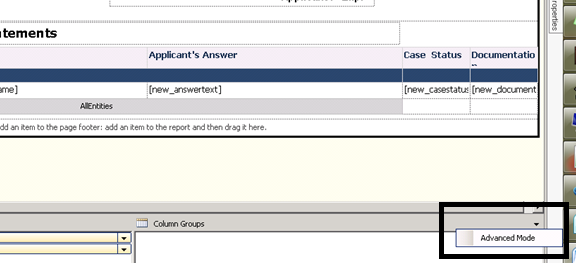
  • Select Advanced Mode in the report Column Groups


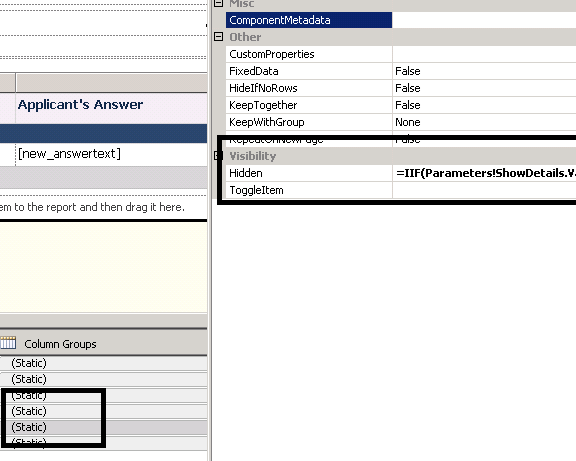
  • Select the static column referring to the column we want to hide and set its Hidden property


The helpful post

http://blogs.msdn.com/b/robertbruckner/archive/2010/05/02/report-design-shrinking-hidden-static-columns.aspx

Bye.