Hi,
Had a requirement to split a List in 3 smaller lists.
For e.g. if a list has 13 different elements.
It has to split into 3 list containing 5, 5 and 3 elements in it.
The helpful post
Hope it helps !
Advertisements

Hi,
Had a requirement to split a List in 3 smaller lists.
For e.g. if a list has 13 different elements.
It has to split into 3 list containing 5, 5 and 3 elements in it.
The helpful post
Hope it helps !

Just sharing a sample code to remove duplicates from a list using LINQ
public class MyClass
{
public string ID { get; set; }
public string Value { get; set; }

}

List<MyClass> myList = new List<MyClass>();
var xrmOptionSet = new MyClass();
xrmOptionSet.ID = "1";
xrmOptionSet.Value = "100";
var xrmOptionSet1 = new MyClass();
xrmOptionSet1.ID = "2";
xrmOptionSet1.Value = "200";
var xrmOptionSet2 = new MyClass();
xrmOptionSet2.ID = "1";
xrmOptionSet2.Value = "100";
myList.Add(xrmOptionSet);
myList.Add(xrmOptionSet1);
myList.Add(xrmOptionSet2);

// here we are first grouping the result by label and then picking the first item from each group
var myDistinctList = myList.GroupBy(i => i.ID)
.Select(g => g.First()).ToList();
Hope it helps..
Load your programming emulators on the cloud & access it conveniently on virtual desktops with your preferred mobile device (iOS/Android/windows) remotely with CloudDesktopOnline.com. For effective team collaboration use a hosted SharePoint and exchange from Apps4Rent.

Hi,
Suppose this is our InfoPath form
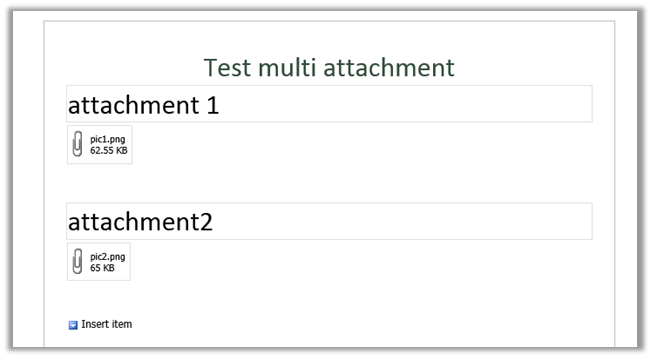
First we will generate the class for the above InfoPath form
https://nishantrana.me/2014/07/13/generate-a-c-class-from-an-infopath-form/
The sample code
myFields invoice = null;
WebClient webclient = new WebClient();
webclient.UseDefaultCredentials = true;

using (Stream fileStream = webclient.OpenRead("http://server:5000/formlibrary/FirstForm.xml?NoRedirect=true"))
{
if (fileStream != null)
{
XmlTextReader reader = new XmlTextReader(fileStream);

reader.Read();
reader.MoveToContent();

XmlSerializer xser = new XmlSerializer(typeof(myFields));
myFields invoiceInfopath = (myFields)xser.Deserialize(reader);
byte[] b = invoiceInfopath.field2;

// filename
int nameBufferLen = b[20] * 2;
byte[] fileNameBufffer = new Byte[nameBufferLen];

for (int i = 0; i < nameBufferLen; i++)
{
fileNameBufffer[i] = b[24 + i];
}

char[] charFileName = UnicodeEncoding.Unicode.GetChars(fileNameBufffer);
string fileName = new string(charFileName);
fileName = fileName.Substring(0, fileName.Length - 1);

// attchment
byte[] fileContent = new byte[b.Length - (24 + nameBufferLen)];

for (int i = 0; i < fileContent.Length; i++)
{
fileContent[i] = b[24 + nameBufferLen + i];
}

FileStream fs = new FileStream(@"C:\test\" + fileName, FileMode.Create);
fs.Write(fileContent, 0, fileContent.Length);
fs.Close();
}
Hope it helps.

The InfoPath form:-

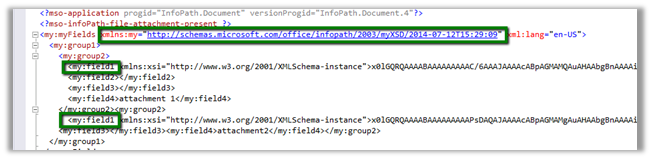
The namespace and the field1 that is node that contains the attachment
Sample Code:
XmlDocument myDoc = new XmlDocument();
myDoc.Load(@"C:\test\form.xml");

// specify the name space
XmlNamespaceManager ns = new XmlNamespaceManager(myDoc.NameTable);
ns.AddNamespace("my", "http://schemas.microsoft.com/office/infopath/2003/myXSD/2014-07-12T15:29:09");

// the node that contains the attachment
XmlNodeList nl = myDoc.SelectNodes("/my:myFields/my:group1/my:group2/my:field1", ns);
foreach (XmlNode n in nl)
{
string s = n.InnerText;
byte[] b = Convert.FromBase64String(s);
int nameBufferLen = b[20] * 2;

// file name buffer to get the filename with extension
byte[] fileNameBufffer = new Byte[nameBufferLen];

for (int i = 0; i < nameBufferLen; i++)
{
fileNameBufffer[i] = b[24 + i];
}
char[] charFileName = UnicodeEncoding.Unicode.GetChars(fileNameBufffer);
string fileName = new string(charFileName);
fileName = fileName.Substring(0, fileName.Length - 1);

// byte array for the remaining content
byte[] fileContent = new byte[b.Length - (24 + nameBufferLen)];

for (int i = 0; i < fileContent.Length; i++)
{
fileContent[i] = b[24 + nameBufferLen + i];
}

FileStream fs = new FileStream(@"C:\test\" + fileName, FileMode.Create);
fs.Write(fileContent, 0, fileContent.Length);
fs.Close();

}
Hope it helps..

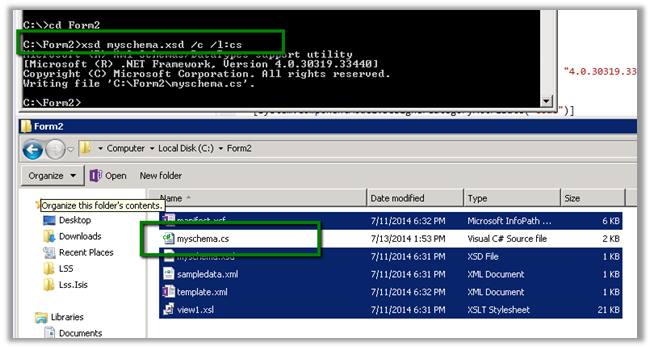
To generate a C# class from change the extension to .cab from .xsn.

Open and copy the content of cab file to a separate folder

Open the Visual Studio Developer Command Prompt and run the XSD.exe to generate the class
Hope it helps…

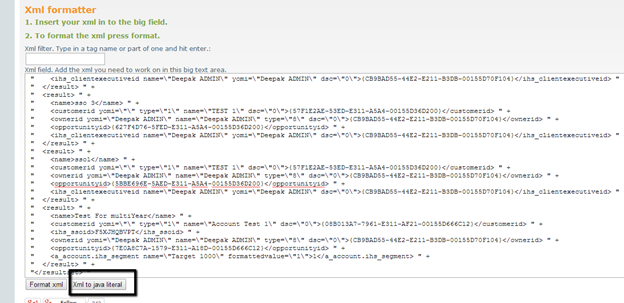
At times we need to convert the XML string to Literal. And it is not fun. While searching for online tool that could help, I found this XML Formatter tool
http://xmltoolbox.appspot.com/
Hope it helps.

 Nishant Rana's Weblog