Reactivate Case in CRM 2011


Hi,

Below the minimum rights required to Reactivate a closed or resolved Case in CRM.

Sample code to do it through code


private void Form_Load(object sender, EventArgs e)
 {
 Uri organizationUri = new Uri("http://servername/orgname/XRMServices/2011/Organization.svc");
 Uri homeRealmUri = null;
 ClientCredentials credentials = new ClientCredentials();
 credentials.Windows.ClientCredential = System.Net.CredentialCache.DefaultNetworkCredentials;
 OrganizationServiceProxy orgProxy = new OrganizationServiceProxy(organizationUri, homeRealmUri, credentials, null);
 IOrganizationService _service = (IOrganizationService)orgProxy;
 ReactivateState("incident", new Guid("caseGuid"), 0, -1, _service);
 }

public static void ReactivateState(string entityName, Guid entityGuid, int state, int status, IOrganizationService orgService)
 {
 try
 {
 SetStateRequest req = new SetStateRequest();
 req.EntityMoniker = new EntityReference(entityName, entityGuid);
 req.State = new OptionSetValue(state);
 req.Status = new OptionSetValue(status);
 orgService.Execute(req);
 }
 catch (Exception ex)
 {

 }
 }

Bye.

Things to consider while using getServerUrl() in CRM 2011


Hi,

We recently faced an issue after we configured our CRM 2011 site for SSL\HTTPS.

While using context.getServerUrl() method in our web resources we were getting the url value having http instead of https. And the other issue that we regularly faced was the Access Denied one if we access our CRM server either through localhost or through IP address.

These two wonderful posts talk about how to deal with these issues

http://social.microsoft.com/Forums/is/crmdeployment/thread/dc35f48d-f528-44ee-91b5-73b6c42e6217

http://myencounterwithcrm.wordpress.com/2011/05/24/crm-2011-alternative-to-context-getserverurl/

getServerUrl() method returns  the url according to the configured values in the Deployment Manager, not based on the url you have used to navigate to the page

and using

var customServerURL = document.location.protocol + “//” + document.location.host +“/” + Xrm.Page.context.getOrgUniqueName();

Update : It works for on premise scenario only

Check this most helpful post on how to get the server url

http://danielcai.blogspot.com/2012/02/get-right-server-url-in-your-crm-client.html

Hope it helps

Issues while setting value for the field in Header of the form in CRM 2011


Hi,

We recently had a requirement to show in header of one of the form, the value from its related entity. So we thought that we will create a new custom field, move it to the header and populate it’s value using JScript in the onload event.

However as we were writing the JScript we realized that the field that is in the header of the form is not accesible using Xrm.Page.data.entity.attribute.

So the next thought was to add that field in the body of the form as well.

http://community.dynamics.com/product/crm/crmtechnical/b/crmcustomereffective/archive/2011/08/22/crm-2011-ability-to-add-the-same-field-to-the-form-more-than-once-and-javascript-challenges.aspx

So now we had that field in header as well as in the body. Now when we were setting the value of the field that was in the body, it was getting set properly as expected. But that value was not getting reflected in the same field in the header till we save the form.

We finally used document.getElementById to set the value for the field in the header.

Hope it helps.

Useful tool for Exporting all the JavaScripts in CRM 2011


Hi,

I have been regularly using the following tool developed by Tanguy for exporting the JScript web resources. The tool is extremely intuitive and helpful. Just thought of sharing it.

http://mscrmtools.blogspot.com/2011/06/new-tool-javascript-web-resource.html

Bye.

Book Review : Pro Business Applications with Silverlight 4 by Chris Anderson


Pro Business Applications with Silverlight 4Pro Business Applications with Silverlight 4 by Chris Anderson
My rating: 5 of 5 stars

It is surely one of the best books on business application development with Silverlight.

It starts with basics of Silverlight and XAML.

Then it gradually covers the important topics like Navigation Framework, WCF RIA Services, MVVM, OOB Mode etc.

It covers almost every aspect of developing a business application.

I don’t think there is any other book that explains this topic in such great detail.

I will highly recommend this book.

View all my reviews

Parameter Value not getting passed while using SetExecutionParameters method of ReportExecutionService


I was recently working on generating pdf for a report deployed in CRM through code using ReportingExecution2005 web service.

https://nishantrana.wordpress.com/2012/01/29/sample-code-to-use-reportexecution2005-asmx-to-generate-pdf-in-crm-2011/

While writing the code, we faced a very strange issue where values for certain ReportParameters were not getting passed.

I will try to explain the scenario using a very simple report.

Suppose I have report that has 4 report parameters and I am setting values for only 3 of the parameters through code. (Note:-ReportParameter4 is set as second parameter)
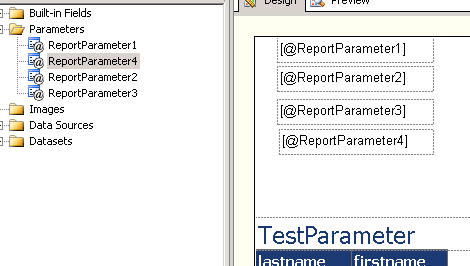
Suppose they all are Boolean parameter with default value as True.

Now I am using the following code to set their values as false.

 ParameterValue[] myPVArray = new ParameterValue[3];

ParameterValue myPV1 = new ParameterValue();
 myPV1.Name = "ReportParameter1";
 myPV1.Value = "False";
 myPVArray[0] = myPV1;

ParameterValue myPV2 = new ParameterValue();
 myPV2.Name = "ReportParameter3";
 myPV2.Value = "False";
 myPVArray[1] = myPV2;

ParameterValue myPV3 = new ParameterValue();
 myPV3.Name = "ReportParameter2";
 myPV3.Value = "False";
 myPVArray[2] = myPV3;

rs.SetExecutionParameters(myPVArray, "en-us");
 

This is the output of the pdf

i.e. the value appears properly for the ReportParameter 1 to 3 as set as false. For the report parameter 4 it comes as True (i.e. its default value as we are not setting it).

Now I go forward and make a small change instead of specifying default value for ReportParameter 4 as True, I modify it to take the value from the DataSet instead.

From

To
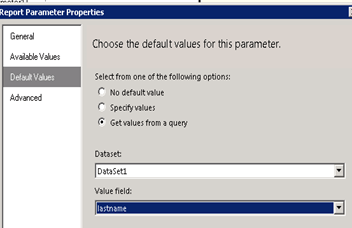
And Data Type from Boolean to Text.

Now I run the same code. This time again we would expect the value for ReportParameter 1 to 3 as False and ReportParameter4 to be whatever value there in the DataSet.

However we will get the following pdf output
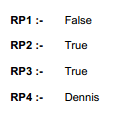

For Report Parameter 2 and 3 we see the default value (i.e. True) instead of False as we are passing through code.

The solution to this that I found was to move the reportparameter 4 as the last parameter in the report.

Currently in our report it is set as the second one.

To

The output after running the code
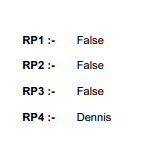
i.e. the one we were expecting.

So one thing we need to remember over here is that if we have any of our report parameter taking its value from dataset then we should make it the last parameter or should put it after all the other report parameters whose value we are passing through code.

Hope it helps.

Nishant Rana's Weblog

Everything related to Microsoft .NET Technology

Skip to content ↓