Sample code to consume UNData API in C#


Hi,

Recently we were working on an application that had to fetch country specific details. For this we used the UNData API.

http://data.un.org/Host.aspx?Content=API

We can make use of SDMX Browser in helping us to write a query

http://data.un.org/SdmxBrowser/start

Create a console app\windows application and add web reference to the following web service

http://data.un.org/WS/NSIEstatV20Service.asmx

Below is the sample C# Code


string queryMsg = @"<message:QueryMessage
xsi:schemaLocation='http://ec.europa.eu/eurostat/sri/service/2.0/SDMXMessage.xsd
http://ec.europa.eu/eurostat/sri/service/2.0/%20SDMXMessage.xsd'
xmlns:generic='http://www.SDMX.org/resources/SDMXML/schemas/v2_0/generic'
xmlns:message='http://www.SDMX.org/resources/SDMXML/schemas/v2_0/message'
xmlns:query='http://www.SDMX.org/resources/SDMXML/schemas/v2_0/query'
xmlns:xsi='http://www.w3.org/2001/XMLSchema-instance'>
<message:Header>
<message:ID>onh14833545733929527</message:ID>
<message:Test>false</message:Test>
<message:Prepared>2017-01-01</message:Prepared>
<message:Sender id='online-help'/>
</message:Header>
<message:Query>
<query:DataWhere>
<query:And>
<query:Dimension id='INDICATOR'>SP_POP_TOTL</query:Dimension>
<query:Dimension id='AGE'>_T</query:Dimension>
<query:Dimension id='SEX'>_T</query:Dimension>
<query:Dimension id='LOCATION'>_T</query:Dimension>
<query:Dimension id='REF_AREA'>IND</query:Dimension>
<query:Time>
<query:StartTime>2014-01-02</query:StartTime>
<query:EndTime>2017-01-02</query:EndTime>
</query:Time>
<query:Dataflow>DF_UNDATA_WPP</query:Dataflow>
</query:And>
</query:DataWhere>
</message:Query>
</message:QueryMessage>";
NSIEstatV20Service service = new NSIEstatV20Service();
System.Xml.XmlDocument queryMessageDocument = new XmlDocument();
queryMessageDocument.LoadXml(queryMsg);
System.Xml.XmlNode queryMessage = queryMessageDocument.DocumentElement;
var result = service.GetCompactData(queryMessage);
MessageBox.Show(result.InnerXml);

The output

The query here basically returns the Total population of India

Hope it helps..

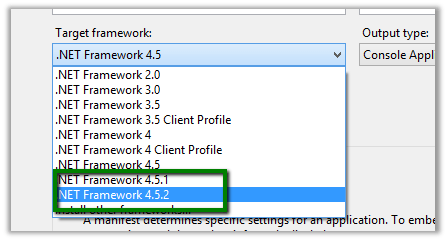
.NET Framework 4.5.2 missing in Visual Studio 2013.


Hi even after installing .NET Framework 4.5.2, it was missing from Visual Studio 2013’s Target framework.

Had to download and install it from the following location

http://www.microsoft.com/en-us/download/details.aspx?id=42637

Hope it helps..

Dll not getting copied to bin directory in Visual Studio


Hi,

In one of our projects we were referencing custom assemblies that were part of the same solution. However those assemblies were not getting copied to the bin directory of the project upon building the project.

We had also set property Copy Local as true for those class library projects.

The reason for this was as we were adding those assemblies in GAC.

VS.NET will copy the dll to the bin directory if your system cannot find the dll in the GAC.”

After removing those assemblies from GAC it added those dlls in the bin.

The helpful thread

http://stackoverflow.com/questions/3548731/visual-studio-2010-add-reference-is-copying-dll-to-bin-directory

Hope it helps..

Serialize and Deserialize InfoPath form and extract the attachment using WebClient in C#


Hi,

Suppose this is our InfoPath form

First we will generate the class for the above InfoPath form

https://nishantrana.me/2014/07/13/generate-a-c-class-from-an-infopath-form/

The sample code


myFields invoice = null;
WebClient webclient = new WebClient();
webclient.UseDefaultCredentials = true;

using (Stream fileStream = webclient.OpenRead("http://server:5000/formlibrary/FirstForm.xml?NoRedirect=true"))
{
if (fileStream != null)
{
XmlTextReader reader = new XmlTextReader(fileStream);

reader.Read();
reader.MoveToContent();

XmlSerializer xser = new XmlSerializer(typeof(myFields));
myFields invoiceInfopath = (myFields)xser.Deserialize(reader);
byte[] b = invoiceInfopath.field2;

// filename
int nameBufferLen = b[20] * 2;
byte[] fileNameBufffer = new Byte[nameBufferLen];

for (int i = 0; i < nameBufferLen; i++)
{
fileNameBufffer[i] = b[24 + i];
}

char[] charFileName = UnicodeEncoding.Unicode.GetChars(fileNameBufffer);
string fileName = new string(charFileName);
fileName = fileName.Substring(0, fileName.Length - 1);

// attchment
byte[] fileContent = new byte[b.Length - (24 + nameBufferLen)];

for (int i = 0; i < fileContent.Length; i++)
{
fileContent[i] = b[24 + nameBufferLen + i];
}

FileStream fs = new FileStream(@"C:\test\" + fileName, FileMode.Create);
fs.Write(fileContent, 0, fileContent.Length);
fs.Close();
}

Hope it helps.

How to Read the InfoPath content and extract the attachment using XMLDocument in C#


The InfoPath form:-

The namespace and the field1 that is node that contains the attachment

Sample Code:


XmlDocument myDoc = new XmlDocument();
myDoc.Load(@"C:\test\form.xml");

// specify the name space
XmlNamespaceManager ns = new XmlNamespaceManager(myDoc.NameTable);
ns.AddNamespace("my", "http://schemas.microsoft.com/office/infopath/2003/myXSD/2014-07-12T15:29:09");

// the node that contains the attachment
XmlNodeList nl = myDoc.SelectNodes("/my:myFields/my:group1/my:group2/my:field1", ns);
foreach (XmlNode n in nl)
{
string s = n.InnerText;
byte[] b = Convert.FromBase64String(s);
int nameBufferLen = b[20] * 2;

// file name buffer to get the filename with extension
byte[] fileNameBufffer = new Byte[nameBufferLen];

for (int i = 0; i < nameBufferLen; i++)
{
fileNameBufffer[i] = b[24 + i];
}
char[] charFileName = UnicodeEncoding.Unicode.GetChars(fileNameBufffer);
string fileName = new string(charFileName);
fileName = fileName.Substring(0, fileName.Length - 1);

// byte array for the remaining content
byte[] fileContent = new byte[b.Length - (24 + nameBufferLen)];

for (int i = 0; i < fileContent.Length; i++)
{
fileContent[i] = b[24 + nameBufferLen + i];
}

FileStream fs = new FileStream(@"C:\test\" + fileName, FileMode.Create);
fs.Write(fileContent, 0, fileContent.Length);
fs.Close();

}

Hope it helps..


Generate a C# class from an InfoPath form


To generate a C# class from change the extension to .cab from .xsn.

Open and copy the content of cab file to a separate folder

Open the Visual Studio Developer Command Prompt and run the XSD.exe to generate the class


Hope it helps…