Sample code to connect Office 365 users to CRM 2011 online


Sharing a sample code that can be used to connect to CRM 2011 online with Office 365.

// Add refereneces to the following dll
 // microsoft.crm.sdk.proxy
 // microsoft.xrm.sdk
 // system.runtime.serialization
 // system.servicemodel

IServiceManagement<IOrganizationService> orgServiceManagement =
 ServiceConfigurationFactory.CreateManagement<IOrganizationService>(new Uri("https://democrm.api.crm5.dynamics.com/XRMServices/2011/Organization.svc"));

AuthenticationCredentials authCredentials = new AuthenticationCredentials();
authCredentials.ClientCredentials.UserName.UserName = _userName;
authCredentials.ClientCredentials.UserName.Password = _password;
AuthenticationCredentials tokenCredentials = orgServiceManagement.Authenticate(authCredentials);

OrganizationServiceProxy organizationProxy = new OrganizationServiceProxy(orgServiceManagement, tokenCredentials.SecurityTokenResponse);
Guid userid = ((WhoAmIResponse)organizationProxy.Execute(new WhoAmIRequest())).UserId;

Sample Code – Dynamics 365 Web API / Organization Service

Bye.

Advertisements

FaultException was unhandled ‘organizationName’ while using DiscoveryService in CRM 2011


Hi,

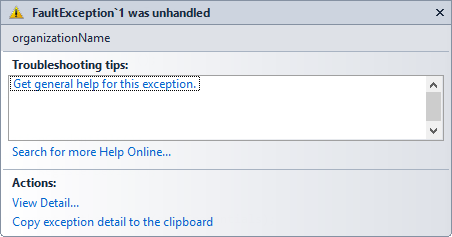
I was getting the below error while using DiscoveryService

The reason was I was unknowingly using RetrieveOrganizationRequest class instead of RetrieveOrganization(s)Request class.

http://social.microsoft.com/Forums/is/crmdevelopment/thread/d5d00302-8f7b-4efc-873b-c54b3e29749d

Hope it helps.

KB2600640 is not installed on this computer in CRM 2011


Hi,

Recently got this error while installing a new rollup version for CRM 2011.

Basically it talks about installing the Update Rollup 6.

http://support.microsoft.com/kb/2600640?wa=wsignin1.0

http://www.microsoft.com/en-us/download/details.aspx?id=28712

Bye.

Unable to browse Active Directory Object error while installing CRM 2011


Hi,

Got the above error while trying to install Microsoft Dynamics CRM 2011. The error was because the  Windows Server 2008 on which we were trying to install was not running as domain controller.

Running the Active Directory Domain Services Installation Wizard (dcpromo.exe) resolved the issue for us.

Check out this informative video

http://www.youtube.com/watch?v=MK8pkoDs96M

Bye.


Using RetrieveEntityRibbonRequest to get the ribbon definition of an Entity


Hi,

Recently I was assigned a task to find out programmatically if a particular button is already defined on an entity or not. For this we can make use RetrieveEntityRibbonRequest class.

Sample C# Code


// Initialize RetrieveEntityRibbonRequest
RetrieveEntityRibbonRequest ribbonReq = new RetrieveEntityRibbonRequest();

// RibbonLocationFilters

// All - Retrieve all Ribbons. Equivalent to Default. Value = 7.
// Default - Retrieve all Ribbons. Equivalent to All. Value = 7.
// Form - Retrieve just the form ribbon. Value = 1.
// HomepageGrid -  Retrieve just the ribbon displayed for entity grids. Value = 2.
// SubGrid -  Retrieve just the ribbon displayed when the entity is displayed in a subgrid or associated view. Value = 4.
// if not specified it returns only the definition
ribbonReq.RibbonLocationFilter = RibbonLocationFilters.All;

// specify the entity schema name
ribbonReq.EntityName = currentEntityName;
RetrieveEntityRibbonResponse ribbonRes = (RetrieveEntityRibbonResponse)_serviceProxy.Execute(ribbonReq);
Byte[] bytes = unzipRibbon(ribbonRes.CompressedEntityXml);
string ribbonDiffString = System.Text.Encoding.GetEncoding("utf-8").GetString(bytes);
if (ribbonDiffString.Contains("RibbonButtonID"))
{
// logic
}

public byte[] unzipRibbon(byte[] data)
{
System.IO.Packaging.ZipPackage package = null;
MemoryStream memStream = null;
memStream = new MemoryStream();
memStream.Write(data, 0, data.Length);
package = (ZipPackage)ZipPackage.Open(memStream, FileMode.Open);
ZipPackagePart part = (ZipPackagePart)package.GetPart(new Uri("/RibbonXml.xml", UriKind.Relative));
using (Stream strm = part.GetStream())
{
long len = strm.Length;
byte[] buff = new byte[len];
strm.Read(buff, 0, (int)len);
return buff;
}
}

Bye.

A managed solution cannot overwrite a Saved Query component on the target system that has unmanaged base instance error while importing a managed solution in CRM 2011


Hi,

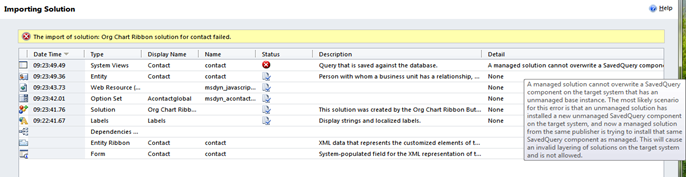
While trying to import a managed solution I was getting the below error.

The reason being the SavedQuery component created by the Activity Feeds Solution in source and target environment has the same id. And it is unmanaged component in the target environment and the managed solution that we were trying to import has the same component as managed.

http://social.microsoft.com/Forums/br/crm/thread/83f66edd-0ec3-45f0-bc82-b63122d1ff7f

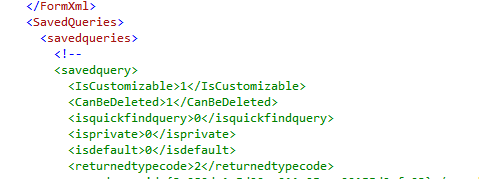
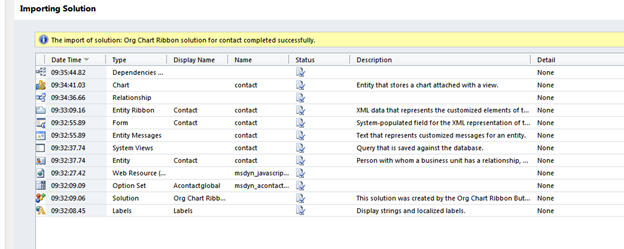
Commenting out all the savedquery from the customizations.xml and importing the solution back solved the issue

Hope it helps.