
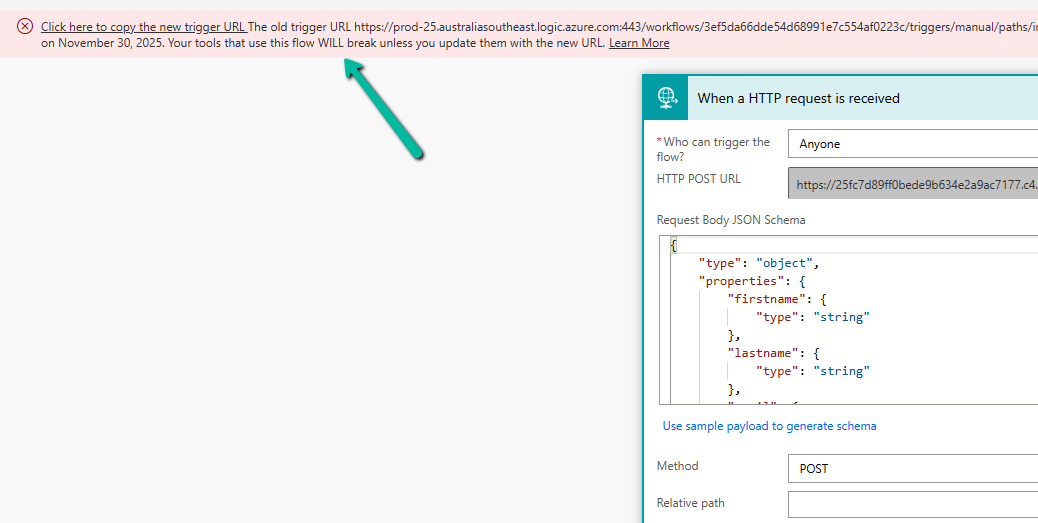
Few weeks back, while working on one of our Power Automate flows, we noticed a banner warning on the HTTP Request trigger step. Microsoft has announced that starting August 2025, all flows using HTTP or Teams Webhook triggers with logic.azure.com URLs will move to a new endpoint under environment.api.powerplatform.com. The old URLs will stop working after November 30, 2025.
The screenshot below shows the banner that appears when the flow is opened in the designer.
When we saw this, we wanted to make sure no other flow across environments was using the old logic.azure.com–based URLs. Instead of checking each flow manually, we used SQL4CDS to quickly identify all such flows.
We ran the following query in SQL4CDS:
SELECT wf.name, wf.workflowid, wf.owneridname, wf.modifiedon
FROM workflow wf
WHERE wf.category = 5
AND LOWER(wf.clientdata) LIKE '%"type":"request","kind":"http"%'
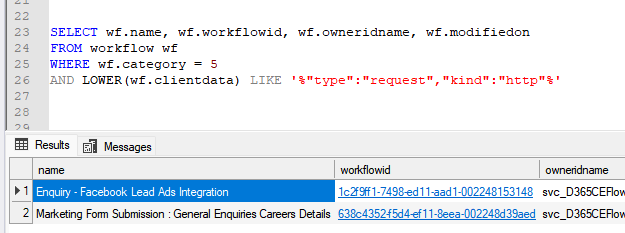
This query returns all flows that have an HTTP Request trigger. It checks the clientdata column in the workflow table where the flow definition is stored as JSON and looks for the trigger type “Request” and kind “Http”.
This helped us identify every flow that exposes an HTTP endpoint — typically used for integrations, webhooks, or form submissions from external systems. Once we had this list, we opened each flow and copied the new trigger URL from the message banner.
The same can be achieved using PowerShell with the command: This lists all flows in a given environment that are part of Microsoft’s trigger URL migration.
Get-AdminFlowWithMigratingTriggerUrl -EnvironmentName

After copying the new URL, we updated our calling applications (for example, the website forms and marketing integrations) to replace the old endpoint with the new one. The new URLs are hosted under the Power Platform domain environment.api.powerplatform.com, replacing the older logic.azure.com endpoints.
To confirm that the requests were now reaching the new infrastructure, we captured the request headers after updating the URL.
This header (x-ms-igw-external-uri) is the easiest and most reliable way to confirm that your flow is now routed through the new Power Platform ingress gateway.
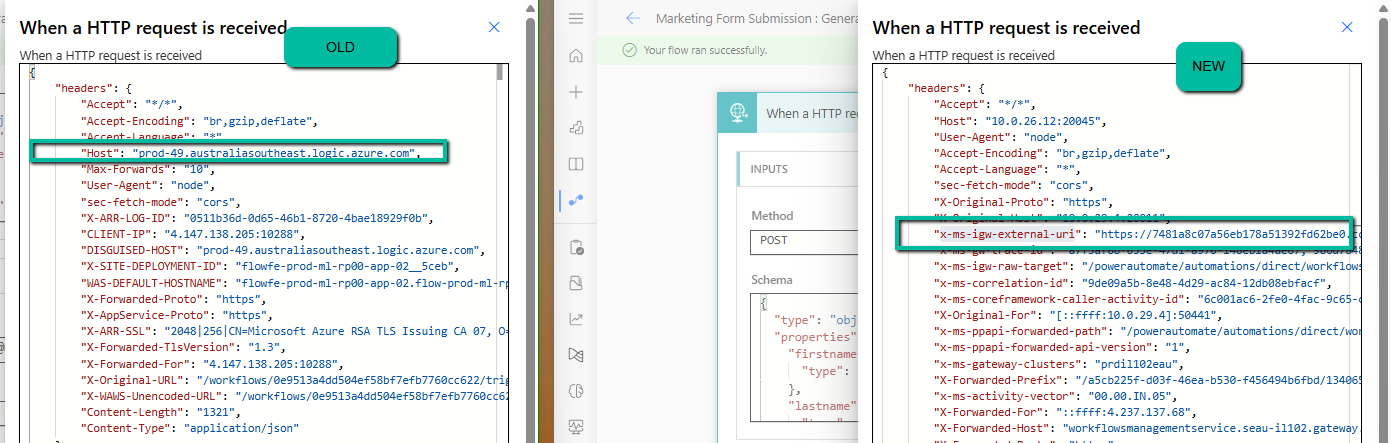
If this header is present and points to environment.api.powerplatform.com, the flow has been successfully migrated. If you still see logic.azure.com under the Host or DISGUISED-HOST headers, that flow or calling application still needs to be updated.
In our case, after replacing the URLs and testing, all flows were confirmed to be running on the new platform, and the integrations worked as expected.
So if we see this warning in your environment, you can either use the SQL4CDS query or the PowerShell command to locate such flows, update the calling systems with the new URL, and then verify by checking for the x-ms-igw-external-uri header in the request. That’s all you need to ensure your integrations continue to work smoothly past November 2025.
Hope it helps..
Discover more from Nishant Rana's Weblog
Subscribe to get the latest posts sent to your email.
Share It -


One thought on “How to Identify and Update Power Automate HTTP Request Trigger Flows Before November 2025”