
Hi I was facing the issue that has been mentioned in this thread
The view selector menu was not showing up on the custom web part page.
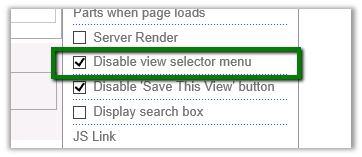
The way we got it working was to extend the XSLTListViewWebPart and set that property though code.
public partial class VisualWebPart1 : System.Web.UI.WebControls.WebParts.WebPart
 {
 // Uncomment the following SecurityPermission attribute only when doing Performance Profiling using
 // the Instrumentation method, and then remove the SecurityPermission attribute when the code is ready
 // for production. Because the SecurityPermission attribute bypasses the security check for callers of
 // your constructor, it's not recommended for production purposes.
 // [System.Security.Permissions.SecurityPermission(System.Security.Permissions.SecurityAction.Assert, UnmanagedCode = true)]
 public VisualWebPart1()
 {
 }

protected override void OnInit(EventArgs e)
 {
 base.OnInit(e);
 InitializeControl();
 }
 private Microsoft.SharePoint.WebPartPages.XsltListViewWebPart myListView;

protected override void CreateChildControls()
 {
 base.CreateChildControls();
 SPSite oSiteCollection = SPContext.Current.Site;
 string listName = "Notification Centre";
 SPWeb oWebSite = SPContext.Current.Web;
 myListView = new Microsoft.SharePoint.WebPartPages.XsltListViewWebPart();
 myListView.Visible = true;
 myListView.EnableViewState = true;
 SPList list = oWebSite.Lists[listName];

myListView.ListName = list.ID.ToString("B").ToUpperInvariant();
 myListView.TitleUrl = list.DefaultViewUrl;
 myListView.WebId = list.ParentWeb.ID;

myListView.ListId = (System.Guid)list.ID;
 myListView.ViewGuid = list.DefaultView.ID.ToString("B").ToUpperInvariant();

myListView.HelpMode = WebPartHelpMode.Modeless;

myListView.DisableViewSelectorMenu = false;
 myListView.InplaceSearchEnabled = true;

myListView.AllowEdit = true;

Controls.Add(myListView);
 }

protected void Page_Load(object sender, EventArgs e)
 {
 }
 }
Hope it helps
Discover more from Nishant Rana's Weblog
Subscribe to get the latest posts sent to your email.
Share It -


 Nishant Rana's Weblog