
We recently had a requirement to implement Mark As Read, Unread and Delete feature for the list items selected in the list.
User will select the list items record and can perform the required operation by selecting appropriate button.
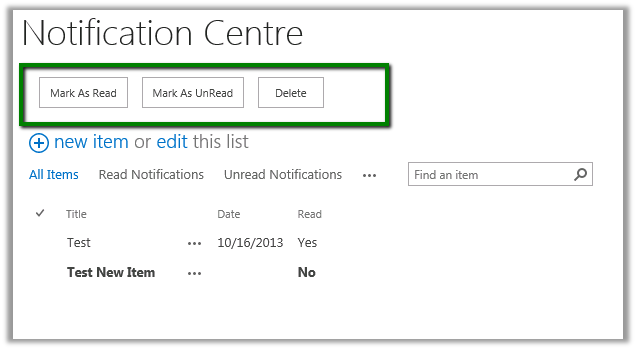
For this we added a content editor web part having the following content
<div>
<input type="button" value="Mark As Read" onclick="javascript:MarkRead();" />
<input type="button" value="Mark As UnRead" onclick="javascript:MarkUnRead();" />
<input type="button" value="Delete" onclick="javascript:Delete();" />
</div>
<script language='javascript' type='text/javascript'>
var items;
var ctx;
var count;
var web;
var totalCount = 0;
function Delete() {
debugger;
ctx = SP.ClientContext.get_current();
web = ctx.get_web();
var currentlibGuid = SP.ListOperation.Selection.getSelectedList();
if (currentlibGuid == null) {
alert('Please select an item in the list!');
return;
}
var currentLib = web.get_lists().getById(currentlibGuid);
items = SP.ListOperation.Selection.getSelectedItems(ctx);
//Get Selected Items count
count = CountDictionary(items);
for (var i in items) {
var currentItem = currentLib.getItemById(items[i].id);
ctx.load(currentItem);
currentItem.deleteObject();
ctx.executeQueryAsync(
Function.createDelegate(this, this.Succeeded),
Function.createDelegate(this, this.onQueryFailed)
);
}
}
function MarkUnRead() {
ctx = SP.ClientContext.get_current();
web = ctx.get_web();
var currentlibGuid = SP.ListOperation.Selection.getSelectedList();
if (currentlibGuid == null) {
alert('Please select an item in the list!');
return;
}
var currentLib = web.get_lists().getById(currentlibGuid);
items = SP.ListOperation.Selection.getSelectedItems(ctx);
//Get Selected Items count
count = CountDictionary(items);
for (var i in items) {
var currentItem = currentLib.getItemById(items[i].id);
ctx.load(currentItem);
currentItem.set_item('MarkAsRead', false);
currentItem.update();
ctx.executeQueryAsync(
Function.createDelegate(this, this.Succeeded),
Function.createDelegate(this, this.onQueryFailed)
);
}
}
function MarkRead() {
ctx = SP.ClientContext.get_current();
web = ctx.get_web();
var currentlibGuid = SP.ListOperation.Selection.getSelectedList();
if (currentlibGuid == null) {
alert('Please select an item in the list!');
return;
}
var currentLib = web.get_lists().getById(currentlibGuid);
items = SP.ListOperation.Selection.getSelectedItems(ctx);
//Get Selected Items count
count = CountDictionary(items);
for (var i in items) {
var currentItem = currentLib.getItemById(items[i].id);
ctx.load(currentItem);
currentItem.set_item('MarkAsRead', true);
currentItem.update();
ctx.executeQueryAsync(
Function.createDelegate(this, this.Succeeded),
Function.createDelegate(this, this.onQueryFailed)
);
}
}
function onQueryFailed(sender, args) {
totalCount = totalCount + 1;
if (totalCount == count) {
location.reload();
}
alert('Request failed. ' + args.get_message() +
'\n' + args.get_stackTrace());
}
function Succeeded() {
totalCount = totalCount + 1;
if (totalCount == count) {
location.reload();
}
}
</script>
Was helped by a good friend of mine and colleague Priyanka, a SharePoint expert. You can check her insightful posts at her MSDN Blog
http://blogs.msdn.com/b/mind_talks/
Hope it helps
Discover more from Nishant Rana's Weblog
Subscribe to get the latest posts sent to your email.
Share It -


 Nishant Rana's Weblog
Hi, and thank you for this. I know this is an older post, but it is the only one together with another one from the same author. But I can’t seem to get it to work. I get the buttons but it doesn’t change the marking for read or unread – I allready made the column.
LikeLike