
For import to work we will first define our WCF Service.
We could refer to this post first on how to define and use the WCF Service.
Here as we are not going to perform update, delete or create operation we don’t have to implement those methods.
Here we would be defining only Read Item, Read List and IdEnumerator Operation of BCS.
IdEnumerator method enables external data search in SharePoint and will be used while defining new profile synchronization connection.
For our scenario we have created a custom entity named Lawyer in our CRM System. These Lawyers are SharePoint user (AD User)
[ServiceContract]
 public interface IWCFLawyer
 {

[OperationContract]
 string[] GetLawyerLoginIDs();

[OperationContract]
 IEnumerable<WCFCustomType> ReadList();

[OperationContract]
 WCFCustomType ReadItem(String lawyerLoginID);

 }


 [DataContract]
 public class WCFCustomType
 {
 String lawyerLoginID;
 string practiceDetail;
 DateTime lawyerAvailability;

[DataMember]
 public String LawyerLoginID
 {
 get { return lawyerLoginID; }
 set { lawyerLoginID = value; }
 }

[DataMember]
 public string PracticeDetail
 {
 get { return practiceDetail; }
 set { practiceDetail = value; }
 }

[DataMember]
 public DateTime LawyerAvailability
 {
 get { return lawyerAvailability; }
 set { lawyerAvailability = value; }
 }
 }


public class WCFLawyer : IWCFLawyer
 {
 private IOrganizationService orgService = GetOrganizationService();
 public IEnumerable<WCFCustomType> ReadList()
 {
 try
 {
 QueryExpression queryExpression = new QueryExpression("new_lawyer");
 ConditionExpression conditionExpression = new ConditionExpression("statuscode", ConditionOperator.Equal, 1);
 queryExpression.ColumnSet = new ColumnSet(new String[] { "new_name","new_lawyerid", "new_practicedetail", "new_nextavailability" });
 EntityCollection contactCollection = orgService.RetrieveMultiple(queryExpression);
 List<WCFCustomType> lstLawyerType = new List<WCFCustomType>();
 WCFCustomType lawyerRecord;
 foreach (Entity entity in contactCollection.Entities)
 {
 lawyerRecord = new WCFCustomType();
 lawyerRecord.LawyerLoginID = entity.Attributes["new_name"].ToString();
 if (entity.Contains("new_practicedetail"))
 {
 lawyerRecord.PracticeDetail = entity.Attributes["new_practicedetail"].ToString();
 }
 if (entity.Contains("new_nextavailability"))
 {
 lawyerRecord.LawyerAvailability =(DateTime)entity.Attributes["new_nextavailability"];
 }

lstLawyerType.Add(lawyerRecord);
 }

return lstLawyerType;


 }
 catch (Exception generalException)
 {
 throw new RuntimeException(
 "There was a problem reading lawyer data.",
 generalException);
 }
 }
 public WCFCustomType ReadItem(string lawyerID)
 {
 try
 {
 // get the lawyer record's guid based on lawyer login id
 QueryExpression queryExpression = new QueryExpression("new_lawyer");
 ConditionExpression conditionExpression = new ConditionExpression("new_name", ConditionOperator.Equal, lawyerID);
 queryExpression.Criteria.AddCondition(conditionExpression);
 queryExpression.ColumnSet = new ColumnSet(new String[] { "new_name", "new_lawyerid" });
 EntityCollection contactCollection = orgService.RetrieveMultiple(queryExpression);
 Guid lawyerGuid = Guid.Empty;
 if (contactCollection.Entities.Count > 0)
 {
 Entity lawyerEntity = contactCollection.Entities[0];
 lawyerGuid = new Guid(lawyerEntity.Attributes["new_lawyerid"].ToString());
 }


 ColumnSet cols= new ColumnSet(new String[] { "new_name","new_lawyerid", "new_practicedetail", "new_nextavailability" });
 WCFCustomType lawyerRecord = null;
 Entity entity = orgService.Retrieve("new_lawyer", lawyerGuid, cols);
 if (entity != null)
 {
 lawyerRecord = new WCFCustomType();
 lawyerRecord.LawyerLoginID = entity.Attributes["new_name"].ToString();
 if (entity.Contains("new_practicedetail"))
 {
 lawyerRecord.PracticeDetail = entity.Attributes["new_practicedetail"].ToString();
 }
 if (entity.Contains("new_nextavailability"))
 {
 lawyerRecord.LawyerAvailability = (DateTime)entity.Attributes["new_nextavailability"];
 }

 }

return lawyerRecord;


 }
 catch (InvalidOperationException)
 {
 throw new ObjectNotFoundException(
 "Unable to read data for the lawyer with ID = " +
 lawyerID.ToString() +
 ". The lawyer no longer exists.");
 }
 catch (Exception generalException)
 {
 throw new RuntimeException(
 "There was a problem reading lawyer data.",
 generalException);
 }
 }

 public String[] GetLawyerLoginIDs()
 {

string[] lawyerIDs;

try
 {
 QueryExpression queryExpression = new QueryExpression("new_lawyer");
 ConditionExpression conditionExpression = new ConditionExpression("statuscode", ConditionOperator.Equal, 1);
 queryExpression.ColumnSet = new ColumnSet(new String[] { "new_lawyerid","new_name", "new_practicedetail", "new_nextavailability" });
 EntityCollection contactCollection = orgService.RetrieveMultiple(queryExpression);
 List<WCFCustomType> lstLawyerType = new List<WCFCustomType>();
 WCFCustomType lawyerRecord;
 lawyerIDs = new string[contactCollection.Entities.Count];
 int i = 0;
 foreach (Entity entity in contactCollection.Entities)
 {

lawyerIDs[i] =entity.Attributes["new_name"].ToString();
 i++;
 }

return lawyerIDs;
 }
 catch (Exception generalException)
 {
 throw new RuntimeException(
 "There was a problem reading lawyer data.",
 generalException);
 }


 }
 private IOrganizationService GetOrganizationService()
 {
 Uri organizationUri = new Uri("http://crmserver/orgname/XRMServices/2011/Organization.svc");
 Uri homeRealmUri = null;
 ClientCredentials credentials = new ClientCredentials();
 credentials.Windows.ClientCredential = new System.Net.NetworkCredential("username", "password", "domain");
 OrganizationServiceProxy orgProxy = new OrganizationServiceProxy(organizationUri, homeRealmUri, credentials, null);
 IOrganizationService _service = (IOrganizationService)orgProxy;
 return _service;
 }

}
Here instead of taking Guid of the record we will be taking LoginId (login name of the AD User) of the user as the unique identifier in our BCS, because the same will be used for while defining user profile synchronization with the BCS. The login name of the users and SAMAccountName in the AD will be the connection point between the two. The records in CRM will be identified by the login name of Users in SharePoint.
Here after implementing the Interface and after publishing the service, here we will again create the External Content Type based on it and will define the operations Read List, Read Item. This time we will use the User’s Login Id as Identifier.
Next open the User Profile Service Application à Manage User Properties in Central Administration Site of SharePoint.
Create a new user property named User Login ID (Lawyer Login Id here in our case) that imports the value from SAMAccountName property of the AD. (Note: AD Profile Synchronization Connection should already be set up for the user’s profiles)


Create a new Synchronization Connection for importing profile from BCS
Define the synchronization connection based on Lawyer Login ID property

Create few more user properties e.g. one for Practice Detail field and other for Lawyer Availability field defined as Data Member in the contract in our case.
Open User Profile Application à Manage User Properties
Create a new property named Practice Detail of type String that imports the value from the PracticeDetail attribute of the BCS connection defined.

Create one more property name Next Availability of type date time that imports the value from the LawyerAvailability attribute of the BCS connection defined.

Go to Manage Profile Service à Start Profile Synchronization to start the synchronization

Select Start Full Synchronization

Select Configure Synchronization Timer Job to define the synchronization interval

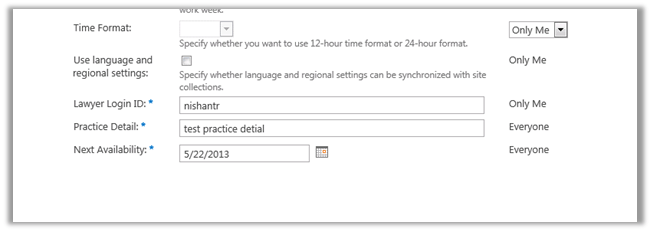
Open the user profiles record after the synchronization
Select Manage User Profiles in the User Profile Application

Search for the record and open it to confirm the successful user profile import.
Hope it helps.
Discover more from Nishant Rana's Weblog
Subscribe to get the latest posts sent to your email.
Share It -


 Nishant Rana's Weblog
One thought on “Import User Profile properties in SharePoint 2013 from CRM 2011 using BCS.”