
Using ExecuteMultipleRequest class we can now execute one or more message requests as a single batch.
For example in the code below we are creating 3 contact entity record as well as deleting one of the contact records as a single batch.
Here below, we are first initializing 3 contact entity record, then creating the associated CreateRequest and DeleteRequest.
We are then adding all these requests to OrganizationRequestCollection which we then use for the Requests property of the ExecuteMutlipleRequest class. The request are executed in the order in which they are added to the OrganizationRequestCollection.
Settings Property defines whether execution should continue if an error occurs and if responses for each message request processed are to be returned or not.
// Create 3 contact entitiy's record
Entity entity1 = new Entity("contact");
entity1.Attributes["lastname"] = "lastname1";
Entity entity2 = new Entity("contact");
entity2.Attributes["lastname"] = "lastname2";
Entity entity3 = new Entity("contact");
entity3.Attributes["lastname"] = "lastname3";
// Create CreateRequest and Delete Request
CreateRequest createReq1 = new CreateRequest();
createReq1.Target = entity1;
CreateRequest createReq2 = new CreateRequest();
createReq2.Target = entity2;

// DeleteRequest with incorrect guid to throw error

DeleteRequest deleteReq = new DeleteRequest();
deleteReq.Target = new EntityReference("contact", Guid.NewGuid());

CreateRequest createReq3 = new CreateRequest();
createReq3.Target = entity3;

// Initialize OrganizationRequestCollection

OrganizationRequestCollection orgReqCollection = new OrganizationRequestCollection();
orgReqCollection.Add(createReq1);
orgReqCollection.Add(createReq2);
orgReqCollection.Add(deleteReq);
orgReqCollection.Add(createReq3);

// Intialize ExecuteMultipleRequest

ExecuteMultipleRequest executeMutlipleRequest = new ExecuteMultipleRequest();
executeMutlipleRequest.Requests = orgReqCollection;
executeMutlipleRequest.Settings = new ExecuteMultipleSettings();

// ContinueOnError - specifies whether to continue in case of error in any of the request or not
executeMutlipleRequest.Settings.ContinueOnError = false;

// ReturnResponses - specifies whether to return responses for the requests or not
executeMutlipleRequest.Settings.ReturnResponses = true;

ExecuteMultipleResponse executeMulResponse = (ExecuteMultipleResponse) _service.Execute(executeMutlipleRequest);
In the above example we are deliberately throwing exception for the DeleteRequest.
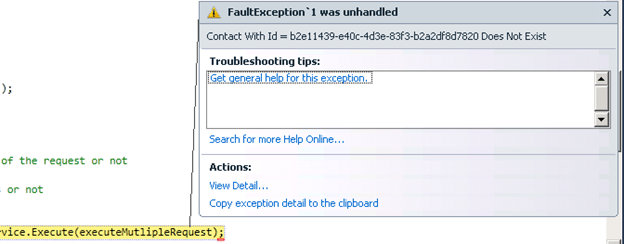
So if we are setting the ContinueOnError property as false, our program will create the first two contact record and then throws exception.
Contact Records Created:

Exception:
And if we are setting the ContinueOnError as true, our program will create all the three contact records and for the DeleteRequest it will return the error message as a part of response as we have set the ReturnResponses as true.
All the three contact records created:

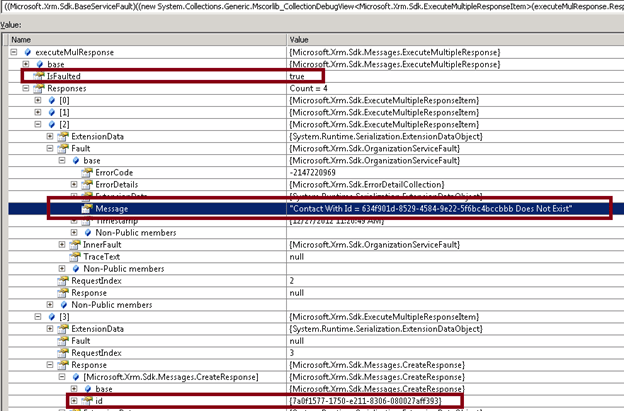
ExecuteMultipleResponse:
Here we get 4 responses one for each of the requests in OrganizationCollectionRequest.
IsFaulted property of the ExecuteMultipleResponse has value as true as we get a FaultException in case of DeleteRequest.
The Message for the DeleteRequest gives us the error message.
The response for the CreateRequest contains the Guid of the contact record created.
Hope it helps
Discover more from Nishant Rana's Weblog
Subscribe to get the latest posts sent to your email.
Share It -


 Nishant Rana's Weblog
how to use ExecuteMultiple request in silverlight
LikeLike