
Hi,
(This works for 1-n relatinship)
For n-n these are the two links that could be of help
http://www.mscrmking.com/2011/06/crm-2011-how-to-filter-add-existing/
http://blogs.huddle.com.ar/sites/Dynamics/Lists/Posts/Post.aspx?ID=14
Let us take a very simple scenario in which for a given contact record, when I add the Sub-Contacts using Add Existing Button, then I should only see those contacts having last name equal to the last name of the current record.
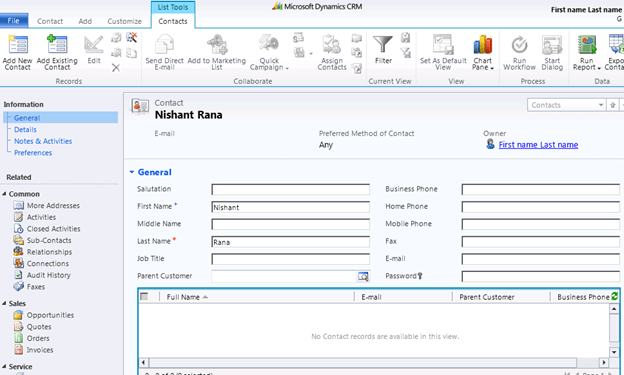
I have following contact records in the system
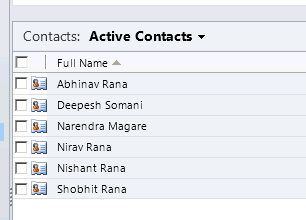
Now clicking on Add Existing Contact button on the ribbon should only show those contact records which have last name equal to “Rana”

To achieve this I have created a plugin and registered the following step for it
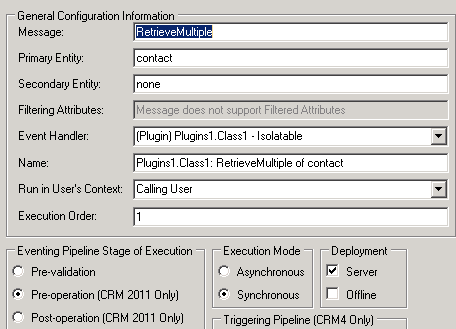
The trick here is to replace the InputParameter named Query with our own QueryExpression.
This the url that is being used for the lookup

From the url we can get the LookupStyle (single or multi) and Id of the record i.e. currentid in our plugin.
The source code
using System;
using System.Collections.Generic;
using System.Linq;
using System.Text;
using Microsoft.Xrm.Sdk;
using System.Web;
using Microsoft.Xrm.Sdk.Query;

namespace Plugins1
{
 public class Class1 : IPlugin
 {
 public void Execute(IServiceProvider serviceProvider)
 {
 if (HttpContext.Current.Request.QueryString["currentid"] != null && HttpContext.Current.Request.QueryString["LookupStyle"].ToString() == "multi")
 {
 string lookupId = HttpContext.Current.Request.QueryString["currentid"].ToString();
 Microsoft.Xrm.Sdk.IPluginExecutionContext context =
 (Microsoft.Xrm.Sdk.IPluginExecutionContext)serviceProvider.GetService(typeof(Microsoft.Xrm.Sdk.IPluginExecutionContext));
 if (context.InputParameters.Contains("Query"))
 {
 // Get the id of the record on which we have our subgrid
 Guid contactGuid = new Guid(HttpContext.Current.Request.QueryString["currentid"].ToString());

// Get the OrgService
 IOrganizationServiceFactory serviceFactory =
 IOrganizationServiceFactory)serviceProvider.GetService(typeof(IOrganizationServiceFactory));
 IOrganizationService service = serviceFactory.CreateOrganizationService(context.UserId);

// Get the lastname value of the conact record
 ColumnSet colsContactLastName = new ColumnSet();
 colsContactLastName.AddColumn("lastname");
 Entity contactEntity = service.Retrieve("contact", contactGuid, colsContactLastName);
 string lastName = contactEntity.Attributes["lastname"].ToString();

// Create the queryexpression to find all the contacts that have last name equal to the record on which we have our subgrid
 QueryExpression newQueryExpression = new QueryExpression();

ConditionExpression condition1 = new ConditionExpression();
 condition1.AttributeName = "lastname";
 condition1.Operator = ConditionOperator.Equal;
 condition1.Values.Add(lastName);

ConditionExpression condition2 = new ConditionExpression();
 condition2.AttributeName = "contactid";
 condition2.Operator = ConditionOperator.NotEqual;
 condition2.Values.Add(contactGuid);

newQueryExpression.EntityName = "contact";
 newQueryExpression.ColumnSet = new ColumnSet();
 newQueryExpression.ColumnSet.AllColumns = true;
 newQueryExpression.Criteria.AddCondition(condition1);
 newQueryExpression.Criteria.AddCondition(condition2);

// Replace the existing Query - Input Parameter with our custom query expresssion
 context.InputParameters["Query"] = newQueryExpression;

}
 }
 }
 }
}
It hasn’t been tested thoroughly though.
Hope it helps.
Discover more from Nishant Rana's Weblog
Subscribe to get the latest posts sent to your email.
Share It -


Good one and great concept…Thanks!
LikeLike
Hi,
This is a great idea. I tried it with n:n relationship and I could’t get the currentid.
Could you help me?
LikeLike
Hi Nishrant
Is this possible at all? When the plugin gets triggered by you opening the lookup form for a subgrid (Add existing record-button) its not possible to retireve the guid. The HttpContext.Current.Request.QueryString[“currentid”] will always be NULL, because you dont trigger your plugin on the main form but instead on the lookupform which dosent have a currentId. I want to precisely the same as you are doing here, but its just not possible, can you please advise me?
My code:
if (HttpContext.Current.Request.QueryString[“currentid”] != null && HttpContext.Current.Request.QueryString[“LookupStyle”].ToString() == “multi”)
{
//string lookupId = HttpContext.Current.Request.QueryString[“currentid”].ToString();
Microsoft.Xrm.Sdk.IPluginExecutionContext context =
(Microsoft.Xrm.Sdk.IPluginExecutionContext)serviceProvider.GetService(typeof(Microsoft.Xrm.Sdk.IPluginExecutionContext));
string lookupId = HttpContext.Current.Request.QueryString[“currentid”].ToString();
if (context.InputParameters.Contains(“Query”))
{
// Get the id of the record on which we have our subgrid
Guid webFragtGuid = new Guid(HttpContext.Current.Request.QueryString[“currentid”].ToString());
// Get the OrgService
IOrganizationServiceFactory serviceFactory = (IOrganizationServiceFactory)serviceProvider.GetService(typeof(IOrganizationServiceFactory));
IOrganizationService service = serviceFactory.CreateOrganizationService(context.UserId);
// Get the lastname value of the conact record
Entity webFragtEntity = service.Retrieve(“df_webfragopstning”, webFragtGuid, new ColumnSet(true));
EntityReference firmaER = (EntityReference)webFragtEntity.Attributes[“df_webfragtopstningerid”];
Guid firmaId = firmaER.Id;
// Create the queryexpression to find all the contacts that have last name equal to the record on which we have our subgrid
QueryExpression newQueryExpression = new QueryExpression();
ConditionExpression condition1 = new ConditionExpression();
condition1.AttributeName = “df_firmaid”;
condition1.Operator = ConditionOperator.Equal;
condition1.Values.Add(firmaId);
newQueryExpression.EntityName = “df_address”;
newQueryExpression.ColumnSet = new ColumnSet();
newQueryExpression.ColumnSet.AllColumns = true;
newQueryExpression.Criteria.AddCondition(condition1);
// Replace the existing Query – Input Parameter with our custom query expresssion
context.InputParameters[“Query”] = newQueryExpression;
}
LikeLike
i retrieve guid then dead.
LikeLike
it is not possible. already dead during if(HttpContext.Current.Request.QueryString[“currentid”] != null)
LikeLike