
Just created a simple html page that shows my location using the new Geolocation API.
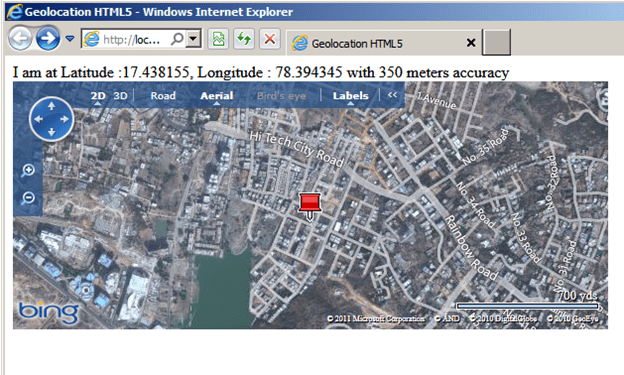
Source Code:-
<!DOCTYPE html>
<html>
<head>
    <meta charset="utf-8" />
    <title>Geolocation HTML5</title>
    <script src="http://dev.virtualearth.net/mapcontrol/mapcontrol.ashx?v=6.2"></script>
    <script>

        window.onload = getMyLocation;

        function getMyLocation() {

        // Check if the browser supports the Geolocation API
            if (navigator.geolocation) {

                // we can specify how the geolocation computes its value
                var postionOptions = { enableHighAccuracy: true, timeout: 5000, maximumAge: 0 };

                // call getCurrentPosition method of the API
                // getCurrentPosition(successHander, errorHandler, positionOptions)
                navigator.geolocation.getCurrentPosition(displayLocation, displayError, postionOptions);
            }
            else {
                alert("No geolocation support in the browser");
            }
        }

        function displayLocation(position) {

            // load map if location is found
            map = new VEMap('myMap');
            map.LoadMap(null, 4, VEMapStyle.Hybrid);

            // get the latitude and longitude
            var latitude = position.coords.latitude;
            var longitude = position.coords.longitude;

            // place the pushpin
            PlacePushPin(latitude, longitude);

            // get location div and show the latitude longitude and the accuracy
            var divLocation = document.getElementById('location');
            divLocation.innerHTML = "I am at Latitude :" + latitude + ", Longitude : " + longitude;
            divLocation.innerHTML += " with " + position.coords.accuracy + " meters accuracy";
        }

        // place the pushpin in the map for the location found

        function PlacePushPin(lat, lon) {
            latlong = new VELatLong(lat, lon);
            myPushPin = new VEShape(VEShapeType.Pushpin, latlong);
            map.AddShape(myPushPin);
            map.SetCenterAndZoom(latlong, 15);
        }

        // error handler
        function displayError(error) {

            var errorTypes = {
                0: "Unknown Error",
                1: "Permission denied by user",
                2: "Position is not available",
                3: "Request timed out"
            };

            var errorMessage = errorTypes[error.code];

            if (error.code == 0 || error.code == 2) {
                errorMessage = errorMessage + " " + error.message;
            }

            var divLocation = document.getElementById('location');
            divLocation.innerHTML = errorMessage;
        }
    </script>
</head>
<body>
    <div id="location"></div>
    <div id='myMap' style='position: relative; width: 600px; height: 250px;'>
    </div>
</body>
</html>
Bye.
Discover more from Nishant Rana's Weblog
Subscribe to get the latest posts sent to your email.
Share It -


 Nishant Rana's Weblog