
Create a new windows application project and add a button to it.
On click of that button, we will create a new document(word) and write a simple Hello World text in it.
To create a word document using C# we need to first reference the following DLL(com)
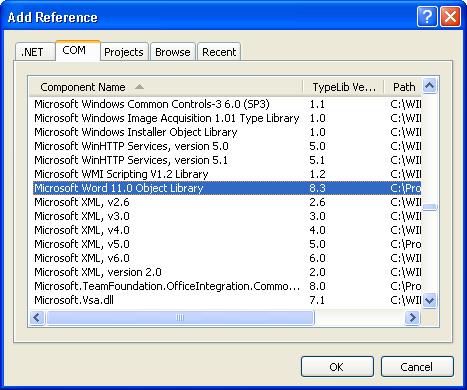
After adding reference, add this directive
using Microsoft.Office.Interop.Word;
Put this code on button click
private void button1_Click(object sender, EventArgs e)
{
object missing = System.Reflection.Missing.Value;
object Visible=true;
object start1 = 0;
object end1 = 0;
ApplicationClass WordApp = new ApplicationClass();
Document adoc = WordApp.Documents.Add(ref missing, ref missing, ref missing, ref missing);
Range rng = adoc.Range(ref start1, ref missing);
try
{
rng.Font.Name = “Georgia”;
rng.InsertAfter(“Hello World!”);
object filename = @”D:\MyWord.doc”;
adoc.SaveAs(ref filename, ref missing, ref missing, ref missing, ref missing, ref missing,
ref missing, ref missing, ref missing, ref missing, ref missing, ref missing, ref missing, ref missing, ref missing, ref missing);
WordApp.Visible = true;
}
catch (Exception ex)
{
MessageBox.Show(ex.Message);
}
}
The easiest way to write code for office interoperability is to make use of VBA code.
Say you want to insert a picture in a word document what you can do is
open the word document – Go to Tools ->Macro-> Record New Macro
Now click on insert menu and insert the picture. Stop the recording, again go to Macro -Macros-> Select your Macro and click on edit
You will find the vba code over there
Sub Macro1()
Selection.InlineShapes.AddPicture FileName:= _
“C:\Documents and Settings\nishantr1\My Documents\My Pictures\untitled.bmp” _
, LinkToFile:=False, SaveWithDocument:=True
End Sub
Now to write the same code in c# you will do something like this
Range rngPic = adoc.Tables[1].Range;
rngPic.InlineShapes.AddPicture(@”C:\anne_hathaway.jpg”, ref missing, ref missing, ref missing);
Bye
Discover more from Nishant Rana's Weblog
Subscribe to get the latest posts sent to your email.
Share It -


 Nishant Rana's Weblog
I have private void mnuManual_Click(object sender, System.EventArgs e)
{
// Opens Word applicationMicrosoft.Office.Interop.
Word.Application word = null;
// Opens new documentMicrosoft.Office.Interop.
Word.Document doc = null;
// Instantiates Word applicationMicrosoft.Office.Interop.
Word = new Word.Application();
// Links to public website where the User Manual is located ( I wanna have the user manual on my desktop as I have not website.
object objFileName= “desktop”
// Keeps User Manual read-only
object objTrueValue = true;
// References to Word class exceptions used when showing error messages
object objMissing = Type.Missing;
// Shows Word application
Word.Visible = true;
// Focuses on Word
Word.Activate();
// Opens file and acts as an exception handler in Word
doc = word.Documents.Open(ref objFileName, ref objMissing, ref objTrueValue,
ref objMissing, ref objMissing, ref objMissing, ref objMissing, ref objMissing,
ref objMissing, ref objMissing, ref objMissing, ref objMissing, ref objMissing,
ref objMissing, ref objMissing, ref objMissing);
// Focuses on User Manual opened in Word application
doc.Activate();
}
My errors are say that” the name ‘doc’ does not exist in the class or namespace. The same is saud for word too. It says I need to reference them.
LikeLike
Creating Word Document is Vey Very Good. Is there any way to OPEN pdf file from Windows Forms?
LikeLike
hi,
Thanks a lot.i search many site and forum for read word doc from asp.net.many site give the samples but it will not work out.this sample is very very useful for me.once again i tell thanks a lot
bye
sampath
LikeLike
Hi Nishant,
This code workd 4 me..
Thnks a tonn 🙂
LikeLike
Hi nishant,
I have done exactly same what you have suggested here but i am getting error as follows
The message filter indicated that the application is busy. (Exception from HRESULT: 0x8001010A (RPC_E_SERVERCALL_RETRYLATER))
LikeLike
i want to write a program using C# that i can read and write microsoft word from sql server.
LikeLike
I have the same problem that Nilesh.
I’m writing a small program to convert wordML’s in pdf using a WS. The problem is that server, who executes office code return the error:
The message filter indicated that the application is busy. (Exception from HRESULT: 0×8001010A (RPC_E_SERVERCALL_RETRYLATER))
I know that main problem is of permissions over ASPNET user.
I try to assign permissions over office COM component using service component but not works.
Too adding permissions in all folders that my process write to ASPNET, IWAM and IUSR users but not works…
Somebody have any idea? thx
LikeLike
Test
LikeLike
Is there a way to Hyperlink “Hello World” to a file or directory?
The code worked the first time with Office 2007 and the 12.0 library.
Thanks for the post.
LikeLike
Hi Steve,
I guess you want to add hyperlink to the Hello World text.
You can do something like this
Range rng=adoc.Range(ref start1,ref missing);
rng.Font.Name=”Georgia”;
rng.InsertAfter(“Hello World!”);
Object address = @”http://www.google.co.in”;
Object screenTip = “Go to google search page”;
rng.Hyperlinks.Add(rng, ref address, ref missing, ref screenTip, ref missing, ref missing);
object filename = @”C:\MyWord.doc”;
..
LikeLike
try to use template-driven rendering like aspose.word or invoke docx lib ( http://www.invoke.co.nz/products/docx.aspx ). You’ll specify all text properties in document and will fill in content only. Aspose is more heavy and powerful (and expensive :)), invoke is simpler but much easier and free
COM sux, both libs are pure .net
LikeLike
Nishant, Is there a simple way to add an image into a newly created Word Document?
LikeLike
Hi Atul,
Check out this post of mine
https://nishantrana.wordpress.com/2008/07/17/opening-and-inserting-a-picture-in-word-document-programmatically-using-c/
LikeLike
Hi Nishant,
Is there any way to create a word document like an application form, in which I will fill the content of form using varibles ?
i.e. I am having an application form in word document; I want to fill it using array of objects & create multiple word documents. How to do it?
LikeLike
how to insert file into .doc ?
LikeLike
Hi,
How to implement C# code to create Word File using macro?
Please help me to create a word file uisng following macro.
Sub Macro1()
Selection.TypeText Text:=”Reference No.: B1729″
Selection.TypeParagraph
Selection.TypeParagraph
Selection.TypeText Text:=”Name: FirstName MiddleName LastName”
Selection.TypeParagraph
Selection.TypeParagraph
Selection.TypeText Text:=”Date Of Birth: dd-mmm-yyyy”
Selection.TypeParagraph
Selection.TypeParagraph
Selection.TypeText Text:=”Address:”
Selection.TypeParagraph
With Selection.ParagraphFormat
.LeftIndent = InchesToPoints(0.63)
.SpaceBeforeAuto = False
.SpaceAfterAuto = False
End With
With Selection.ParagraphFormat
.SpaceBeforeAuto = False
.SpaceAfterAuto = False
.FirstLineIndent = InchesToPoints(-0.63)
End With
With Selection.ParagraphFormat
.SpaceBeforeAuto = False
.SpaceAfterAuto = False
.FirstLineIndent = InchesToPoints(0)
End With
Selection.TypeText Text:=”Block No, Society”
Selection.TypeParagraph
Selection.TypeText Text:=”Area, Area Code”
Selection.TypeParagraph
Selection.TypeText Text:=”City, State”
Selection.TypeParagraph
With Selection.ParagraphFormat
.LeftIndent = InchesToPoints(0)
.SpaceBeforeAuto = False
.SpaceAfterAuto = False
End With
Selection.TypeParagraph
End Sub
Regards,
Aniket A. Salunkhe
LikeLike
Thanks
LikeLike
Thanks it helped me 🙂
LikeLike
hi
for witch version of c# is this code
i am trying to do this but when i add using directive there is no interop…
LikeLike
hi thanks nice code .
plz provide me reference to use table in word.
LikeLike
@Nishant: thanks for the very helpful article.
@Oscar:
try adding at the end of code:
WordApp.Quit(ref missing, ref missing, ref missing);
WordApp = null;
If that doesn’t help try removing Word.App.Visible line.
LikeLike
Excellent work !!!!!!!
Thanks a lot, solved my problem just in a second….
LikeLike
Dear Nishant Rana,
When i deploy this code on iis. This code start the process of Word but it did not show word on screen.
If i run this in visual studio it work fine. Please help me as soon as possible.
Regards
Shahbaz Sajjad
LikeLike
Nishant ,
I have the same problem, did you find a solution.. please share.
thanks
LikeLike
Dear Nishant Rana,
Is there a way to create items in the table of contents that link to the actual item in the page(page 1, page 2, page 3, etc)
LikeLike
Check this post !
https://nishantrana.wordpress.com/2008/07/17/creating-and-updating-table-of-contents-in-word-document-using-c/
LikeLike
Dear Nishant Rana,
Thank you for that post, it was helpful. I am having two issues with the table of contents. The first thing is the positioning of table of contents, I need it to go on the top of the page. It currently goes to the end of the page right now. Also, I am having an issue with the headers and subheaders being displayed in the table of contents. For instance, if I have a paragraph with a heading, I only want the heading to display in the table of contents, not the acutal contents of the paragraph.
Thanks,
J
LikeLike
Nice articles, Anyone used spire.Doc ? I feel it other easy way to read and write word. maybe best word component to .net.
http://www.e-iceblue.com/Introduce/word-for-net-introduce.html
LikeLike
thanks this is really functional
LikeLike
Hello,
This is nice article.
But I want to save the particular content of the word to other file format such as .txt, .html, .docx and html source code.
Particular content means e.g. I am having one table of 1 row and 1 column in word file, and i want to save this table’s content to other file format. Only the table’s content I want to save. Please help me if you have any solution for that. Thanking You 🙂
LikeLike
Hi.
I like this blogpost. It was nice to read.
I am curious how come I didn’t find this blog earlier.
I will surely share. Some of my Facebook friends will like this.
Thanks and keep up the good work!
🙂
LikeLike
Hai
I am getting problem on copying these lines from the above code plzzzzzzzz help me
Range rng = adoc.Range(ref start1, ref missing);
rng.Font.Name = “Georgia”;
rng.InsertAfter(“Hello World!”);
LikeLike
Im using VB.6, this code to export data in datagrid to word 2003 or 2007;
_____________________________________________________
‘WORD
A_1.Recordset.MoveFirst
Dim Word As Word.Application
Jumlah = A_1.Recordset.RecordCount
Set Word = CreateObject(“word.Application”)
Word.Documents.Add
Word.Documents(1).Tables.Add Word.Documents(1).Range, Jumlah, 7
For i = 1 To Jumlah
Word.Documents(1).Tables(1).Cell(i, 1).Range.InsertAfter A_1.Recordset(0)
Word.Documents(1).Tables(1).Cell(i, 2).Range.InsertAfter A_1.Recordset(1)
Word.Documents(1).Tables(1).Cell(i, 3).Range.InsertAfter A_1.Recordset(2)
Word.Documents(1).Tables(1).Cell(i, 4).Range.InsertAfter A_1.Recordset(3)
Word.Documents(1).Tables(1).Cell(i, 5).Range.InsertAfter A_1.Recordset(4)
Word.Documents(1).Tables(1).Cell(i, 6).Range.InsertAfter A_1.Recordset(5)
Word.Documents(1).Tables(1).Cell(i, 7).Range.InsertAfter A_1.Recordset(6)
A_1.Recordset.MoveNext
Text9.Text = A_1.Recordset.AbsolutePosition
Next i
Word.Visible = True
A_1.Recordset.MoveFirst
__________________________________________
in before time, add in references “Microsoft Word 11.0 object library” to word 2003, or “Microsoft Word 12.0 object library” to word 2007. Good Luck…….
LikeLike
Thanks a lot Friend ,This article is very helpful for me……………….
LikeLike
Hi,
aDoc = wordApp.Documents.Open(ref filename, ref missing, ref readOnly, ref missing, ref missing, ref missing, ref missing, ref missing, ref missing, ref missing, ref missing, ref isVisible, ref missing, ref missing, ref missing);
this doesn’t work in IIS for me.
I have made all the changes dcomconfig security settings
The website becomes non responsive.
(Exception type: COMException
Exception message: The remote procedure call failed. (Exception from HRESULT: 0x800706BE)
at Word.Documents.Open(Object& FileName, Object& ConfirmConversions, Object& ReadOnly, Object& AddToRecentFiles, Object& PasswordDocument, Object& PasswordTemplate, Object& Revert, Object& WritePasswordDocument, Object& WritePasswordTemplate, Object& Format, Object& Encoding, Object& Visible, Object& OpenAndRepair, Object& DocumentDirection, Object& NoEncodingDialog))
Please find me any solution you have
thanks in advance.
LikeLike
i’m having troubles when i add more than one hyperlink, could you help me i’m using something like this
Range rango = oDoc.Range(ref oStartRange, ref oMissing);
rango.InsertAfter(“I. ” + descriNodo);
Object address = “www.google.com”;
Object screenTip = “Search on google”;
rango.Hyperlinks.Add(rango, ref address, ref oMissing, ref screenTip, ref oMissing, ref oMissing);
rango.InsertParagraphAfter();
….
///more code here
…
Range rng = oDoc.Range(ref oStartRange, ref oEndRange);
rng.InsertAfter(relacion.Descripcion);
Object direccion = “www.microsoft.com”;
Object toolTip = “Microsoft”;
//rng.InsertParagraphBefore();
rng.Hyperlinks.Add(rng, ref direccion, ref oMissing, ref toolTip, ref oMissing, ref oMissing);
rng.ParagraphFormat.LeftIndent = 85;
dat.Range.InsertParagraphAfter();
In Word i only have the textline of
Search in google
But the link is the one of Microsoft
Please help!!
LikeLike
Hi Nishanth …. Thanx for ur posts … I want a small help… My problem is i want to read thing me word doc(Including shapes) … I have tried some of the ways but its giving me upto to read only text …..
Can u please??
LikeLike
I have the error like word was unable to read this document. it may be corrupt
try one or more following
1.open and repair the file
This is already open datareader associated with this command must be closed first.
.could you give solution now. Thanks in advance
N.sanmugavel
LikeLike
hi,
Thanks a lot. I found new solution to create word document without Office Interop.
http://www.e-iceblue.com/Introduce/word-for-net-introduce.html
LikeLike
Hi Nishanth,
Thanx for your post. It helped us build our own simple engine for genarating document. We took approach of using bookmarks for placeholders. It worked great until we realized that it is causing problems, such as spontaneous COM errors. Our customers had so much problems with the solution that we started to look around and found out that the better way is to use Microsoft’s Open XML SDK.
We started to build a new engine based on Open XML parser, but then we found out that there are products on the market that do not need the presence of Office Word. We now use the document generation solution from http://www.Docentric.com which is exactly what we needed.
Event if we were to build our custom solution, we would probably use the Open XML SDK.
P.Bruce
LikeLike
If anyone gets the following message
“Error: Interop type ‘Microsoft.Office.Interop.Word.ApplicationClass’ cannot be embedded. Use the applicable interface instead.”
here’s what you should do. Change the line
ApplicationClass WordApp = new ApplicationClass();
to
Microsoft.Office.Interop.Word.Application WordApp = new Microsoft.Office.Interop.Word.Application();
LikeLike
I have gone through the same procedure everything was working fine but when i published the site the code written is not working dont know why
LikeLike
Hello
Would anyone share a sample code to create word document automatically password protected ?
Thanks a lot..
LikeLike
Very nice and informative article that beautifully elaborate the basics idea of creating word document using c#. This post helped me lot in understanding creating ms-word document using c# code. Check this link too its having wonderful post with great explanation over the internet on reading ms-word document using c# code….
http://www.mindstick.com/Articles/5cd1b721-9b94-4ea0-bd6e-2bb157401069/?Read%20Microsoft%20Word%20Document%20File%20by%20using%20C#
LikeLike
This is very useful post.
Nice work.
LikeLike
Great post. But this works only when MS office is installed on your machine. I have written on a simple dotnet solution for working with word documents at http://programmingfree.blogspot.in/2012/06/working-with-word-documents.html
LikeLike
I love what you guys are usually up too. Such clever work and coverage!
Keep up the good works guys I’ve incorporated you guys to my personal blogroll.
LikeLike
Thanks for every other informative blog.
The place else could I am getting that type of info written in such an ideal approach?
I’ve a challenge that I’m simply now running on, and I’ve been on the glance out for such info.
LikeLike
Everything is very open with a very clear explanation of the challenges.
It was really informative. Your website is extremely helpful.
Thanks for sharing!
LikeLike
The other day, while I was at work, my sister stole
my iPad and tested to see if it can survive a 30 foot drop, just so she can be a youtube
sensation. My apple ipad is now destroyed and she has 83 views.
I know this is entirely off topic but I had to share it with
someone!
LikeLike