Set SelectedDate for DateTimeControl in SharePoint.


While working on a visual web part wherein we were using SharePoint’s DateTimeControl, realized that it was not that straight forward to set the value for the DateTimeControl.

The following post came handy

http://blog.enderspsyche.com/2013/04/setting-datetimecontrol-date-in.html

Hope it helps!

Using JavaScript in custom master page for SharePoint 2013 that uses SP.js.


Hi,

We recently had a requirement to show no of listitems on a particular list on every page within the site. So we decided to use the JavaScript that does so in our custom master page itself.

This is how we got it working

Adding the SharePoint script link that refers to the SP.js file in our custom html master page.

<!–MS:<SharePoint:ScriptLink ID=”ScriptLink21″ Name=”sp.js” runat=”server” OnDemand=”false” LoadAfterUI=”true” Localizable=”false”>–>
<!–ME:</SharePoint:ScriptLink>–>

And then executing our script using the following method i.e. after SP.js is loaded

function GetCount() {

// code that uses CSOM to get the count

}


ExecuteOrDelayUntilScriptLoaded(GetCount, “sp.js”);

Hope it helps.

Object reference not set to an instance of an object. at Microsoft.SharePoint.Publishing.Internal.CodeBehind.AreaNavigationSettingsPage.OKButton_Click(Object sender, EventArgs e) error in AreaNavigationSettings.aspx page


Hi,

Was getting the above issue while trying to configure navigation for the SharePoint Site. Tried out different solutions mentioned in the following post.

http://phinotworking.com/stubborn-site-navigation-menu-items/

Corrected the JavaScript issue on the page, renamed the id of the div to something else instead of container but that didn’t work. Then through PowerShell script deleted few of the navigation links and again gave it a try. This time it worked properly.


I think the navigation page would have got corrupted or something because of those links and hence deleting those links fixed the issue.

Hope it helps.


Windows could not connect to the User Profile Service service \ Desktop is not available\ The dependency service or group failed to start errors in Windows Server 2008


Hi,

I was getting the above error after logging into the Windows Server 2008 machine. Tried out different things but nothing helped.

Finally we figured out the reason for this. Actually someone had configured the User Profile Service to run under a different credentials instead of Local System.

Running it back under the Local System account resolved the issue for us.

Hope it helps.

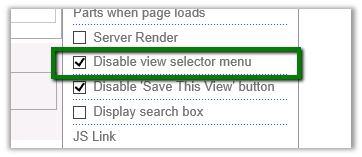
Disable view selector menu in ListViewWebPart in SharePoint 2013.


Hi I was facing the issue that has been mentioned in this thread

http://social.technet.microsoft.com/Forums/sharepoint/en-US/3c323f28-0b0b-410c-9a4e-3a824d923713/2013-list-view-webpart-view-selector?forum=sharepointgeneral

The view selector menu was not showing up on the custom web part page.

The way we got it working was to extend the XSLTListViewWebPart and set that property though code.


public partial class VisualWebPart1 : System.Web.UI.WebControls.WebParts.WebPart
 {
 // Uncomment the following SecurityPermission attribute only when doing Performance Profiling using
 // the Instrumentation method, and then remove the SecurityPermission attribute when the code is ready
 // for production. Because the SecurityPermission attribute bypasses the security check for callers of
 // your constructor, it's not recommended for production purposes.
 // [System.Security.Permissions.SecurityPermission(System.Security.Permissions.SecurityAction.Assert, UnmanagedCode = true)]
 public VisualWebPart1()
 {
 }

protected override void OnInit(EventArgs e)
 {
 base.OnInit(e);
 InitializeControl();
 }
 private Microsoft.SharePoint.WebPartPages.XsltListViewWebPart myListView;

protected override void CreateChildControls()
 {
 base.CreateChildControls();
 SPSite oSiteCollection = SPContext.Current.Site;
 string listName = "Notification Centre";
 SPWeb oWebSite = SPContext.Current.Web;
 myListView = new Microsoft.SharePoint.WebPartPages.XsltListViewWebPart();
 myListView.Visible = true;
 myListView.EnableViewState = true;
 SPList list = oWebSite.Lists[listName];

myListView.ListName = list.ID.ToString("B").ToUpperInvariant();
 myListView.TitleUrl = list.DefaultViewUrl;
 myListView.WebId = list.ParentWeb.ID;

myListView.ListId = (System.Guid)list.ID;
 myListView.ViewGuid = list.DefaultView.ID.ToString("B").ToUpperInvariant();

myListView.HelpMode = WebPartHelpMode.Modeless;

myListView.DisableViewSelectorMenu = false;
 myListView.InplaceSearchEnabled = true;

myListView.AllowEdit = true;

Controls.Add(myListView);
 }

protected void Page_Load(object sender, EventArgs e)
 {
 }
 }

Hope it helps

Implementing Mark As Read and Delete functionality for selected list items in SharePoint 2013


We recently had a requirement to implement Mark As Read, Unread and Delete feature for the list items selected in the list.

User will select the list items record and can perform the required operation by selecting appropriate button.
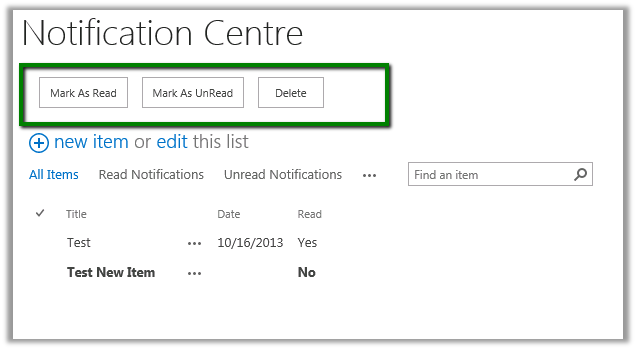
For this we added a content editor web part having the following content


<div>
 <input type="button" value="Mark As Read" onclick="javascript:MarkRead();" />
 <input type="button" value="Mark As UnRead" onclick="javascript:MarkUnRead();" />
 <input type="button" value="Delete" onclick="javascript:Delete();" />
</div>

<script language='javascript' type='text/javascript'>

var items;
 var ctx;
 var count;
 var web;
 var totalCount = 0;

function Delete() {
 debugger;
 ctx = SP.ClientContext.get_current();
 web = ctx.get_web();
 var currentlibGuid = SP.ListOperation.Selection.getSelectedList();
 if (currentlibGuid == null) {

alert('Please select an item in the list!');
 return;
 }
 var currentLib = web.get_lists().getById(currentlibGuid);
 items = SP.ListOperation.Selection.getSelectedItems(ctx);

//Get Selected Items count
 count = CountDictionary(items);

&nbsp;

for (var i in items) {
 var currentItem = currentLib.getItemById(items[i].id);
 ctx.load(currentItem);

currentItem.deleteObject();

ctx.executeQueryAsync(
 Function.createDelegate(this, this.Succeeded),
 Function.createDelegate(this, this.onQueryFailed)
 );

}
 }

function MarkUnRead() {
 ctx = SP.ClientContext.get_current();
 web = ctx.get_web();
 var currentlibGuid = SP.ListOperation.Selection.getSelectedList();
 if (currentlibGuid == null) {

alert('Please select an item in the list!');
 return;
 }
 var currentLib = web.get_lists().getById(currentlibGuid);
 items = SP.ListOperation.Selection.getSelectedItems(ctx);

//Get Selected Items count
 count = CountDictionary(items);

&nbsp;

for (var i in items) {
 var currentItem = currentLib.getItemById(items[i].id);
 ctx.load(currentItem);

currentItem.set_item('MarkAsRead', false);
 currentItem.update();

ctx.executeQueryAsync(
 Function.createDelegate(this, this.Succeeded),
 Function.createDelegate(this, this.onQueryFailed)
 );
 }
 }
 function MarkRead() {

ctx = SP.ClientContext.get_current();
 web = ctx.get_web();
 var currentlibGuid = SP.ListOperation.Selection.getSelectedList();
 if (currentlibGuid == null) {

alert('Please select an item in the list!');
 return;
 }
 var currentLib = web.get_lists().getById(currentlibGuid);
 items = SP.ListOperation.Selection.getSelectedItems(ctx);

//Get Selected Items count
 count = CountDictionary(items);

&nbsp;

for (var i in items) {
 var currentItem = currentLib.getItemById(items[i].id);
 ctx.load(currentItem);

currentItem.set_item('MarkAsRead', true);
 currentItem.update();

ctx.executeQueryAsync(
 Function.createDelegate(this, this.Succeeded),
 Function.createDelegate(this, this.onQueryFailed)
 );
 }
 }
 function onQueryFailed(sender, args) {

totalCount = totalCount + 1;

if (totalCount == count) {
 location.reload();
 }
 alert('Request failed. ' + args.get_message() +
 '\n' + args.get_stackTrace());
 }

function Succeeded() {

totalCount = totalCount + 1;

if (totalCount == count) {
 location.reload();
 }
 }
</script>

&nbsp;

Was helped by a good friend of mine and colleague Priyanka, a SharePoint expert. You can check her insightful posts at her MSDN Blog

http://blogs.msdn.com/b/mind_talks/

Hope it helps