Suppose our string is in following format
string input = “Test1,, Test2,,,,,”;
string result = Regex.Replace(input, “,+”, “,”).Trim(‘,’);

http://stackoverflow.com/questions/4405703/remove-extra-commas-in-c-sharp
Bye.

Suppose our string is in following format
string input = “Test1,, Test2,,,,,”;
string result = Regex.Replace(input, “,+”, “,”).Trim(‘,’);
http://stackoverflow.com/questions/4405703/remove-extra-commas-in-c-sharp
Bye.

Hi,
VS 2012 was repeatedly getting crashed when attaching debugger for debugging the plugins.
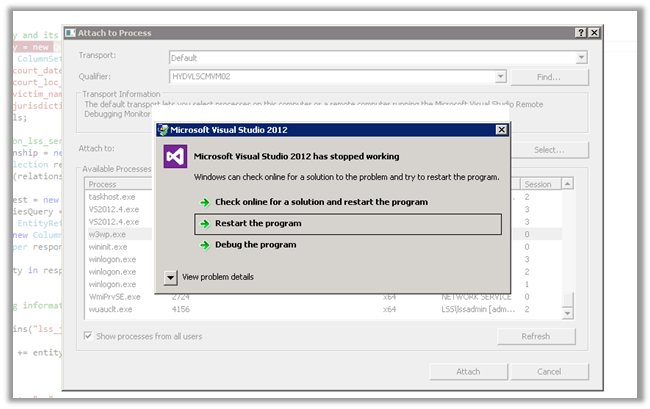 Tried out unsuccessfully so many things suggested over the internet, however the only thing that worked was installing the VS 2012 update 4
http://www.microsoft.com/en-in/download/details.aspx?id=39305
Hope it helps.

Hi,
We had one requirement in which we wanted to change the logging level of log4net programmatically based on the value passed.
Suppose this is how we have configured log4net in our application.
<?xml version="1.0"?>
<configuration>
 <configSections>
 <section name="log4net" type="log4net.Config.Log4NetConfigurationSectionHandler, log4net"/>
 </configSections>
 <log4net>
 <appender name="RollingLogFileAppender" type="log4net.Appender.RollingFileAppender">
 <file value="TestLog.txt"/>
 <appendToFile value="true"/>
 <rollingStyle value="Composite"/>
 <datePattern value="yyyyMMdd"/>
 <maxSizeRollBackups value="10"/>
 <maximumFileSize value="10MB"/>
 <layout type="log4net.Layout.PatternLayout">
 <conversionPattern value="[%d{yyyy-MM-dd HH:mm:ss}] [%p] [%c:%L] - %m%n"/>
 </layout>
 </appender>
 <root>
 <level value="DEBUG"/>
 <appender-ref ref="RollingLogFileAppender"/>
 </root>
 </log4net>
<startup><supportedRuntime version="v4.0" sku=".NETFramework,Version=v4.0"/></startup></configuration>
The sample code for changing the log level
namespace SampleLogApp
{
 using System.Reflection;

using log4net;
 using log4net.Core;
 using log4net.Repository;
 using log4net.Repository.Hierarchy;
 using log4net.Config;

public partial class Form1 : Form
 {

 private static readonly ILog logger = LogManager.GetLogger(MethodBase.GetCurrentMethod().DeclaringType);
 private List<Person> lstPerson;

 public Form1()
 {
 InitializeComponent();
 // configure the log4net logging
 XmlConfigurator.Configure();
 }

private void btnStartLogging_Click(object sender, EventArgs e)
 {
 foreach(Person person in lstPerson)
 {
 // set the logging type depending on person
 SetLoggingLevel(person.LogType);
 logger.Debug("Debug: " + person.FullName);
 logger.Info("Info: " + person.FullName);
 logger.Warn("Warn: " + person.FullName);
 logger.Error("Error: " + person.FullName);
 }
 }

private void Form1_Load(object sender, EventArgs e)
 {
 lstPerson = new List<Person>();
 lstPerson.Add(new Person() { FullName = "Abhinav Ranjan", LogType = "Debug" });
 lstPerson.Add(new Person() { FullName = "Nirav Pancholi", LogType = "Info" });
 lstPerson.Add(new Person() { FullName = "Shobhit Bhatnagar", LogType = "Error" });
 }

/// <summary>
 /// Sets the logging level.
 /// </summary>
 /// <param name="logType">Type of the log.</param>
 private static void SetLoggingLevel(string logType)
 {
 Logger currentLogger = (Logger)logger.Logger;
 currentLogger.Level = currentLogger.Hierarchy.LevelMap[logType];
 }
 }
}
The output in TestLog.txt
[2012-04-16 00:17:27] [DEBUG] [SampleLogApp.Form1:39] – Debug: Abhinav Ranjan
[2012-04-16 00:17:27] [INFO] [SampleLogApp.Form1:40] – Info: Abhinav Ranjan
[2012-04-16 00:17:27] [WARN] [SampleLogApp.Form1:41] – Warn: Abhinav Ranjan
[2012-04-16 00:17:27] [ERROR] [SampleLogApp.Form1:42] – Error: Abhinav Ranjan
[2012-04-16 00:17:27] [INFO] [SampleLogApp.Form1:40] – Info: Nirav Pancholi
[2012-04-16 00:17:27] [WARN] [SampleLogApp.Form1:41] – Warn: Nirav Pancholi
[2012-04-16 00:17:27] [ERROR] [SampleLogApp.Form1:42] – Error: Nirav Pancholi
[2012-04-16 00:17:27] [ERROR] [SampleLogApp.Form1:42] – Error: Shobhit Bhatnagar
The helpful post
http://geekswithblogs.net/rakker/archive/2007/08/22/114900.aspx
Hope it helps.

Hi,
I was assigned the task of renaming the domain. This post was extremely useful.
http://www.shariqsheikh.com/blog/index.php/200804/how-to-rename-a-windows-server-2008-domain/
I’ll put few of the steps from that post here
“From the command prompt, I started out by running rendom /list which outputs an XML file (Domainlist.xml) to the directory where rendom resides. You edit that file to change your domain configuration to the new domain name. i.e ForestDNSZones, DomainDNSZones, Netbios name. See referenced link for details.
After you have modified the file you can run rendom /showforest which shows you the future configuration, verify and make changes if necessary.
Upload the changes you have made in the XML file: Run rendom /upload
Verify readiness of Domain Controller(s): Run rendom /prepare
Execute domain rename instructions: Run rendom /execute
After thats finishes up successfully, you should also run GPFIXUP tool to fix up GPO references to your old domain name.
Here is an example :
C:\Users\Administrator>gpfixup /olddns:08r2.lab /newdns:mcts.lab
Group Policy fix up utility Version 1.1 (Microsoft)Start fixing group policy (GroupPolicyContainer) objects:
……..Start fixing site group policy links:
.Start fixing non-site group policy links:
….
gpfixup tool executed with success.C:\Users\Administrator>gpfixup /oldnb:08r2 /newnb:mcts
Group Policy fix up utility Version 1.1 (Microsoft)Start fixing group policy (GroupPolicyContainer) objects:
..
gpfixup tool executed with success.
Lastly, run rendom /clean”
Bye..

Just found a good site,
http://www.the-art-of-web.com/javascript/escape/
I had this url in CRM 2011 for creating related entity record
quickly wanted to escape the special character, used the tool given at that site to get the url without any special character

 Nishant Rana's Weblog