Simple example of configuring Enterprise library Caching Block.


Download the Enterprise Library 5 from here

http://www.microsoft.com/en-in/download/details.aspx?id=15104

Create a new windows application.

We need the configuration information to setup the caching.

Open the EntLib Configuration console.

Open the app.config file of the windows application created.

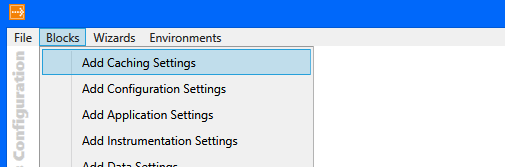
Select Blocks à Add Caching Settings

It will add the required configuration information to the config file of the windows application.

Sample code implementing Caching block to save dictionary object in Cache.


public static class Configuration
{
public static Dictionary<string, string> GetConfigSettings()
{
// get the cache manager
ICacheManager cacheManager = CacheFactory.GetCacheManager();
var configSettings = (Dictionary<string, string>)cacheManager["configSettings"];

if (configSettings == null)
{
configSettings = new Dictionary<string, string>();
configSettings.Add("key1", "value1");
configSettings.Add("key2", "value2");

// add the dictionary object
cacheManager.Add("configSettings", configSettings);
}
else
{
// get from the configsettings object from the cache
configSettings = (Dictionary<string, string>) cacheManager["configSettings"];
}

return configSettings;
}
}

Bye.


Change log4net logging level programmatically


Hi,

We had one requirement in which we wanted to change the logging level of log4net programmatically based on the value passed.

Suppose this is how we have configured log4net in our application.


<?xml version="1.0"?>
<configuration>
 <configSections>
 <section name="log4net" type="log4net.Config.Log4NetConfigurationSectionHandler, log4net"/>
 </configSections>
 <log4net>
 <appender name="RollingLogFileAppender" type="log4net.Appender.RollingFileAppender">
 <file value="TestLog.txt"/>
 <appendToFile value="true"/>
 <rollingStyle value="Composite"/>
 <datePattern value="yyyyMMdd"/>
 <maxSizeRollBackups value="10"/>
 <maximumFileSize value="10MB"/>
 <layout type="log4net.Layout.PatternLayout">
 <conversionPattern value="[%d{yyyy-MM-dd HH:mm:ss}] [%p] [%c:%L] - %m%n"/>
 </layout>
 </appender>
 <root>
 <level value="DEBUG"/>
 <appender-ref ref="RollingLogFileAppender"/>
 </root>
 </log4net>
<startup><supportedRuntime version="v4.0" sku=".NETFramework,Version=v4.0"/></startup></configuration>

The sample code for changing the log level


namespace SampleLogApp
{
 using System.Reflection;

using log4net;
 using log4net.Core;
 using log4net.Repository;
 using log4net.Repository.Hierarchy;
 using log4net.Config;

public partial class Form1 : Form
 {

 private static readonly ILog logger = LogManager.GetLogger(MethodBase.GetCurrentMethod().DeclaringType);
 private List<Person> lstPerson;

 public Form1()
 {
 InitializeComponent();
 // configure the log4net logging
 XmlConfigurator.Configure();
 }

private void btnStartLogging_Click(object sender, EventArgs e)
 {
 foreach(Person person in lstPerson)
 {
 // set the logging type depending on person
 SetLoggingLevel(person.LogType);
 logger.Debug("Debug: " + person.FullName);
 logger.Info("Info: " + person.FullName);
 logger.Warn("Warn: " + person.FullName);
 logger.Error("Error: " + person.FullName);
 }
 }

private void Form1_Load(object sender, EventArgs e)
 {
 lstPerson = new List<Person>();
 lstPerson.Add(new Person() { FullName = "Abhinav Ranjan", LogType = "Debug" });
 lstPerson.Add(new Person() { FullName = "Nirav Pancholi", LogType = "Info" });
 lstPerson.Add(new Person() { FullName = "Shobhit Bhatnagar", LogType = "Error" });
 }

/// <summary>
 /// Sets the logging level.
 /// </summary>
 /// <param name="logType">Type of the log.</param>
 private static void SetLoggingLevel(string logType)
 {
 Logger currentLogger = (Logger)logger.Logger;
 currentLogger.Level = currentLogger.Hierarchy.LevelMap[logType];
 }
 }
}

The output in TestLog.txt

[2012-04-16 00:17:27] [DEBUG] [SampleLogApp.Form1:39] – Debug: Abhinav Ranjan
[2012-04-16 00:17:27] [INFO] [SampleLogApp.Form1:40] – Info: Abhinav Ranjan
[2012-04-16 00:17:27] [WARN] [SampleLogApp.Form1:41] – Warn: Abhinav Ranjan
[2012-04-16 00:17:27] [ERROR] [SampleLogApp.Form1:42] – Error: Abhinav Ranjan
[2012-04-16 00:17:27] [INFO] [SampleLogApp.Form1:40] – Info: Nirav Pancholi
[2012-04-16 00:17:27] [WARN] [SampleLogApp.Form1:41] – Warn: Nirav Pancholi
[2012-04-16 00:17:27] [ERROR] [SampleLogApp.Form1:42] – Error: Nirav Pancholi
[2012-04-16 00:17:27] [ERROR] [SampleLogApp.Form1:42] – Error: Shobhit Bhatnagar

The helpful post

http://geekswithblogs.net/rakker/archive/2007/08/22/114900.aspx

Hope it helps.

Using EncryptedXml class for encrypting XML file in C#


Hi,

We had a requirement to encrypt a particular node and its corresponding child elements in one of our xml file. While searching for the best and the simplest way to do so, I came across these wonderful posts which make use of EncrptedXml class.

http://www.devx.com/dotnet/Article/21564/1954

http://dotnetslackers.com/articles/xml/XMLEncryption.aspx

http://blogs.msdn.com/b/shawnfa/archive/2003/11/14/57032.aspx

Hope it helps

Sample code for Encryption\Decryption of Password (strings) in C#


Hi,

Just sharing the helper classes that we have used in our project.


using System;
using System.Collections.Generic;
using System.Linq;
using System.Text;
using System.Security.Cryptography;

namespace WindowsFormsApplication5
{
 public class SaltedHash
 {
 #region Fields

/// <summary>
 /// Delimiter character
 /// </summary>
 private string delimiter = " ";

/// <summary>
 /// Hash Provider
 /// </summary>
 private HashAlgorithm hashProvider;

/// <summary>
 /// Salth length
 /// </summary>
 private int salthLength;

#endregion Fields

#region Constructors

/// <summary>
 /// Initializes a new instance of the SaltedHash class.
 /// </summary>
 /// <param name="hashAlgorithm">A <see cref="HashAlgorithm"/> HashAlgorihm which is derived from HashAlgorithm. C# provides
 /// the following classes: SHA1Managed,SHA256Managed, SHA384Managed, SHA512Managed and MD5CryptoServiceProvider</param>
 /// <param name="theSaltLength">Length in bytes</param>
 public SaltedHash(HashAlgorithm hashAlgorithm, int theSaltLength)
 {
 this.hashProvider = hashAlgorithm;
 this.salthLength = theSaltLength;
 }

/// <summary>
 /// Initializes a new instance of the SaltedHash class.
 /// </summary>
 public SaltedHash()
 : this(new SHA256Managed(), 4)
 {
 }

#endregion Constructors

#region Methods

/// <summary>
 /// Gets the hashed string with salt
 /// </summary>
 /// <param name="data">The data to hash</param>
 /// <returns> The hashed string </returns>
 public string GetHashedString(string data)
 {
 string hash, salt;
 this.GetHashAndSaltString(data, out hash, out salt);
 return hash.Replace(this.delimiter, String.Empty) + this.delimiter + salt.Replace(this.delimiter, string.Empty);
 }

/// <summary>
 /// Verifies the data and hash
 /// </summary>
 /// <param name="data">The data to compare</param>
 /// <param name="hashedData">The hash to compare with</param>
 /// <returns>Returns bool flag</returns>
 public bool VerifyHashString(string data, string hashedData)
 {
 if (String.IsNullOrEmpty(hashedData))
 {
 return false;
 }

string[] split = hashedData.Split(this.delimiter.ToCharArray());

if (split == null || split.Length != 2)
 {
 return false;
 }

return this.VerifyHashString(data, split[0], split[1]);
 }

/// <summary>
 /// The actual hash calculation is shared by both GetHashAndSalt and the VerifyHash functions
 /// </summary>
 /// <param name="data">The data byte array</param>
 /// <param name="salt">The salt byte array</param>
 /// <returns>
 /// A byte array with the calculated hash
 /// </returns>
 private byte[] ComputeHash(byte[] data, byte[] salt)
 {
 // Allocate memory to store both the Data and Salt together
 byte[] dataAndSalt = new byte[data.Length + this.salthLength];

// Copy both the data and salt into the new array
 Array.Copy(data, dataAndSalt, data.Length);
 Array.Copy(salt, 0, dataAndSalt, data.Length, this.salthLength);

// Calculate the hash
 // Compute hash value of our plain text with appended salt.
 return this.hashProvider.ComputeHash(dataAndSalt);
 }

/// <summary>
 /// Given a data block this routine returns both a Hash and a Salt
 /// </summary>
 /// <param name="data">The data byte array</param>
 /// <param name="hash">The hash byte array</param>
 /// <param name="salt">The salt byte array</param>
 private void GetHashAndSalt(byte[] data, out byte[] hash, out byte[] salt)
 {
 // Allocate memory for the salt
 salt = new byte[this.salthLength];

// Strong runtime pseudo-random number generator, on Windows uses CryptAPI
 // on Unix /dev/urandom
 RNGCryptoServiceProvider random = new RNGCryptoServiceProvider();

// Create a random salt
 random.GetNonZeroBytes(salt);

// Compute hash value of our data with the salt.
 hash = this.ComputeHash(data, salt);

random.Dispose();
 }

/// <summary>
 /// The routine provides a wrapper around the GetHashAndSalt function providing conversion
 /// from the required byte arrays to strings. Both the Hash and Salt are returned as Base-64 encoded strings.
 /// </summary>
 /// <param name="data">The data byte array</param>
 /// <param name="hash">The hash byte array</param>
 /// <param name="salt">The salt byte array</param>
 private void GetHashAndSaltString(string data, out string hash, out string salt)
 {
 byte[] hashOut;
 byte[] saltOut;

// Obtain the Hash and Salt for the given string
 this.GetHashAndSalt(Encoding.UTF8.GetBytes(data), out hashOut, out saltOut);

// Transform the byte[] to Base-64 encoded strings
 hash = Convert.ToBase64String(hashOut);
 salt = Convert.ToBase64String(saltOut);
 }

/// <summary>
 /// This routine verifies whether the data generates the same hash as we had stored previously
 /// </summary>
 /// <param name="data">The data byte array</param>
 /// <param name="hash">The hash byte array</param>
 /// <param name="salt">The salt byte array</param>
 /// <returns>
 /// True on a succesful match
 /// </returns>
 private bool VerifyHash(byte[] data, byte[] hash, byte[] salt)
 {
 byte[] newHash = this.ComputeHash(data, salt);

//// Compare hash
 if (newHash.Length != hash.Length)
 {
 return false;
 }

for (int lp = 0; lp < hash.Length; lp++)
 {
 if (!hash[lp].Equals(newHash[lp]))
 {
 return false;
 }
 }

return true;
 }

/// <summary>
 /// This routine provides a wrapper around VerifyHash converting the strings containing the
 /// data, hash and salt into byte arrays before calling VerifyHash.
 /// </summary>
 /// <param name="data">The data byte array</param>
 /// <param name="hash">The hash byte array</param>
 /// <param name="salt">The salt byte array</param>
 /// <returns>
 /// Returns bool flag
 /// </returns>
 private bool VerifyHashString(string data, string hash, string salt)
 {
 byte[] hashToVerify = Convert.FromBase64String(hash);
 byte[] saltToVerify = Convert.FromBase64String(salt);
 byte[] dataToVerify = Encoding.UTF8.GetBytes(data);
 return this.VerifyHash(dataToVerify, hashToVerify, saltToVerify);
 }

#endregion Methods
 }
}

the C# version of the following code

http://msdn.microsoft.com/en-us/library/ms172831.aspx


using System;
using System.Collections.Generic;
using System.Linq;
using System.Text;
using System.Security.Cryptography;

namespace WindowsFormsApplication5
{
 class Simple3Des
 {
 TripleDESCryptoServiceProvider tripleDes = new TripleDESCryptoServiceProvider();

public Simple3Des(string key)
 {
 // Initialize the crypto provider.
 tripleDes.Key = TruncateHash(key, tripleDes.KeySize / 8);
 tripleDes.IV = TruncateHash("", tripleDes.BlockSize / 8);
 }

private byte[] TruncateHash(string key, int length)
 {
 SHA1CryptoServiceProvider sha1 = new SHA1CryptoServiceProvider();
 // Hash the key.
 byte[] keyBytes = System.Text.Encoding.Unicode.GetBytes(key);
 byte[] hash = sha1.ComputeHash(keyBytes);

// Truncate or pad the hash.
 Array.Resize(ref hash, length);
 return hash;
 }

public string EncryptData(string plaintext)
 {

// Convert the plaintext string to a byte array.
 byte[] plaintextBytes = System.Text.Encoding.Unicode.GetBytes(plaintext);

// Create the stream.
 System.IO.MemoryStream ms = new System.IO.MemoryStream();
 // Create the encoder to write to the stream.
 CryptoStream encStream = new CryptoStream(ms, tripleDes.CreateEncryptor(), System.Security.Cryptography.CryptoStreamMode.Write);

// Use the crypto stream to write the byte array to the stream.
 encStream.Write(plaintextBytes, 0, plaintextBytes.Length);
 encStream.FlushFinalBlock();

// Convert the encrypted stream to a printable string.
 return Convert.ToBase64String(ms.ToArray());
 }

public string DecryptData(string encryptedtext)
 {

// Convert the encrypted text string to a byte array.
 byte[] encryptedBytes = Convert.FromBase64String(encryptedtext);

// Create the stream.
 System.IO.MemoryStream ms = new System.IO.MemoryStream();
 // Create the decoder to write to the stream.
 CryptoStream decStream = new CryptoStream(ms, tripleDes.CreateDecryptor(), System.Security.Cryptography.CryptoStreamMode.Write);

// Use the crypto stream to write the byte array to the stream.
 decStream.Write(encryptedBytes, 0, encryptedBytes.Length);
 decStream.FlushFinalBlock();

// Convert the plaintext stream to a string.
 return System.Text.Encoding.Unicode.GetString(ms.ToArray());
 }

&nbsp;

}
}

Bye.

Passing Reference Type by Reference


Suppose this is our class Person, having an string property name FullName.

        class Person
        {
            public string FullName { get; set; }

        }

        private void button1_Click(object sender, RoutedEventArgs e)
        {
            UnderstandingPassbyValandRef();
        }
     
        private void UnderstandingPassbyValandRef()
        {
            Person myPOriginal = new Person();
            myPOriginal.FullName = "Nishant Rana";

            PassByValue(myPOriginal);
            MessageBox.Show(myPOriginal.FullName);
            // Output : “Nishant Rana PassByVal”
            
            PassByRef(ref myPOriginal);
            MessageBox.Show(myPOriginal.FullName);
            // Output : “Srihari Radhakrishnan”

            this.Close();
        }


  • Here copy of the reference, which points to myPOriginal is passed to the method.So it is possible for the method to change the contents of Person.
  • However by using the new operator inside the method makes the variable pVal reference a new Person object. Thus any changes after that will not affect the orignal person myPOriginal object.
         
  •   private void PassByValue(Person pVal)
            {
                pVal.FullName = "Nishant Rana PassByVal";
                pVal = new Person();
                pVal.FullName = "Arvind Singh";
            }


  • Here actual reference is passed to the method.
  • All of the changes that take place inside the method affect the original person object.    
         
  •   private void PassByRef(ref Person pRef)
            {
                pRef.FullName = "Nishant Rana PassByRef";
                pRef = new Person();
                pRef.FullName = "Srihari Radhakrishnan";
            }


Bye..

New features in C# language


Auto-Implemented Properties

Suppose this is our Person class with two properties First Name and Last Name.

public class Person
    {
        private string firstName;
        private string lastName;
        public string FirstName
        {
            get
            {
                return firstName;
            }
            set
            {
                firstName= value;
            }
        }  
        public string LastName
        {
            get
            {
                return lastName ;
            }
            set
            {
                lastName = value;
            }

        }
    }


Here we are not putting any extra logic while using get and set blocks for the properties, so the above code could be written as following using Auto-Implemented Properties.

 public class Person
    {
        public string FirstName { get;set;}
        public string LastName { get; set; }

    }


Things to remember :-

Both get and set accessor are required.

To make it read only we can declare set accessor as private

 public string LastName { get; private set; }


Object Initializers 

To initialize our Person object normally we would be writing the following code

  Person person = new Person();
  person.FirstName = “Nishant”;
  person.LastName = “Rana”;


However now we could do this in much simpler manner

Person person = new Person() { FirstName = “Nishant”, LastName = “Rana” };


Using Object initializers we can assign values to any accessible fields or properties of an object at creation time without having to explicitly invoke a constructor.


Extension Methods

Using Extension methods we can add methods to existing types without creating a new derived type, recompiling or modifying the original type.

Suppose this is how we have defined our Person class with one method named GetFirstName.

public class Person
    {
        public string FirstName { get;set;}
        public string LastName { get; set; }

        public string GetFirstName()
        {
            return FirstName;
        }
    }


Now we will add method to this existing Person Type named GetLastName

 public static class PersonExtension
    {
        public static string GetLastName(this Person p)
        {
            return p.LastName;
        }
    }

Here we need to follow these rules

  • We need to declare our class as static.
  • We need to define the method as static and the first parameter is preceded by this keyword and specifies which type the method operates on.

Now the code that calls both these methods. GetLastName function would be called as if it was an instance method and not an static one.

   Person person = new Person() { FirstName = “Nishant”, LastName = “Rana” };
   string firstName = person.GetFirstName();
   string lastName = person.GetLastName();


Collection Initializers

Here instead of writing the following code to intialize the collection

   List<Person> lstPerson = new List<Person>();
   Person person1 = new Person() { FirstName = “Nishant”, LastName = “Rana” };
   Person person2 = new Person() { FirstName = “Ashutosh”, LastName = “Pandey” };
            lstPerson.Add(person1);
            lstPerson.Add(person2);
we could use the following syntax, without making use of add method
 
List<Person> lstPerson=new List<Person>()
            { 
                {new Person { FirstName=“Nishant”, LastName=“Rana”}},
                {new Person {FirstName =“Ashutosh”, LastName=“Pandey”}}                
            };


Implicitly type local variables

Now we can declare variables using var keyword (implicitly) without explicitly defining their type.

 string FullName = “Nishant Rana”;
or
var FullName = “Nishant Rana”;
 
 
var myStringArray = new[] { “a”, “b”, “c” };
 
The above two lines of code are equivalent.
Here compiler infer the type of variable from the expression on the right side. It could be built-in type, user-defined type, anonymous type or any other type defined in .NET framework.


Anonymous Types

Anonymous types are class types that contain one or more public read only properties.

var v = new { FirstName = “Nishant”, LastName = “Rana” };

The above line of code creates a anonymous class having two public read only properties named FirstName and LastName.

Things to remember :-

  • The compiler gives name to the anonymous types but our application won’t be able to access it.
  • It cannot be cast to any type except “Object’”.

Anonymous methods and Lambda expressions

Suppose this is our simple delegate

 public delegate void MySimpleDelegate();


And this is the function which it points to

  public void MySimpleFunction()
        {
            Response.Write(“Simple function”);
        }


And this is how we would be using the delegate

  MySimpleDelegate mySimpleDelegate = MySimpleFunction;
   mySimpleDelegate();


Now here instead of defining the MySimpleFunction separately we can make use of anonymous methods

  MySimpleDelegate mySimpleDelegate = delegate
            {
                Response.Write(“Simple function”);
            };
mySimpleDelegate();


Infact we can also use lambda expression over here

MySimpleDelegate mySimpleDelegate = () => Response.Write(“Simple function”); 
mySimpleDelegate();
 
 
Here       ()           –>  no input parameter
and        =>          –> lamda operator


Optional parameters
 

We can declare an optional parameter by specifying default value as a part of declaration

public void GetTotal(int a = 0, int b = 0)
        {
            MessageBox.Show((a + b).ToString());
        }

We can call the above method in any of the following way

 
            GetTotal(1, 1);
            GetTotal(1);
            GetTotal();


Named Arguements

Name the arguments to be passed
            GetTotal(a: 1, b: 2);
            GetTotal(b:2, a: 1);
This will throw error named argument must appear after fixed arugments have been specified
 
           GetTotal(a:1, 2);

Dynamic Type

New dynamic type that allows us to do things that are resolved during run time.

         dynamic dString = GetName(“a”,”b”);
         dynamic dInt = 12;


Bye.