
Add references to the following three dlls in the project
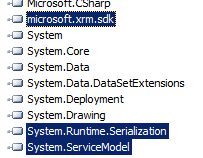
The initialization code
Uri organizationUri = new Uri("http://CRM2011/Contoso/XRMServices/2011/Organization.svc");
Uri homeRealmUri = null;
ClientCredentials credentials = new ClientCredentials();
credentials.Windows.ClientCredential = new System.Net.NetworkCredential("administrator", "pass@word2", "contoso");
OrganizationServiceProxy orgProxy = new OrganizationServiceProxy(organizationUri, homeRealmUri, credentials, null);
// Get the IOrganizationService
IOrganizationService orgService = (IOrganizationService)orgProxy;
//Get OrganizationServiceContext -the organization service context class implements the IQueryable interface and
//a .NET Language-Integrated Query (LINQ) query provider so we can write LINQ queries against Microsoft Dynamics CRM data.
OrganizationServiceContext orgServiceContext = new OrganizationServiceContext(orgService);
1) Simple Select
// Get name,number and ownerid for all the account records
var queryAccount1 = from r in orgServiceContext.CreateQuery("account")
select new
{
AccountName = r["name"],
AccountNumber = r["accountnumber"],
Owner = (EntityReference)r["ownerid"]
};

foreach (var account in queryAccount1)
{
MessageBox.Show("Account Name :-" + account.AccountName.ToString() + " " +
" Account Number :-" + account.AccountNumber.ToString() +
" Account Owner Id :- " + account.Owner.Id.ToString());
}
2)Select with Where
var queryAccount2 = from r in orgServiceContext.CreateQuery("account")
where ((EntityReference)r["accountid"]).Id.Equals(new Guid("EFB29802-7283-E011-8259-00155D045710"))
select new
{
AccountName = r["name"],
AccountNumber = r["accountnumber"],
Owner = (EntityReference)r["ownerid"]
};
3) Select with 2 Where clause
var queryAccount3 = from r in orgServiceContext.CreateQuery("account")
where (r["name"].Equals("test account 2") && r["address1_postalcode"].Equals("382424"))
select new
{
AccountName = r["name"],
AccountNumber = r["accountnumber"],
Owner = (EntityReference)r["ownerid"]
};
4) Where operator supports the following String functions Contains, StartsWith, EndsWith, and Equals.
var queryContactwithFirstNameasNishant = from r in orgServiceContext.CreateQuery("contact")
where ((string)r["firstname"]).Contains("Nishant")
select new
{
FirstName = r["firstname"],
LastName = r["lastname"]
};

var queryContactStartsWithN = from r in orgServiceContext.CreateQuery("contact")
where ((string)r["firstname"]).StartsWith("N")
select new
{
FirstName = r["firstname"],
LastName = r["lastname"]
};

 Nishant Rana's Weblog
Hi i need to retrive the data from the employees extension into the project report extension’s forms text field, means i want to retrive data of one entity into another and then save it. please help me…
LikeLike
Hi Nishant. Sounds like great stuff. But when I try to include attributes that are not set to required, the linq query just do not seem to work when a single record with a null value attribute is in the result. Is there a way to coop with this behavior? (btw: I am not a programmer :o)
LikeLike
Edwin,
Yes you can handle this by adding one more condition to check <>!=null
LikeLike
Hi Nishant. Sounds like great stuff. But when I try to include attributes that are not set to required, the linq query just do not seem to work when a single record with a null value attribute is in the result. Is there a way to coop with this behavior? (btw: I am not a programmer )
+1
LikeLike
Hello ,
How Do I Use the Filestream Data Type to Store BLOB Data in CRM 2011
Thanks
Sneha
LikeLike
Hi Nishant sir,
I am trying to access data from crm in siverlight through Odata Service.
I want to retrive account info on the basis of contact name.
for the same purpose I used join in my query.
While executing at “_account.LoadAsync(qery2);” I get error that Join is not supported.
My question might be silly but I would be too grateful to you If you could help me out.
Thanks in advance
code snippet
var qery2 = from a in context.AccountSet
join c in context.ContactSet on a.PrimaryContactId.Id equals c.ContactId
where c.FullName.Contains(“some_name”)
select a;
account.LoadCompleted += new EventHandler _account_LoadCompleted_1);
_account.LoadAsync(qery2)
LikeLike
any way you could email me the entire solution david@withersdavid.com?
LikeLike
You’ve come through again man. good job. and thank you so much.
LikeLike