Implementing Marking Item as Read functionality for list item in SharePoint 2013.


Hi,

We recently had a requirement where we wanted to mark list item as read when they are opened (DispForm.aspx).

For this we added a Yes/No (checkbox) field to the List.

Opened the DispForm.aspx for editing and added a Content Editor web part there.

Uploaded a text file having following script in one of the document libraries.

</pre>
_spBodyOnLoadFunctionNames.push("updateListItem");

function updateListItem() {

var siteUrl = window.location.protocol + "//" + window.location.host;
 var clientContext = new SP.ClientContext(siteUrl);
 var oList = clientContext.get_web().get_lists().getByTitle('Notifications');

 JSRequest.EnsureSetup();

//Get a query string parameter called Id. i.e - "page.aspx?Id=11" will return 11
 var itemId = JSRequest.QueryString["ID"];
 this.oListItem = oList.getItemById(itemId);
 oListItem.set_item('MarkAsRead', true);
 oListItem.update();

clientContext.executeQueryAsync(
 Function.createDelegate(this, this.onQuerySucceeded),
 Function.createDelegate(this, this.onQueryFailed)
 );
 }

function onQuerySucceeded() {
 alert('Item updated!');
 }

function onQueryFailed(sender, args) {
 alert('Request failed. ' + args.get_message() + '\n' + args.get_stackTrace());
 }
<pre>

And refered that txt file in our content web editor web part.

Hope it helps.

Set AssignedToId for a ListItem using SharePoint 2013 Rest API.


Hi,

Was working on a requirement in which we had to create new listitems of task type and set the Assigned To field in it.

It wasn’t as straight forward as we thought. Finally this is what worked


var fieldUserValues = new Array();
 fieldUserValues.push(userIdForTask);

var item = {
 "__metadata": { "type": eventToSave.TaskTypeName },
 "Title": eventToSave.EventName,
 "StartDate": startDate,
 "DueDate": endDate,
 "Body" : eventToSave.Description,
 "Priority": eventToSave.TaskPriority,
 'AssignedToId': { "results": fieldUserValues },
 };
 executor.executeAsync(
 {
 url: appweburl + "/_api/SP.AppContextSite(@target)/web/lists/getbytitle('" + eventToSave.TaskName + "')/items?@target='" + hostweburl + "'",
 method: "POST",
 headers: {
 "accept": "application/json;odata=verbose",
 "content-type": "application/json;odata=verbose",
 "X-RequestDigest": $("#__REQUESTDIGEST").val()

 },
 body: JSON.stringify(item),
 success: function (data) { succeededInsert(data); },
 error: failedInsert
 }
 );

Hope it helps.

Fixed: The form cannot be rendered. This may be due to a misconfiguration of the Microsoft SharePoint Server State Service error for InfoPath in SharePoint 2013.


Hi,

We had configured the InfoPath Form Services in our SharePoint server.

Now after creating and publishing an InfoPath form to a form library, while creating a new document we got the below error

To fix this, here first we need to check if the state service is up and running

Central Administration à Application Management à Manage Service Applications

The state service was up and running in our case.

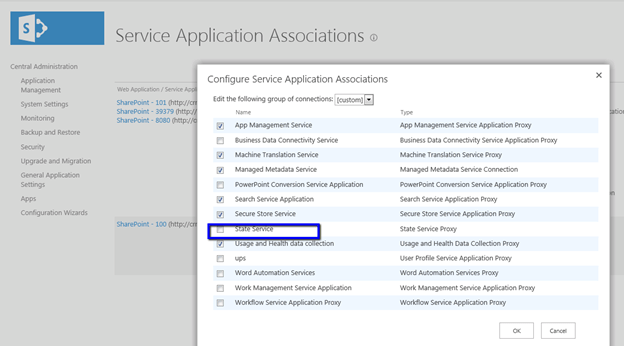
So the next thing to look out for was the Service Application Association i.e. whether our current web application is associated with the service or not.

Central Administration à Application Management à Configure Service Applications Associations

As it was in our case it wasn’t associated. After configuring the same, the error got resolved.

Hope it helps.

Fixed: Application Server Administration job failed for service instance Microsoft.Office.Server.Search.Administration.SearchServiceInstance error in SharePoint 2013


Hi,

We were getting the below error in the event log every time we were clicking on Populate Containers button while creating a new synchronization connection for User Profiles.


Error :

Application Server Administration job failed for service instance Microsoft.Office.Server.Search.Administration.SearchServiceInstance (90579710-4ed5-47e9-a3d8-de997f96262e).

Reason: An update conflict has occurred, and you must re-try this action. The object SearchDataAccessServiceInstance was updated by CONTOSO\administrator, in the OWSTIMER (2720) process, on machine CRM2011. View the tracing log for more information about the conflict.

Stopping the Timer Service, clearing the Configuration Cache and restarting the Timer Service helped us to fix the issue.

http://www.social-point.com/sharepoint-2010-event-id-6482-application-server-administration-job-failed-for-service-instance-microsoft-office-server-search-administration-searchserviceinstance

Bye.

Advertisements

Fixed: The given key was not present in the dictionary error in Register Managed Account in SharePoint 2013


Hi,

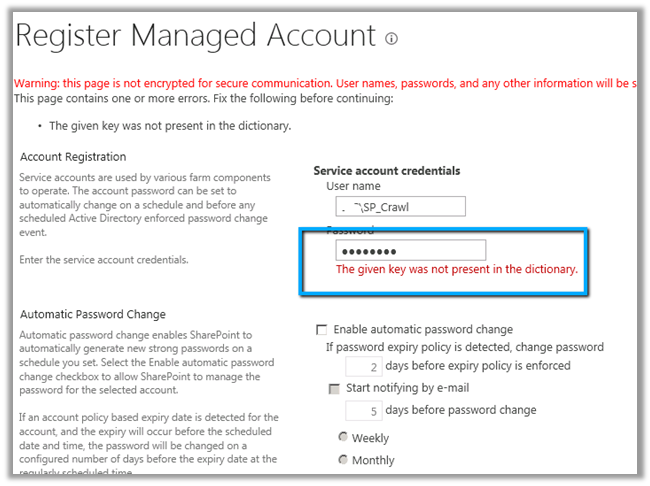
While trying to register a new managed account in SharePoint 2013 through Central Administration we were getting the below error.

To resolve this issue, we need to open the Active Directory Users and Computers console and select the account, right click Properties, select Authenticated Users in Security tab and
give Allow Permissions for Read Account Restrictions.

Hope it helps.

Fixed: Failed to create the configuration database. An exception of type System.Security.AccessControl.PrivilegeNotHeldException was thrown. Additional exception information: The process does not possess the ‘SeSecurityPrivilege’ privilege which is required for this operation.


Hi,

Got the below error while running the Configuration Wizard in SharePoint 2013.

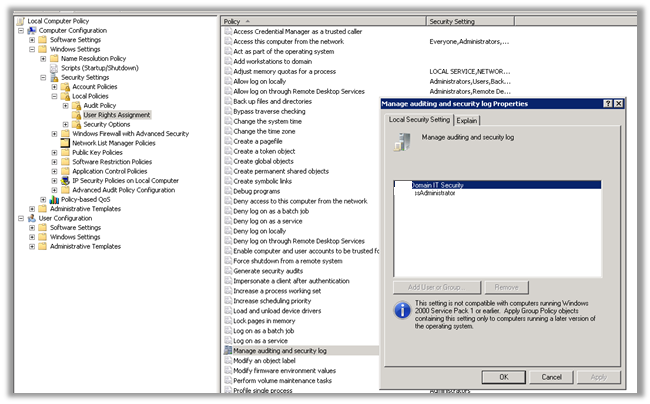
Adding the user under which the installation was running to the Manage Security and Audit Log resolved the issue for us.

gpedit.msc àcomputer configurationàWindows Settings àSecurity Settings àUser Rights Assignment

Hope it helps.