Manage New Icon Indicator for list items (DaysToShowNewIndicator) in SharePoint.


Hi,

Was looking into how long the new icon appears for a newly created list items in SharePoint.

The default is 2 days.

And this is configurable through DaysToShowNewIndicator property.

Powershell

http://www.deliveron.com/blog/post/Change-Settings-for-e2809cNewe2809d-Icon-in-SharePoint-2010-using-PowerShell.aspx

STSADM

http://technet.microsoft.com/en-us/library/cc287681(v=office.12).aspx

Programmatically

http://code-journey.com/2009/change-how-long-a-listitem-is-considered-a-new-item-setpropery-daystoshownewindicator/

Hope it helps.

An object of the type Microsoft.SharePoint.Administration.SPWindowsServiceCredentialDeploymentJobDefinition named “windows-service-credentials-FIMSynchronizationService” already exists under the parent Microsoft.Office.Server.Administration.ProfileSynchronizationService named “FIMSynchronizationService”. Rename your object or delete the existing object in SharePoint 2013


Hi,

Got the below error while trying to change the Service Account for User Profile Service Application.

As the error suggests we need to delete the existing job definition to resolve this issue.

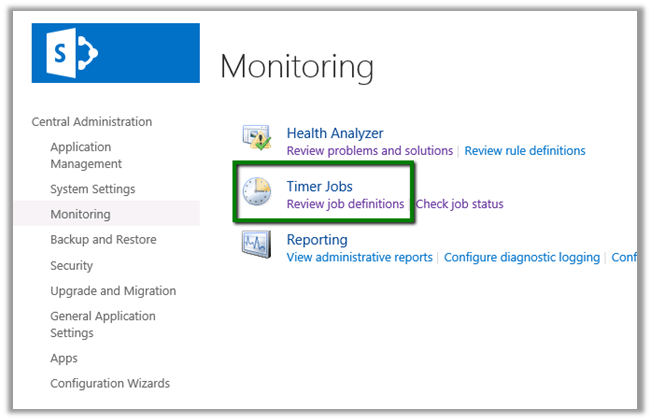
Open Central Administration à Monitoring

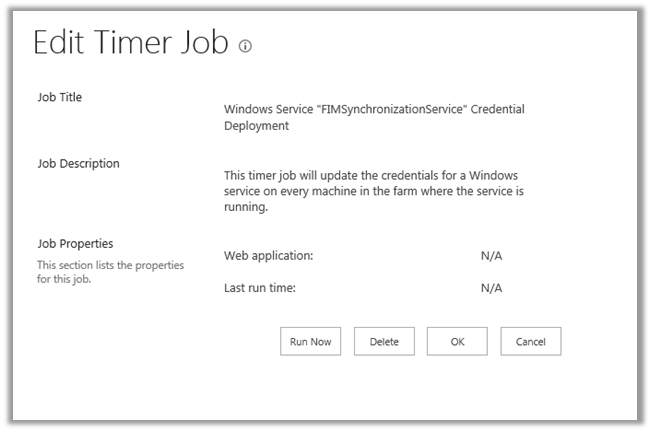
Select the service

Delete it

Now if we try changing the Service Account associated to the User Profile Synchronization Service it will work properly.

Hope it helps.

Connecting to SharePoint Online in Office 365 through a windows or console application


Hi,

Was looking for a way to connect to SharePoint online using CSOM through a windows application. Found this wonderful article that explains in details about the same.

http://www.wictorwilen.se/Post/How-to-do-active-authentication-to-Office-365-and-SharePoint-Online.aspx

It also provides us with a helper class name MsOnlineClaimsHelper that does all the heavy lifting for us.

MsOnlineClaimsHelper claimsHelper = new MsOnlineClaimsHelper(https://xyz.com/sites/dev”, “x@y.onmicrosoft.com”,“pwd”);

Hope it helps.

Fixed – “A type named ’SP.Data.ListItem’ could not be resolved by the model. When a model is available, each type name must resolve to a valid type” error in SharePoint 2013.


Hi,

Was getting the above error while creating a listitem for a Tasks List using Rest interface in a SharePoint app.

Here we need to pass SP.Data.<ListName>ListItem i.e. ListEntityTypeFullName of the List.

We can get it using the following

<a href="https:///_api/web/lists/getbytitle(&#8221;)?$select=ListItemEntityTypeFullName”>https://<site>/_api/web/lists/getbytitle(‘<List Name>’)?$select=ListItemEntityTypeFullName

More details

http://msdn.microsoft.com/en-us/library/jj164022%28office.15%29.aspx#ListItems

Hope it helps.

Advertisements

appweburl or SPAppWebUrl is undefined error in SharePoint 2013 Auto Hosted Apps


Hi,

I was getting the “appweburl” is undefined error while developing a SharePoint Auto Hosted App.


// Initialize the RequestExecutor with the app web URL.

executor = new SP.RequestExecutor(appweburl);


//Get the URI decoded URLs.

hostweburl =

decodeURIComponent(

getQueryStringParameter(“SPHostUrl”)

);


appweburl =

decodeURIComponent(

getQueryStringParameter(“SPAppWebUrl”)

);


The value of hostweburl was getting passed in the querystring properly, but the value for appweburl was not getting passed.

The way to resolve this issue was to add an empty element to the App.

By default the Autohosted or Provider-hosted template have an empty app web. If the app web is empty SharePoint doesn’t create the app web for you.

That’s how simply adding an empty element fixes the issue.

The post that came to rescue.

http://rainerat.spirit.de/2012/10/05/sharepoint-2013-apps-csom-vs-rest/

Hope it helps.

Specifying SharePoint Site Url SharePoint Hosted Apps in SharePoint 2013


Hi,

Recently I downloaded a SharePoint Hosted app from codepex. I was getting error while deploying the app as it was pointing to SharePoint Site which obviously couldn’t be found.

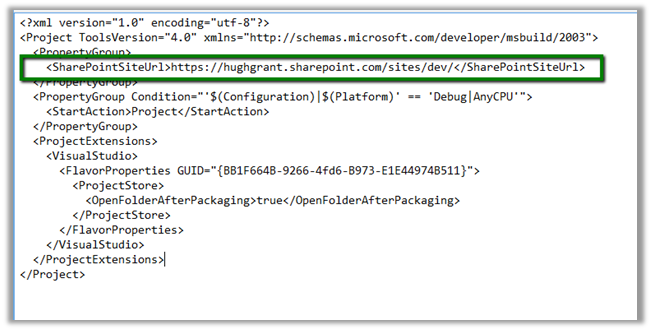
To specify our own SharePoint site Url we need to edit the [Project].csproj.user file. And specify the correct SharePoint Url over there

Followed by closing and reopening the csproj file.

Hope it helps.