Fixed – InvalidStateError: Failed to read the ‘responseText’ property from ‘XMLHttpRequest’: The value is only accessible if the object’s ‘responseType’ is ” or ‘text’ (was ‘arraybuffer’).


Recently we got the below error when we tried to download and zip the files from within CRM’s Web Resource. The files were stored in Azure Blob Storage. We were using JSZipUtils for it.


Access to XMLHttpRequest at ‘https://abcnon…..’ from origin https://abc-dev-abc.crm6.dynamics.com’ has been blocked by CORS policy: No ‘Access-Control-Allow-Origin’ header is present on the requested resource.
BlobAttachmentPreview.js:663 Uncaught Error: InvalidStateError: Failed to read the ‘responseText’ property from ‘XMLHttpRequest’: The value is only accessible if the object’s ‘responseType’ is ” or ‘text’ (was ‘arraybuffer’).
    at f.onreadystatechange (jszip-utils.min.js:1:1544)

As we can see in the details, the error turned out to be the CORS issue.

Mistakenly we had the forward slash added to end of the URL specified in the Allowed origins.


Before – https://abc-dev-abc.crm6.dynamics.com/
After – https://abc-dev-abc.crm6.dynamics.com
Removing the slash at the end fixed the issue, as the Azure Blob Storage CORS rules typically require exact matching for allowed origins
.

Hope it helps..

Advertisements


Advertisements

FluentValidation – build strongly-typed validation rules in .NET


Install the FluentValidation .NET library for validation.

Below is our sample Contact class and its corresponding validator class.

The validator class needs to inherit AbstractValidator<Contact> and define the validation rules in the constructor using the RuleFor method.

Instantiate the validator class, and pass the object to be validated.

Here we have passed incorrect values for all the properties of the contact.

The ValidationResult holds all the validation error details.

Give it a try – https://docs.fluentvalidation.net/en/latest/index.html

Hope it helps..

using FluentValidation;
using FluentValidation.Results;
using System;
using System.Collections.Generic;
using System.Linq;
using System.Text;
using System.Threading.Tasks;

namespace FluentValidator
{
    class Program
    {
        static void Main(string[] args)
        {
            var myContact = new Contact();
            var contactValidator = new ContactValidator();

            myContact.FirstName = "";
            myContact.LastName = "Lei";
            myContact.Email = "aa.gcom";
            myContact.Age = 10;
            myContact.FamilyStatusCode = (FamilyStatusCode)Enum.Parse(typeof(FamilyStatusCode),"5");

            ValidationResult result = contactValidator.Validate(myContact);
        }
    }

    class Contact
    {
        public string FirstName { get; set; }
        public string LastName { get; set; }
        public string Email { get; set; }
        public int Age { get; set; }
        public FamilyStatusCode FamilyStatusCode { get; set; }
    }

    enum FamilyStatusCode
    {
        Single = 1,
        Married = 2,
        Divorced = 3,
        Widowed = 4
    }

    class ContactValidator : AbstractValidator<Contact>
    {
       public ContactValidator()
        {
            // First Name should not be null
            RuleFor(contact => contact.FirstName).NotEmpty();
            // Last Name should not be null and minimum length should be 4
            RuleFor(contact => contact.LastName).NotNull().MinimumLength(4);
            // Email Address Validation
            RuleFor(contact => contact.Email).EmailAddress();
            // Age should be between 18 to 60
            RuleFor(contact => contact.Age).ExclusiveBetween(18, 60);
            // Family Status Code Enum should be a valid value
            RuleFor(contact => contact.FamilyStatusCode).IsInEnum();

        }
    }
}
Advertisements

Dll not getting copied to bin directory in Visual Studio


Hi,

In one of our projects we were referencing custom assemblies that were part of the same solution. However those assemblies were not getting copied to the bin directory of the project upon building the project.

We had also set property Copy Local as true for those class library projects.

The reason for this was as we were adding those assemblies in GAC.

VS.NET will copy the dll to the bin directory if your system cannot find the dll in the GAC.”

After removing those assemblies from GAC it added those dlls in the bin.

The helpful thread

http://stackoverflow.com/questions/3548731/visual-studio-2010-add-reference-is-copying-dll-to-bin-directory

Hope it helps..

Specifying New Line in XML


Hi,

While specifying Data for one of the multiline column in a ListInstance we wanted to specify New Line in the content.

This is how we specified

The result

Hope it helps..

Fixed – Cannot obtain value of local or argument as it not available at the instruction pointer, possibly because it has been optimized away while debugging in Visual Studio


Hi,

Was facing this the above issue while trying to debug the code. The debugger was getting attached properly but it wasn’t showing values for the variables.
Unchecking the following option in the class library project properties fixed the issue


This helpful post.

http://blogs.msdn.com/b/sburke/archive/2008/01/29/how-to-disable-optimizations-when-debugging-reference-source.aspx

Bye..


Advertisements

How to Read the InfoPath content and extract the attachment using XMLDocument in C#


The InfoPath form:-

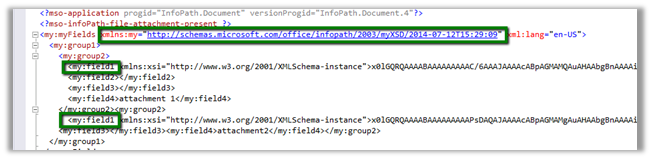
The namespace and the field1 that is node that contains the attachment

Sample Code:


XmlDocument myDoc = new XmlDocument();
myDoc.Load(@"C:\test\form.xml");

// specify the name space
XmlNamespaceManager ns = new XmlNamespaceManager(myDoc.NameTable);
ns.AddNamespace("my", "http://schemas.microsoft.com/office/infopath/2003/myXSD/2014-07-12T15:29:09");

// the node that contains the attachment
XmlNodeList nl = myDoc.SelectNodes("/my:myFields/my:group1/my:group2/my:field1", ns);
foreach (XmlNode n in nl)
{
string s = n.InnerText;
byte[] b = Convert.FromBase64String(s);
int nameBufferLen = b[20] * 2;

// file name buffer to get the filename with extension
byte[] fileNameBufffer = new Byte[nameBufferLen];

for (int i = 0; i < nameBufferLen; i++)
{
fileNameBufffer[i] = b[24 + i];
}
char[] charFileName = UnicodeEncoding.Unicode.GetChars(fileNameBufffer);
string fileName = new string(charFileName);
fileName = fileName.Substring(0, fileName.Length - 1);

// byte array for the remaining content
byte[] fileContent = new byte[b.Length - (24 + nameBufferLen)];

for (int i = 0; i < fileContent.Length; i++)
{
fileContent[i] = b[24 + nameBufferLen + i];
}

FileStream fs = new FileStream(@"C:\test\" + fileName, FileMode.Create);
fs.Write(fileContent, 0, fileContent.Length);
fs.Close();

}

Hope it helps..