Hi,
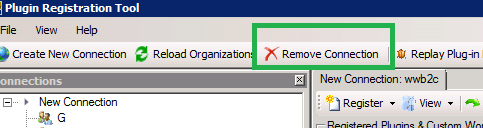
Today I was getting the above error while trying to update one of my plugin assemblies. The password of the admin account had recently changed. So I had to Remove the existing connection and create a new one to get things working.
Bye.

Hi,
Today I was getting the above error while trying to update one of my plugin assemblies. The password of the admin account had recently changed. So I had to Remove the existing connection and create a new one to get things working.
Bye.

Hi,
We got this error while importing the solution in one of the option set fields. Our development server were still in RTM. This was a known issue in RTM.
Installing the Update Rollup 1 and restarting the server fixed the issue.
http://www.microsoft.com/en-us/download/details.aspx?id=4837
Bye.

Hi,
Sometimes we’d see our drop down list getting fixed i.e. drop down doesn’t appear when we click on the attribute.
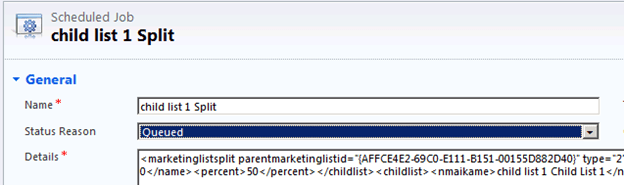
One option is to either refresh the form or the other better option is to click on the tabs on the left side instead of refreshing the whole page.
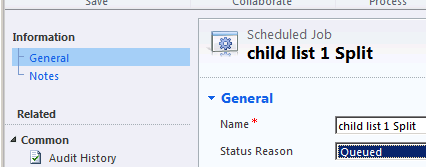
More details here
http://social.microsoft.com/Forums/uk/crmdevelopment/thread/49737c72-f79a-428c-94bf-e26dc4b89cef
Bye.

Hi,
While trying to run SWTools for CRM 2011, we might receive the “Could not load fie or assembly Microsoft.Crm.Sdk” error.
The solution is to create a file named SwTools.exe.config with the following content
<configuration>
 <runtime>
 <assemblyBinding xmlns="urn:schemas-microsoft-com:asm.v1">
 <dependentAssembly>
 <assemblyIdentity name="Microsoft.Crm.Sdk" publicKeyToken="31bf3856ad364e35" culture="neutral" />
 <publisherPolicy apply="no" />
 </dependentAssembly>
 </assemblyBinding>
 </runtime>
</configuration>
And place the file where the SwTools.exe is.
Thanks to David for providing the solution.
http://mscrmuk.blogspot.com/2011/02/using-crm-40-assemblies-on-crm-2011.html
Have a look at this post as well
http://blog.aggregatedintelligence.com/2012/03/unable-to-run-website-that-uses.html
Bye.

Hi,
At times we would like to send email using SendEmailRequest but still want to make use of template and replace the content in it.
For e.g. this is our sample template (Global template)
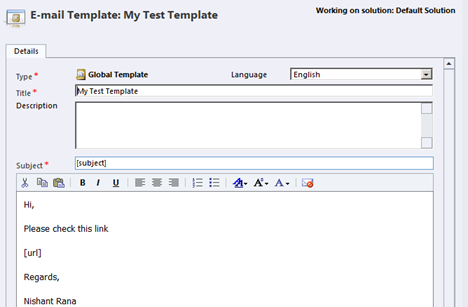
Here we would replace the [subject] and [url] placeholders.
Sample Code used
</p>
<p>private void SendMail(object sender, EventArgs e)<br />
{<br />
IOrganizationService orgService = GetOrganizationService();<br />
Entity entity = GetGlobalTemplate("My Test Template", GetOrganizationService());<br />
Entity email = new Entity();<br />
email.LogicalName = "email";</p>
<p>// get the Subject content from template and replace it with "My New Subject"<br />
email.Attributes["subject"] = GetDataFromXml(entity.Attributes["subject"].ToString(), "match");<br />
email.Attributes["subject"] = email.Attributes["subject"].ToString().Replace("[subject]", "My New Subject");</p>
<p>// get the description from template and replace [url] placeholder with a bing's url<br />
email.Attributes["description"] = GetDataFromXml(entity.Attributes["body"].ToString(), "match");<br />
string urlToReplace = "<a href='http://www.bing.com'>Open Bing</a>";<br />
email.Attributes["description"] = email.Attributes["description"].ToString().Replace("[url]", urlToReplace);</p>
<p>List<Entity> fromtoEntities = new List<Entity>();<br />
Entity activityParty = new Entity();<br />
activityParty.LogicalName = "activityparty";<br />
activityParty.Attributes["partyid"] = new EntityReference("systemuser", new Guid("FC480E73-77A9-E111-B151-00155D882D40"));<br />
fromtoEntities.Add(activityParty);<br />
email.Attributes["from"] = fromtoEntities.ToArray();<br />
email.Attributes["to"] = fromtoEntities.ToArray();<br />
email.Attributes["regardingobjectid"] = new EntityReference("contact", new Guid("2CCB57AA-A9B3-E111-B151-00155D882D40"));</p>
<p>Guid emailCreated = orgService.Create(email);<br />
SendEmailRequest req = new SendEmailRequest();<br />
req.EmailId = emailCreated;<br />
req.TrackingToken = "";<br />
req.IssueSend = true;<br />
SendEmailResponse res = (SendEmailResponse)orgService.Execute(req);<br />
}</p>
<p>private static string GetDataFromXml(string value, string attributeName)<br />
{<br />
if (string.IsNullOrEmpty(value))<br />
{<br />
return string.Empty;<br />
}</p>
<p>XDocument document = XDocument.Parse(value);<br />
// get the Element with the attribute name specified<br />
XElement element = document.Descendants().Where(ele => ele.Attributes().Any(attr => attr.Name == attributeName)).FirstOrDefault();<br />
return element == null ? string.Empty : element.Value;<br />
}</p>
<p>public static Entity GetGlobalTemplate(string title, IOrganizationService orgService)<br />
{<br />
Entity emailTemplate = null;<br />
try<br />
{</p>
<p>QueryExpression query = new QueryExpression();</p>
<p>// Setup the query for the template entity<br />
query.EntityName = "template";</p>
<p>// Return all columns<br />
query.ColumnSet.AllColumns = true;<br />
query.Criteria = new FilterExpression();<br />
query.Criteria.FilterOperator = LogicalOperator.And;</p>
<p>// Create the title condition<br />
ConditionExpression condition1 = new ConditionExpression();<br />
condition1.AttributeName = "title";<br />
condition1.Operator = ConditionOperator.Equal;<br />
condition1.Values.Add(title);</p>
<p>query.Criteria.Conditions.Add(condition1);</p>
<p>// Execute the query and return the result<br />
EntityCollection entityColl = orgService.RetrieveMultiple(query);</p>
<p>if (entityColl.Entities.Count > 0)<br />
{<br />
emailTemplate = entityColl.Entities[0];<br />
}<br />
}<br />
catch<br />
{<br />
throw;<br />
}<br />
return emailTemplate;<br />
}</p>
<p>
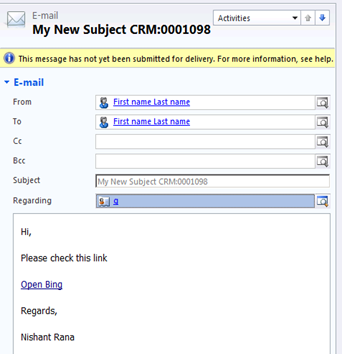
The email activity created :-
Bye.

Hi,
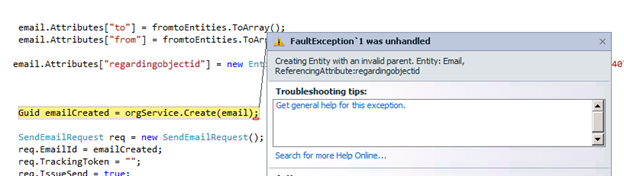
We got this error while trying to send email programmatically. The issue was we were setting regarding object id as one of the entity for which Email was not enabled.

Hope it helps.

 Nishant Rana's Weblog