

Just sharing a simple example of using the RIGHT and LEFT functions to extract the required content from a particular column.
E.g. we want to extract the name (FirstName, LastName, Mobile) from the below column in the Excel

Here we can apply RIGHT(text, [num_chars]) function to first remove the characters
<xs:element name=” i.e. 18 characters
And then LEFT(text, [num_chars]) function to remove the remaining
” type=”xs:string”/> i.e. 20 characters
=RIGHT(A1:A3, LEN(A1:A3) -18)
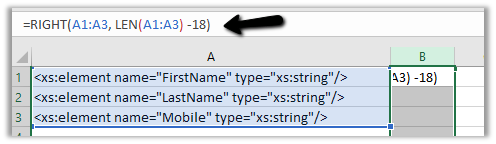
Output –

=LEFT(B1:B3,LEN(B1:B3)-20)

Output –

The LEN(text) function gets the length of the text
Hope this helps..
Advertisements
Discover more from Nishant Rana's Weblog
Subscribe to get the latest posts sent to your email.
Share It -


 Nishant Rana's Weblog
One thought on “Using RIGHT and LEFT string functions in Excel”