Issues while setting value for the field in Header of the form in CRM 2011


Hi,

We recently had a requirement to show in header of one of the form, the value from its related entity. So we thought that we will create a new custom field, move it to the header and populate it’s value using JScript in the onload event.

However as we were writing the JScript we realized that the field that is in the header of the form is not accesible using Xrm.Page.data.entity.attribute.

So the next thought was to add that field in the body of the form as well.

http://community.dynamics.com/product/crm/crmtechnical/b/crmcustomereffective/archive/2011/08/22/crm-2011-ability-to-add-the-same-field-to-the-form-more-than-once-and-javascript-challenges.aspx

So now we had that field in header as well as in the body. Now when we were setting the value of the field that was in the body, it was getting set properly as expected. But that value was not getting reflected in the same field in the header till we save the form.

We finally used document.getElementById to set the value for the field in the header.

Hope it helps.

querySelector and querySelectorAll – Selectors API


Hi,

Apart from our usual document.getElementsById and document.getElementsByTagName method to select element from the DOM we can now make use of document.querySelector and document.querySelectorAll .

With them we can use the same selectors that we use in CSS to select elements for styling.

A simple example

<html>
<head>
    <title>Selectors API</title>
    <script>
        window.onload = function () {

            // select div element with id myDivId
            var myDiv = document.querySelector("#myDivId");

            // select p element with text "Paragraph 1"
            var paragraph1 = myDiv.querySelector("span>p");

            // select p element having class as p1Class
            var paragraph2 = document.querySelector("p.p2Class");

            // select all p element
            var allParagraph = document.querySelectorAll("div>span>span>p");
        }

    </script>
</head>
<body>
    <div id="myDivId" class='divClass'>
        <span><span class='spanClass'>
            <p>
                Paragraph 1</p>
            <p id="p2" class="p2Class">
                Paragraph 2</p>
        </span></span>
    </div>
</body>
</html>

More details

http://msdn.microsoft.com/en-us/ie/cc307217.aspx

http://msdn.microsoft.com/en-us/library/cc288326(v=vs.85).aspx

Browser supported

http://caniuse.com/queryselector

Making cross domain call using JSONP (JSON with padding)


Hi,

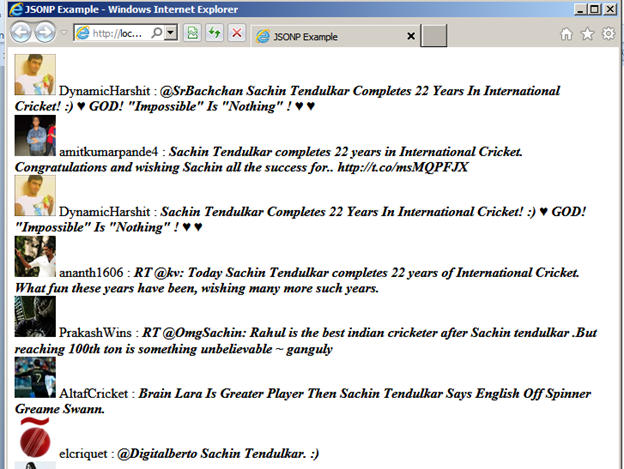
Just created a simple html page that uses JSONP to make cross domain call to twitter’s API.

Source Code:-

<!DOCTYPE html>
<html>
<head>
    <title>JSONP Example</title>
    <script>

        function getTweets(tweets) {

            var tweetDiv = document.getElementById("tweet");

            for (var i = 0; i < tweets.results.length; i++) {
                var tweet = tweets.results[i];

                // create div element for each result
                var div = document.createElement("div");
                div.innerHTML = "<img src= " + tweet.profile_image_url + "></img> ";
                div.innerHTML += tweet.from_user + " : <b><i>" + tweet.text + "</b></i>";

                // append it to tweet div
                tweetDiv.appendChild(div);
            }
        }
    </script>
</head>
<body>
<div id="tweet">
</div>
<!--Specifying search term and callback function-->
<script src="http://search.twitter.com/search.json?q=Sachin%20Tendulkar&rpp=10&callback=getTweets"></script>
</body>
</html>

Bye

Error: ‘VEMap’ is undefined


If we get the above error while working with Virtual Earth first thing we need to check is whether the internet connection is working or not.

Next thing to check is whether JavaScript is disabled for the browser. And if this is the case, to enable it in case of IE.

Go to Tools à Internet Options à Security Tab

Find the entry Active Scripting and enable it.

Hope it helps.

Get QueryString values in JavaScript


Hi,

We can make use of the following functions to get the value of querystring parameters through JavaScript

// helper function to get the query string
function Querystring() {

var querystring = location.search.substring(1, location.search.length);

var args = querystring.split(‘&’);

for (var i = 0; i < args.length; i++) {

var pair = args[i].split(‘=’);

 temp = unescape(pair[0]).split(‘+’);

 name = temp.join(‘ ‘);
temp = unescape(pair[1]).split(‘+’);
value = temp.join(‘ ‘);
this[name] = value;
}
this.get = Querystring_get;

}

function Querystring_get(strKey, strDefault) {
var value = this[strKey];
if (value == null) {
value = strDefault;
}
return value;
} 

Suppose our current page url is

http://mycustompage/home.aspx?id=1020

To get the value for id we’ll do this

var qs = new Querystring();

var idValue=qs.get(“id”, “”);

 Bye..