

Just sharing a simple example of using the RIGHT and LEFT functions to extract the required content from a particular column.
E.g. we want to extract the name (FirstName, LastName, Mobile) from the below column in the Excel

Here we can apply RIGHT(text, [num_chars]) function to first remove the characters
<xs:element name=” i.e. 18 characters
And then LEFT(text, [num_chars]) function to remove the remaining
” type=”xs:string”/> i.e. 20 characters
=RIGHT(A1:A3, LEN(A1:A3) -18)
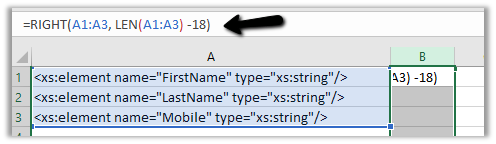
Output –

=LEFT(B1:B3,LEN(B1:B3)-20)

Output –

The LEN(text) function gets the length of the text
Hope this helps..
Advertisements

 Nishant Rana's Weblog