Hi,
Let us take a very simple example to understand RetrieveMetadataChangesRequest class introduced in Polaris.
In this example we will retrieve information about all the attributes for contact entity where attribute type is of lookup.
For this we will use the RetrieveMetadataChangesRequest class.
This class contains the data which specifies the metadata information that needs to be retrieved.
RetrieveMetadataChangesRequest class has a Query property that accepts an EntityQueryExpression.
RetrieveMetadataChangesRequest retrieveMetadataChangesRequest = new
RetrieveMetadataChangesRequest()
{
Query = entityQueryExpression
};
EntityQueryExpression class defines the query to retrieve the metadata information.
Here we will need to set the following three properties of the EntityQueryExpression class
EntityQueryExpression entityQueryExpression = new
EntityQueryExpression()
{
Criteria = EntityFilter,
Properties = EntityProperties,
AttributeQuery = new
AttributeQueryExpression()
{
Criteria = AttributeFilter,
Properties = AttributeProperties
}
};
- Criteria – specifies the filter criteria like for which entities we want metadata information to be retrieved.
- Properties –
specifies the properties to be returned.
- AttributeQuery – specifies the criteria and properties for the entities attribute metadata like which type of attribute to retrieve and what all information to be retrieved for that attribute.
Specfying EntityFilter
This is how we will specify that we need metadata information for only the contact entity.
Specifying Properties of the Entity to be retrieved
Here we are specifying all the properties to be returned
MetadataPropertiesExpression EntityProperties = new
MetadataPropertiesExpression() { AllProperties = true };
Here we can set the AllProperties as false and instead specify the property names that we want to retrieve as shown below
EntityProperties.PropertyNames.Add(“AttributeType”);
Specifying the lookup attribute to be retrieved
MetadataConditionExpression metadataconditionexpressionEntity = new
MetadataConditionExpression();
metadataconditionexpressionEntity.PropertyName = "SchemaName";
metadataconditionexpressionEntity.Value = "Contact";
metadataconditionexpressionEntity.ConditionOperator = MetadataConditionOperator.Equals;
MetadataFilterExpression EntityFilter = new MetadataFilterExpression(LogicalOperator.And);
EntityFilter.Conditions.Add(metadataconditionexpressionEntity);
Specifying the properties to be retrieved for the lookup attribute
Here we are specifying that we only need the AttributeType and Description information for the Lookup attributes retrieved.
MetadataPropertiesExpression AttributeProperties = new
MetadataPropertiesExpression() { AllProperties = false };
AttributeProperties.PropertyNames.Add("AttributeType");
AttributeProperties.PropertyNames.Add("Description");
Full sample code
// specifying EntityFilter to only include entity having SchemaName as contact

MetadataConditionExpression metadataconditionexpressionEntity = new
MetadataConditionExpression();
metadataconditionexpressionEntity.PropertyName = "SchemaName";
metadataconditionexpressionEntity.Value = "Contact";
metadataconditionexpressionEntity.ConditionOperator = MetadataConditionOperator.Equals;
MetadataFilterExpression EntityFilter = new MetadataFilterExpression(LogicalOperator.And);
EntityFilter.Conditions.Add(metadataconditionexpressionEntity);

// specfying EntityProperties to include the properties to be retrieved
MetadataPropertiesExpression EntityProperties = new
MetadataPropertiesExpression() { AllProperties = true };
MetadataConditionExpression metadataExpression = new
MetadataConditionExpression("AttributeType", MetadataConditionOperator.Equals, AttributeTypeCode.Lookup);
MetadataFilterExpression AttributeFilter = new
MetadataFilterExpression(LogicalOperator.And);
AttributeFilter.Conditions.Add(metadataExpression);

//A Properties expression to limit the properties to be included with attributes
MetadataPropertiesExpression AttributeProperties = new
MetadataPropertiesExpression() { AllProperties = false };
AttributeProperties.PropertyNames.Add("AttributeType");
AttributeProperties.PropertyNames.Add("Description");

//An entity query expression to combine the filter expressions and property expressions for the query.
EntityQueryExpression entityQueryExpression = new
EntityQueryExpression()
{
Criteria = EntityFilter,
Properties = EntityProperties,
AttributeQuery = new
AttributeQueryExpression()
{
Criteria = AttributeFilter,
Properties = AttributeProperties
}
};

RetrieveMetadataChangesRequest retrieveMetadataChangesRequest = new
RetrieveMetadataChangesRequest()
{
Query = entityQueryExpression
};
RetrieveMetadataChangesResponse retrieveMetadataChangesResponse = (RetrieveMetadataChangesResponse)_service.Execute(retrieveMetadataChangesRequest);
EntityMetadata entityMetadata = retrieveMetadataChangesResponse.EntityMetadata[0];
foreach (AttributeMetadata attMetadata in entityMetadata.Attributes)
{
MessageBox.Show(attMetadata.Description.UserLocalizedLabel.Label);
}
Hope it helps.
0.000000
0.000000



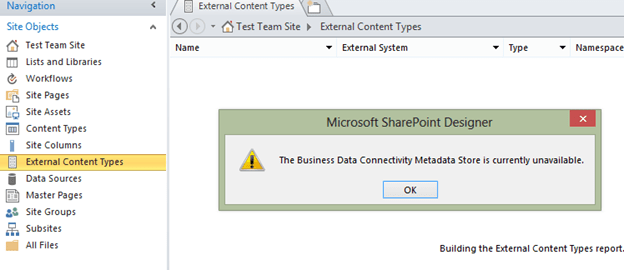 Next I used SharePoint Designer 2010 to connect to the SharePoint 2013 online site. There it didn’t throw the Metadata Store is currently available error.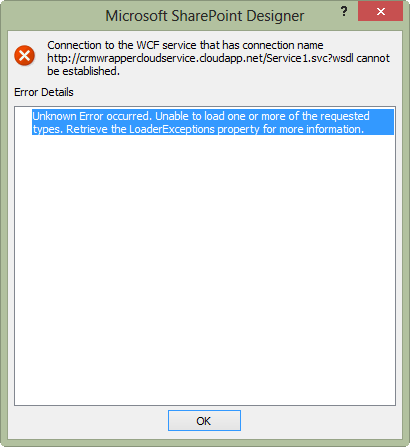





 Nishant Rana's Weblog